This time we’re going bigger than ever. Fabric, Power BI, SQL, AI and more. We're covering it all. You won't want to miss it.
Learn moreDid you hear? There's a new SQL AI Developer certification (DP-800). Start preparing now and be one of the first to get certified. Register now
Hello,
We are trying to change our folders from local folders to a sharepoint folder.
When I change the source of the files in Power Query, I get the following error.
DataSource.Error: Microsoft.Mashup.Engine1.Library.Resources.HttpResource: Request failed:
OData Version: 3 and 4, Error: The remote server returned an error: (404) Not Found. (Not Found)
OData Version: 4, Error: The remote server returned an error: (404) Not Found. (Not Found)
OData Version: 3, Error: The remote server returned an error: (404) Not Found. (Not Found)
Details:
DataSourceKind=SharePoint
DataSourcePath=https://example.sharepoint.com/sites/Folder/Shared/Documents/Orders/UAE
SPRequestGuid=f138f39f-0046-3000-3825-3697055d98f3, f138f39f-104f-3000-0798-886091df15e6, f138f39f-3054-3000-0798-862ce5dab40c
I used this query:
SharePoint.Files(https://example.sharepoint.com/sites/Folder/Shared/Documents/Orders/UAE, [ApiVersion = 15]) in place of the previous File.Contents one.
I have tried using Web.Content, but it would authenticate at all despite entering the correct credentials.
Any idea how to solve this?
Solved! Go to Solution.
Hi @Kareem_Amr_IT ,
It should be an authetication error,I tested here,and no errors:
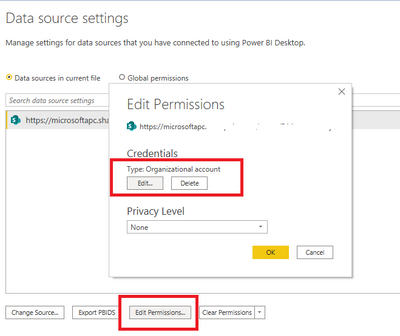
Go to data source settings and edit the credentials:
Best Regards,
Kelly
Did I answer your question? Mark my reply as a solution!
Hi @Kareem_Amr_IT ,
It should be an authetication error,I tested here,and no errors:
Go to data source settings and edit the credentials:
Best Regards,
Kelly
Did I answer your question? Mark my reply as a solution!
With the SharePoint connector, you need to use the site url, not the full url to the folder.
= SharePoint.Files("https://example.sharepoint.com/sites/Folder", [ApiVersion = 15])
From there, you can filter on the FolderPath column to get to your desired folder.
Pat
To learn more about Power BI, follow me on Twitter or subscribe on YouTube.
Check out the April 2026 Power BI update to learn about new features.
If you have recently started exploring Fabric, we'd love to hear how it's going. Your feedback can help with product improvements.
| User | Count |
|---|---|
| 7 | |
| 5 | |
| 4 | |
| 4 | |
| 3 |