Join us in Barcelona for FabCon and SQLCon, September 28 - October 1, 2026.
This is best Fabric, Power BI, SQL and AI community event. How do we know? The last event sold out! Save €200 with code FABCMTY200.
Register now- Power BI forums
- Get Help with Power BI
- Desktop
- Service
- Report Server
- Power Query
- Mobile Apps
- Developer
- DAX Commands and Tips
- Custom Visuals Development Discussion
- Health and Life Sciences
- Power BI Spanish forums
- Translated Spanish Desktop
- Training and Consulting
- Instructor Led Training
- Dashboard in a Day for Women, by Women
- Galleries
- Data Stories Gallery
- Themes Gallery
- Contests Gallery
- QuickViz Gallery
- Quick Measures Gallery
- Visual Calculations Gallery
- Fabric Apps Gallery
- Notebook Gallery
- Translytical Task Flow Gallery
- TMDL Gallery
- R Script Showcase
- Webinars and Video Gallery
- Ideas
- Custom Visuals Ideas (read-only)
- Issues
- Issues
- Events
- Upcoming Events
The Fabric community is upgrading! Read all of the details including the timeline and what you can expect. Learn more
- Power BI forums
- Forums
- Get Help with Power BI
- Power Query
- Select max rows for category
- Subscribe to RSS Feed
- Mark Topic as New
- Mark Topic as Read
- Float this Topic for Current User
- Bookmark
- Subscribe
- Printer Friendly Page

- Mark as New
- Bookmark
- Subscribe
- Mute
- Subscribe to RSS Feed
- Permalink
- Report Inappropriate Content
Select max rows for category
Hi community,
I need to select on power query only the rows that its date is max for each category (Store_Year_Period). So if the table is like this:
| Store_Year_Period | Date | Value1 | Value2 | Value3 |
| A20191 | 05/01/2018 | 1 | 5 | 10 |
| A20191 | 08/01/2018 | 2 | 10 | 20 |
| A20191 | 15/01/2019 | 3 | 15 | 30 |
| A20191 | 15/01/2019 | 4 | 20 | 40 |
| A20192 | 06/02/2018 | 5 | 25 | 50 |
| A20192 | 06/02/2018 | 6 | 30 | 60 |
| A20192 | 06/02/2019 | 7 | 35 | 70 |
| B20191 | 03/01/2019 | 8 | 40 | 80 |
| B20191 | 03/01/2019 | 9 | 45 | 90 |
| B20191 | 16/01/2019 | 10 | 50 | 100 |
| B20192 | 10/04/2019 | 11 | 55 | 110 |
| B20192 | 15/04/2018 | 12 | 60 | 120 |
| B20192 | 16/04/2018 | 13 | 65 | 130 |
The final result shoul look like this:
| Store_Year_Period | Date | Value1 | Value2 | Value3 |
| A20191 | 15/01/2019 | 3 | 15 | 30 |
| A20191 | 15/01/2019 | 4 | 20 | 40 |
| A20192 | 06/02/2018 | 5 | 25 | 50 |
| A20192 | 06/02/2018 | 6 | 30 | 60 |
| A20192 | 06/02/2019 | 7 | 35 | 70 |
| B20191 | 16/01/2019 | 10 | 50 | 100 |
| B20192 | 16/04/2018 | 13 | 65 | 130 |
I'm not an expert on M query so I'd need some help here please.
Thanks!
Solved! Go to Solution.


- Mark as New
- Bookmark
- Subscribe
- Mute
- Subscribe to RSS Feed
- Permalink
- Report Inappropriate Content
Hi @Anonymous ,
I have created a sample for your reference. Please check the following steps as below.
1. Duplicate the table and add a custom column as below.
Date.Year([Date])2. Group the table like that.

let
    Source = Table.FromRows(Json.Document(Binary.Decompress(Binary.FromText("fZFBDsMgDAT/wjmSsQMEju03ovz/G/XaCrVQ0wusYbQ2y3mml2QenLZUiUl1V2kl9pyuLSD9i4hfq1gYrpSNGlrsdgDxjypuoyJQaNBI7n4wESz1mWneSMVvBr0OMPA5nHnfE+005+k+iopnxuaGz1gYbuFlllDNpgLn4VGZmAVuifOKaVBl/ov446BWrkUOuTfzQ/DXBw==", BinaryEncoding.Base64), Compression.Deflate)), let _t = ((type text) meta [Serialized.Text = true]) in type table [Store_Year_Period = _t, Date = _t, Value1 = _t, Value2 = _t, Value3 = _t]),
    #"Changed Type" = Table.TransformColumnTypes(Source,{{"Store_Year_Period", type text}, {"Date", type text}, {"Value1", Int64.Type}, {"Value2", Int64.Type}, {"Value3", Int64.Type}}),
    #"Changed Type with Locale" = Table.TransformColumnTypes(#"Changed Type", {{"Date", type date}}, "ca-IT"),
    #"Added Custom" = Table.AddColumn(#"Changed Type with Locale", "Custom", each Date.Year([Date])),
    #"Grouped Rows" = Table.Group(#"Added Custom", {"Store_Year_Period", "Custom"}, {{"max date", each List.Max([Date]), type date}})
in
    #"Grouped Rows"
3. Then Merge tables like that.

4. Expand the max date column and insert a new custom column in the merged table.
=if [#"Table (2).max date"] = [Date] then 1 else 0
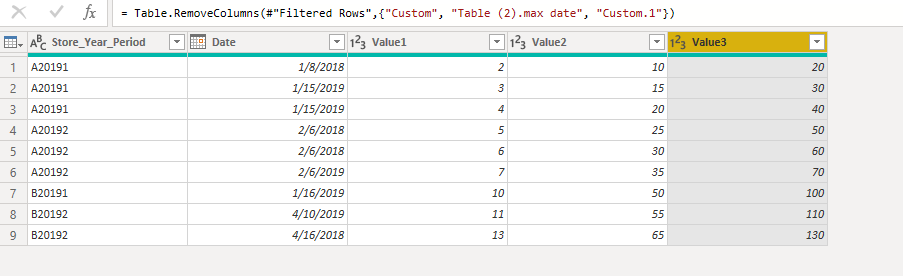
5. Then filter the table based on the custom column to get the excepted result. M code for your reference.
let
    Source = Table.FromRows(Json.Document(Binary.Decompress(Binary.FromText("fZFBDsMgDAT/wjmSsQMEju03ovz/G/XaCrVQ0wusYbQ2y3mml2QenLZUiUl1V2kl9pyuLSD9i4hfq1gYrpSNGlrsdgDxjypuoyJQaNBI7n4wESz1mWneSMVvBr0OMPA5nHnfE+005+k+iopnxuaGz1gYbuFlllDNpgLn4VGZmAVuifOKaVBl/ov446BWrkUOuTfzQ/DXBw==", BinaryEncoding.Base64), Compression.Deflate)), let _t = ((type text) meta [Serialized.Text = true]) in type table [Store_Year_Period = _t, Date = _t, Value1 = _t, Value2 = _t, Value3 = _t]),
    #"Changed Type" = Table.TransformColumnTypes(Source,{{"Store_Year_Period", type text}, {"Date", type text}, {"Value1", Int64.Type}, {"Value2", Int64.Type}, {"Value3", Int64.Type}}),
    #"Changed Type with Locale" = Table.TransformColumnTypes(#"Changed Type", {{"Date", type date}}, "ca-IT"),
    #"Added Custom" = Table.AddColumn(#"Changed Type with Locale", "Custom", each Date.Year([Date])),
    #"Merged Queries" = Table.NestedJoin(#"Added Custom", {"Store_Year_Period", "Custom"}, #"Table (2)", {"Store_Year_Period", "Custom"}, "Table (2)", JoinKind.LeftOuter),
    #"Expanded Table (2)" = Table.ExpandTableColumn(#"Merged Queries", "Table (2)", {"max date"}, {"Table (2).max date"}),
    #"Added Custom1" = Table.AddColumn(#"Expanded Table (2)", "Custom.1", each if [#"Table (2).max date"] = [Date] then 1 else 0),
    #"Filtered Rows" = Table.SelectRows(#"Added Custom1", each ([Custom.1] = 1)),
    #"Removed Columns" = Table.RemoveColumns(#"Filtered Rows",{"Custom", "Table (2).max date", "Custom.1"})
in
    #"Removed Columns"
If this post helps, then please consider Accept it as the solution to help the others find it more quickly.


- Mark as New
- Bookmark
- Subscribe
- Mute
- Subscribe to RSS Feed
- Permalink
- Report Inappropriate Content
Hello @Anonymous
here another faster version
let
    Source = Table.FromRows(Json.Document(Binary.Decompress(Binary.FromText("fZFNDoUwCITv0rVJAW1tl+9dw3j/a8iAGtLEbtqBfBn+jiP9hLhzWhKVTJw1ahogUfBTOpcItQCJAyoGih+rrsFqCYgZtbmNikChANVM8lSEjeApM6p6MRVfFCruoOC1O/V/Z1xDX81bUjGjbAJ49YHiGijbVSFTgfM1ZtpezrZv6+eRKzdnRxKfEWrkauRwgmp+uMF5AQ==", BinaryEncoding.Base64), Compression.Deflate)), let _t = ((type text) meta [Serialized.Text = true]) in type table [Store_Year_Period = _t, Date = _t, Value1 = _t, Value2 = _t, Value3 = _t]),
    #"Changed Type" = Table.TransformColumnTypes(Source,{{"Store_Year_Period", type text}, {"Date", type date}, {"Value1", Int64.Type}, {"Value2", Int64.Type}, {"Value3", Int64.Type}}),
    #"Grouped Rows" = Table.Group
        (
            #"Changed Type",
            {"Store_Year_Period"},
            {{
                "All",
                (table)=> Table.SelectRows
                    (
                        table,
                        (select)=> select[Date]=List.Max
                            (
                                table[Date]
                            )
                    )
            }}
        ),
    #"Expanded All" = Table.ExpandTableColumn
    (
        #"Grouped Rows",
        "All",
        {"Date", "Value1", "Value2", "Value3"}, {"Date", "Value1", "Value2", "Value3"}
    )
in
    #"Expanded All"
If this post helps or solves your problem, please mark it as solution.
Kudos are nice to - thanks
Have fun
Jimmy
- Mark as New
- Bookmark
- Subscribe
- Mute
- Subscribe to RSS Feed
- Permalink
- Report Inappropriate Content
Hello @Anonymous
here another faster version
let
    Source = Table.FromRows(Json.Document(Binary.Decompress(Binary.FromText("fZFNDoUwCITv0rVJAW1tl+9dw3j/a8iAGtLEbtqBfBn+jiP9hLhzWhKVTJw1ahogUfBTOpcItQCJAyoGih+rrsFqCYgZtbmNikChANVM8lSEjeApM6p6MRVfFCruoOC1O/V/Z1xDX81bUjGjbAJ49YHiGijbVSFTgfM1ZtpezrZv6+eRKzdnRxKfEWrkauRwgmp+uMF5AQ==", BinaryEncoding.Base64), Compression.Deflate)), let _t = ((type text) meta [Serialized.Text = true]) in type table [Store_Year_Period = _t, Date = _t, Value1 = _t, Value2 = _t, Value3 = _t]),
    #"Changed Type" = Table.TransformColumnTypes(Source,{{"Store_Year_Period", type text}, {"Date", type date}, {"Value1", Int64.Type}, {"Value2", Int64.Type}, {"Value3", Int64.Type}}),
    #"Grouped Rows" = Table.Group
        (
            #"Changed Type",
            {"Store_Year_Period"},
            {{
                "All",
                (table)=> Table.SelectRows
                    (
                        table,
                        (select)=> select[Date]=List.Max
                            (
                                table[Date]
                            )
                    )
            }}
        ),
    #"Expanded All" = Table.ExpandTableColumn
    (
        #"Grouped Rows",
        "All",
        {"Date", "Value1", "Value2", "Value3"}, {"Date", "Value1", "Value2", "Value3"}
    )
in
    #"Expanded All"
If this post helps or solves your problem, please mark it as solution.
Kudos are nice to - thanks
Have fun
Jimmy
- Mark as New
- Bookmark
- Subscribe
- Mute
- Subscribe to RSS Feed
- Permalink
- Report Inappropriate Content
Hi @Anonymous ,
I have created a sample for your reference. Please check the following steps as below.
1. Duplicate the table and add a custom column as below.
Date.Year([Date])2. Group the table like that.
let
    Source = Table.FromRows(Json.Document(Binary.Decompress(Binary.FromText("fZFBDsMgDAT/wjmSsQMEju03ovz/G/XaCrVQ0wusYbQ2y3mml2QenLZUiUl1V2kl9pyuLSD9i4hfq1gYrpSNGlrsdgDxjypuoyJQaNBI7n4wESz1mWneSMVvBr0OMPA5nHnfE+005+k+iopnxuaGz1gYbuFlllDNpgLn4VGZmAVuifOKaVBl/ov446BWrkUOuTfzQ/DXBw==", BinaryEncoding.Base64), Compression.Deflate)), let _t = ((type text) meta [Serialized.Text = true]) in type table [Store_Year_Period = _t, Date = _t, Value1 = _t, Value2 = _t, Value3 = _t]),
    #"Changed Type" = Table.TransformColumnTypes(Source,{{"Store_Year_Period", type text}, {"Date", type text}, {"Value1", Int64.Type}, {"Value2", Int64.Type}, {"Value3", Int64.Type}}),
    #"Changed Type with Locale" = Table.TransformColumnTypes(#"Changed Type", {{"Date", type date}}, "ca-IT"),
    #"Added Custom" = Table.AddColumn(#"Changed Type with Locale", "Custom", each Date.Year([Date])),
    #"Grouped Rows" = Table.Group(#"Added Custom", {"Store_Year_Period", "Custom"}, {{"max date", each List.Max([Date]), type date}})
in
    #"Grouped Rows"
3. Then Merge tables like that.
4. Expand the max date column and insert a new custom column in the merged table.
=if [#"Table (2).max date"] = [Date] then 1 else 0
5. Then filter the table based on the custom column to get the excepted result. M code for your reference.
let
    Source = Table.FromRows(Json.Document(Binary.Decompress(Binary.FromText("fZFBDsMgDAT/wjmSsQMEju03ovz/G/XaCrVQ0wusYbQ2y3mml2QenLZUiUl1V2kl9pyuLSD9i4hfq1gYrpSNGlrsdgDxjypuoyJQaNBI7n4wESz1mWneSMVvBr0OMPA5nHnfE+005+k+iopnxuaGz1gYbuFlllDNpgLn4VGZmAVuifOKaVBl/ov446BWrkUOuTfzQ/DXBw==", BinaryEncoding.Base64), Compression.Deflate)), let _t = ((type text) meta [Serialized.Text = true]) in type table [Store_Year_Period = _t, Date = _t, Value1 = _t, Value2 = _t, Value3 = _t]),
    #"Changed Type" = Table.TransformColumnTypes(Source,{{"Store_Year_Period", type text}, {"Date", type text}, {"Value1", Int64.Type}, {"Value2", Int64.Type}, {"Value3", Int64.Type}}),
    #"Changed Type with Locale" = Table.TransformColumnTypes(#"Changed Type", {{"Date", type date}}, "ca-IT"),
    #"Added Custom" = Table.AddColumn(#"Changed Type with Locale", "Custom", each Date.Year([Date])),
    #"Merged Queries" = Table.NestedJoin(#"Added Custom", {"Store_Year_Period", "Custom"}, #"Table (2)", {"Store_Year_Period", "Custom"}, "Table (2)", JoinKind.LeftOuter),
    #"Expanded Table (2)" = Table.ExpandTableColumn(#"Merged Queries", "Table (2)", {"max date"}, {"Table (2).max date"}),
    #"Added Custom1" = Table.AddColumn(#"Expanded Table (2)", "Custom.1", each if [#"Table (2).max date"] = [Date] then 1 else 0),
    #"Filtered Rows" = Table.SelectRows(#"Added Custom1", each ([Custom.1] = 1)),
    #"Removed Columns" = Table.RemoveColumns(#"Filtered Rows",{"Custom", "Table (2).max date", "Custom.1"})
in
    #"Removed Columns"
If this post helps, then please consider Accept it as the solution to help the others find it more quickly.
Helpful resources

FabCon & SQLCon – Barcelona 2026
Join us in Barcelona for FabCon and SQLCon, the Fabric, Power BI, SQL, and AI community event. Save €200 with code FABCMTY200.

Power BI DataViz World Championships - June 2026
A new Power BI DataViz World Championship is coming this June! Don't miss out on submitting your entry.


| User | Count |
|---|---|
| 3 | |
| 3 | |
| 3 | |
| 2 | |
| 2 |


