Get Fabric or SQL Certified for Free.
Get certified for free when you join Fabric Data Days 2026 and dive into Fabric, Power BI, SQL, AI, and other essential data skills.
Join now- Power BI forums
- Get Help with Power BI
- Desktop
- Service
- Report Server
- Power Query
- Mobile Apps
- Developer
- DAX Commands and Tips
- Custom Visuals Development Discussion
- Health and Life Sciences
- Power BI Spanish forums
- Translated Spanish Desktop
- Training and Consulting
- Instructor Led Training
- Dashboard in a Day for Women, by Women
- Galleries
- Data Stories Gallery
- Themes Gallery
- Contests Gallery
- QuickViz Gallery
- Quick Measures Gallery
- Visual Calculations Gallery
- Fabric Apps Gallery
- Notebook Gallery
- Translytical Task Flow Gallery
- TMDL Gallery
- R Script Showcase
- Webinars and Video Gallery
- Ideas
- Custom Visuals Ideas (read-only)
- Issues
- Issues
- Events
- Upcoming Events
July 7 - July 17 | Round 2 of the Power BI Dataviz World Championships. Don't miss your chance! Learn more
- Power BI forums
- Forums
- Get Help with Power BI
- Power Query
- Re: Select Rows based on Timestamp in one table an...
- Subscribe to RSS Feed
- Mark Topic as New
- Mark Topic as Read
- Float this Topic for Current User
- Bookmark
- Subscribe
- Printer Friendly Page


- Mark as New
- Bookmark
- Subscribe
- Mute
- Subscribe to RSS Feed
- Permalink
- Report Inappropriate Content
Select Rows based on Timestamp in one table and Start End Fields on a Second Table
Hi There,
I am new to Power BI, so please forgive the basic question.
I have three tables
- Session Table : Containing Start and End Times
- Mapping Table : Containg Operator to File Name mapping
- Events Table: Containing A Time stamp and some values.
What I need to do is create a result which filters the Events Table based on the Start and End times in the Session Table.
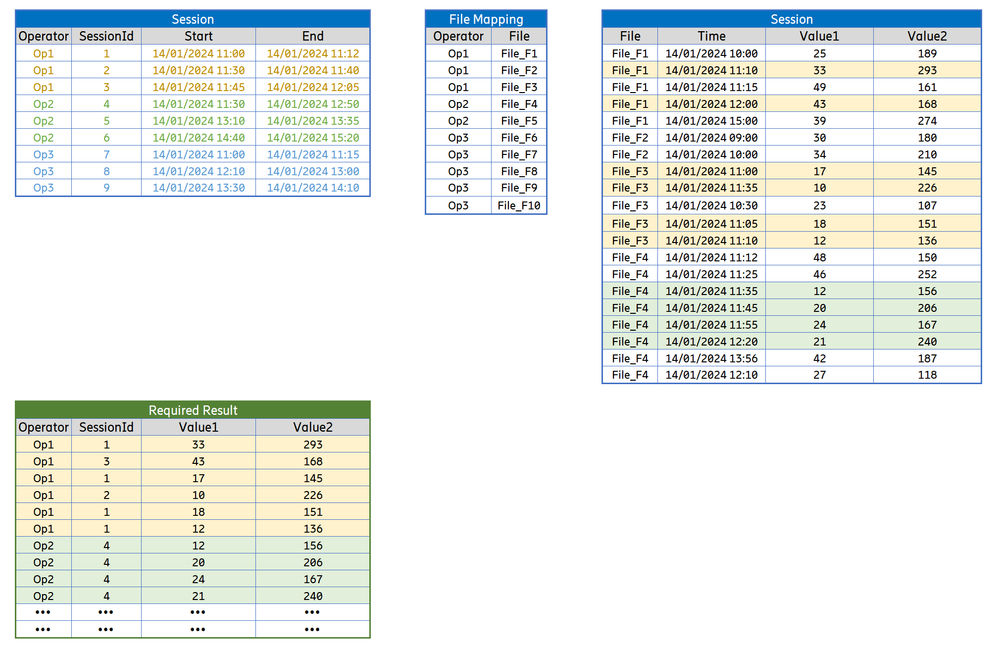
Any help would be grealy appricated.
Thanks
Solved! Go to Solution.


- Mark as New
- Bookmark
- Subscribe
- Mute
- Subscribe to RSS Feed
- Permalink
- Report Inappropriate Content
I spent around 2 hours with this query. I tried different versions of code because I wanted to speed it up, but txt source is too slow and you need to do a lot of comparism. I'm not able to make it faster. Maybe someone else can help.
Change address to your folder in Source step.
let
Source = Folder.Files("c:\Downloads\PowerQueryForum\VHalpenny\"),
    FilteredSessionsTable = Table.SelectRows(Source, each ([Name] = "SessionsTable.xlsx")),
    Content = FilteredSessionsTable{0}[Content],
    ImportedExcelWorkbook = Excel.Workbook(Content, true),
    Sheet1 = ImportedExcelWorkbook{[Item="Sheet1",Kind="Sheet"]}[Data],
    FilteredRows1 = Table.SelectRows(Sheet1, each ([T200] <> null)),
    RemoveMiliseconds = Table.TransformColumns(FilteredRows1, List.Transform({"T200", "T300"}, (x)=> { x, each DateTime.From(DateTime.ToText(_, [Format="yyyy-MM-dd hh:mm:ss"])) })),
    Ad_DateTimeList = Table.AddColumn(RemoveMiliseconds, "DateTimeList", each List.DateTimes([T200], Duration.TotalSeconds([T300] - [T200])+1, #duration(0,0,0,1)), type list),
    Ad_MergeKey1 = Table.AddColumn(Ad_DateTimeList, "MergeKey", each
        if Time.Minute([T200]) = Time.Minute([T300])
        then { Number.From(DateTime.ToText([T200], "yyyyMMddhhmm")) }
        else { Number.From(DateTime.ToText([T200], "yyyyMMddhhmm")), Number.From(DateTime.ToText([T300], "yyyyMMddhhmm")) },
    type list),
    // Niektore riadky su zduplikovane kvoli MERGE neskor. Jedna sa o riadky kedy minuta z [T200] nie je rovna minute z [T300]
    ExpandedMergeKey1 = Table.ExpandListColumn(Ad_MergeKey1, "MergeKey"),
    TableSessions = Table.Buffer(Table.SelectColumns(ExpandedMergeKey1,{"Operator", "MergeKey", "DateTimeList"})),
    StepBack = Source,
    FiteredOperatorTextFiles = Table.SelectRows(StepBack, each Text.StartsWith([Name], "Operator", Comparer.OrdinalIgnoreCase) and [Extension] = ".txt" ),
    RemovedOtherColumns1 = Table.SelectColumns(FiteredOperatorTextFiles,{"Content", "Name"}),
    Ad_Data = Table.AddColumn(RemovedOtherColumns1, "Data", each
        [ a = Table.TransformColumnNames(Table.PromoteHeaders(Csv.Document([Content],[Delimiter=";", Columns=3, Encoding=1250, QuoteStyle=QuoteStyle.None])), Text.Trim), //csv to table + promote headers + trim column names
          b = Table.AddColumn(a, "Operator", (x)=> Text.BeforeDelimiter([Name], "_"), type text), //Add Operator column
          c = Table.AddColumn(b, "System", (x)=> Text.Proper(Text.BetweenDelimiters(Text.Lower([Name]), "_", ".txt")), type text) //Add System column
          //d = Table.FirstN(c, RepeatValue) //for query creating purpose (to load less data)
        ][c], type table),
    CombinedData = Table.Combine(Ad_Data[Data]),
    ChangedType = Table.TransformColumnTypes(CombinedData,{{"Time", type datetime}, {"MR-DC DRB PDCP DL Throughput Total (kbps)", type number}, {"MR-DC DRB PDCP UL Throughput Total (kbps)", type number}}, "en-US"),
    FilteredRows2 = Table.SelectRows(ChangedType, each [Time] <> null),
    RemoveMiliseconds2 = Table.TransformColumns(FilteredRows2, {{"Time", each DateTime.From(DateTime.ToText(_, [Format="yyyy-MM-dd hh:mm:ss"]))}}),
    Ad_MergeKey2 = Table.AddColumn(RemoveMiliseconds2, "MergeKey", each Number.From(DateTime.ToText([Time], "yyyyMMddhhmm")), Int64.Type),
    GroupedRows = Table.Group(Ad_MergeKey2, {"Operator", "MergeKey"}, {{"All", each _, type table [Time=nullable datetime, #"MR-DC DRB PDCP DL Throughput Total (kbps)"=nullable number, #"MR-DC DRB PDCP UL Throughput Total (kbps)"=nullable number, Operator=text, System=text, Date=date, Hour=number]}}),
    MergedQueries = Table.NestedJoin(GroupedRows, {"Operator", "MergeKey"}, TableSessions, {"Operator", "MergeKey"}, "TableSessions", JoinKind.LeftOuter),
    FilteredRows3 = Table.SelectRows(MergedQueries, each Table.RowCount([TableSessions]) <> 0),
    Ad_TableSessionDateTimes = Table.AddColumn(FilteredRows3, "TableSession_DateTimes", each List.Combine([TableSessions][DateTimeList]), type list),
    RemovedOtherColumns2 = Table.SelectColumns(Ad_TableSessionDateTimes,{"All", "TableSession_DateTimes"}),
    ExpandedAll = Table.ExpandTableColumn(RemovedOtherColumns2, "All", {"Time", "MR-DC DRB PDCP DL Throughput Total (kbps)", "MR-DC DRB PDCP UL Throughput Total (kbps)", "Operator", "System"}, {"Time", "MR-DC DRB PDCP DL Throughput Total (kbps)", "MR-DC DRB PDCP UL Throughput Total (kbps)", "Operator", "System"}),
    Ad_KeepRow = Table.AddColumn(ExpandedAll, "Keep Row", each List.Contains(List.Buffer([TableSession_DateTimes]), [Time]), type logical),
    FilteredRows4 = Table.SelectRows(Ad_KeepRow, each [Keep Row] = true)
in
    FilteredRows4
- Mark as New
- Bookmark
- Subscribe
- Mute
- Subscribe to RSS Feed
- Permalink
- Report Inappropriate Content
- Mark as New
- Bookmark
- Subscribe
- Mute
- Subscribe to RSS Feed
- Permalink
- Report Inappropriate Content
Thanks for that.
I have uploaded the source data to Google Drive, it allows general access.
This is the link.
I have also included the text of the sequence I used in Power BI to add the filename as a column to the table containing all the Events. It is called Power BI Query Sequence for Event Table.txt
- Mark as New
- Bookmark
- Subscribe
- Mute
- Subscribe to RSS Feed
- Permalink
- Report Inappropriate Content
- Mark as New
- Bookmark
- Subscribe
- Mute
- Subscribe to RSS Feed
- Permalink
- Report Inappropriate Content
Hi dufoq3,
That was a mistake, sorry.
When I removed the other columns in excel it saved it with the space. I corrected the first file but forgot to do the second one.
my appologies.
- Mark as New
- Bookmark
- Subscribe
- Mute
- Subscribe to RSS Feed
- Permalink
- Report Inappropriate Content

- Mark as New
- Bookmark
- Subscribe
- Mute
- Subscribe to RSS Feed
- Permalink
- Report Inappropriate Content
Sorry I was unaware of this issue. I think excel had modified the dates
I have now re-constructed both files using a script and checked the that date field is normal.
Here is the link.
https://drive.google.com/file/d/1Dsg62N8N9wA7-c8N5DBKmlsIO4SHizEw/view?usp=drive_link
Thanks again for your help.
- Mark as New
- Bookmark
- Subscribe
- Mute
- Subscribe to RSS Feed
- Permalink
- Report Inappropriate Content
- Mark as New
- Bookmark
- Subscribe
- Mute
- Subscribe to RSS Feed
- Permalink
- Report Inappropriate Content

Helpful resources

FabCon & SQLCon – Barcelona 2026
Join us in Barcelona for FabCon and SQLCon, the Fabric, Power BI, SQL, and AI community event. Save €200 with code FABCMTY200.

Fabric Community Sticker Challenge - Barcelona 2026
If you love stickers, then you will definitely want to check out our community sticker challenge, Barcelona edition!

Power BI Monthly Update - July 2026
Check out the July 2026 Power BI update to learn about new features.

Power BI DataViz World Championships - June 2026
A new Power BI DataViz World Championship is coming this June! Don't miss out on submitting your entry.


