cancel
Showing results for 
Search instead for 
Did you mean: 

The Power BI Data Visualization World Championships is back! Get ahead of the game and start preparing now! Learn more

Reply
Djorran
Regular Visitor

Schedule data refresh OData with parameter

Hi,

I wonder if someone knows a way to schedule a data refresh from Power BI with an OData query that have a parameter in it's url?

Both these urls works fine from the Power BI desktop but after uploading it to Power BI I can't schedule the query if I use the url where the date are a parameter.


Source = OData.Feed("https://odatamw111.navmoln.se:80/MW111Services/OData/Company('Company')/V_E_Query?$filter=Posting_Da... eq DateTime'2015-101-01T00:00:00'")


Källa = OData.Feed("https://odatamw111.navmoln.se:80/MW111Services/OData/Company('Company')/V_E_Query?$filter=Posting_Da... eq "&Startdate&"")


Kind regards,

Djorran

7 REPLIES 7
Anonymous
Not applicable

Hi,

My issue is similar if not identical. I am connecting to OData v 4.0


I need to fetch records since two Sundays ago from current date and also filter to get only a few columns. So, I used a parameter for the report start date, externalized the source URL, used Text.Combine() to construct the URL in the Advanced Editor.


Something like this:

URL = Text.Combine({CRMODataConnectString,"/leads?$select=column1,column2,column3, ... ,columnN&$filter=columnX gt ",ReportStartDate},""),


But ever since I moved to


Source = OData.Feed(URL)

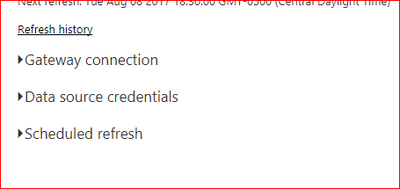
I am not able to refresh on the Power BI service. I get an error that schedule refresh is not supported for this Source. image.png


I don't even get the usual sub menus under schedule refresh - like Gateway connection, Data Source Credentials and Schedule Refresh.


image.png


On Power BI desktop, it is faster than ever due to the filters.


Rajkumar
Advocate II
Advocate II

I'm also facing the same issue. parametrized query is working fine in the desktop s/w, but it is not getting refresh in the power BI site.


My scenario is : I have to collect data from multiple project sites ( Project site is customized with couple of added lists) , so I'm passing project name as a parameter to the query , so that It will collect data for each project. This is refreshing awesome in Desktop, but not Power BI. 


Power BI team, could you please look into this issue asap?

Kristian
Advocate I
Advocate I

Hi


I wonder if you ever get a responsre to your issue because I am facing the same one. I would appreciate any help!


Thanks and kind regards

Kristian

Kristian
Advocate I
Advocate I

Hi


I'm also wondering if you ever get a response to your issue because I'm facing the same one. Would appreciate it!


Thanks and kind regards

Kristian

Rémi
Resolver III
Resolver III

Hi,


I don't know why you have an error, but why not doing the filter after ?

Hi,

Because when you work with OData the Power Query filter just filter the visual. So if you wan't to get transaction for a specific month you first need to read all transactions and then will Power Query apply the filter and only show you the transactions for the specific month.


Kind regards,

Djorran

Hi Djorran,


Did you ever get a response for this.  I have a similar issue, however mine is compounded that the paremeter actually increases the data \data\Opportunities?cross-company=true.


I have noticed that sometimes having the extra parameter will work, however mostly it does not.


Kind Regards,


Andy

Helpful resources

Announcements
Power BI DataViz World Championships

Power BI Dataviz World Championships

The Power BI Data Visualization World Championships is back! Get ahead of the game and start preparing now!

December 2025 Power BI Update Carousel

Power BI Monthly Update - December 2025

Check out the December 2025 Power BI Holiday Recap!

FabCon Atlanta 2026 carousel

FabCon Atlanta 2026

Join us at FabCon Atlanta, March 16-20, for the ultimate Fabric, Power BI, AI and SQL community-led event. Save $200 with code FABCOMM.

Top Solution Authors