Get certified for free when you join Fabric Data Days 2026 and dive into Fabric, Power BI, SQL, AI, and other essential data skills.
Join nowJuly 7 - July 17 | Round 2 of the Power BI Dataviz World Championships. Don't miss your chance! Learn more
Hi
I'm working on a group pipeline pbix and the group uses salesforce but each company is using a different tenant so I'm having difficulty thinking how to consolidate.
PowerBI only connects to one Dalesforce tenant at a time, has anyone else come across this issue of needing to use more than one tenant of Salesforce in the same pbix and how did you solve it?
Hi @Matt_HD,
For this scenario, I would first try to make each Salesforce org a separate Power BI data source.
Instead of connecting every org through the generic Production option or the same login.salesforce.com URL, try using the Custom option with a unique Salesforce My Domain URL for each org, for example:
https://companyA.my.salesforce.com
https://companyB.my.salesforce.com
Then authenticate each source separately, pull the same objects or reports from each org, add a Company or Org column, and append the tables in Power Query. This makes the consolidation model much easier to manage.
If that still becomes hard to maintain, another option is to use a Salesforce-side connector.
One alternative is Power BI Connector for Salesforce by Metrica Software, available on Salesforce AgentExchange / AppExchange: https://appexchange.salesforce.com/appxListingDetail?listingId=31526f0e-abd8-4cb5-bd1a-3bd56b5c0577
With this approach, you create data sources inside Salesforce, choose the required objects and fields, apply filters, and then connect Power BI to the prepared data sources. It supports standard and custom Salesforce objects, and it can be useful when you need a cleaner multi-org reporting setup.
If you also use Salesforce Reports, it avoids the frustrating 2,000-row Salesforce Reports limit. There is a 30-day free trial, clear documentation, and responsive support:
https://metricasoftware.com/docs/salesforce/
https://metricasoftware.com/docs/salesforce/contact-support/
Disclosure: I am with Metrica. If helpful, we can also arrange a quick demo and show how to structure the multi-org setup, data sources, Power BI connection, and refresh process.
Cheers,
Metrica Team.
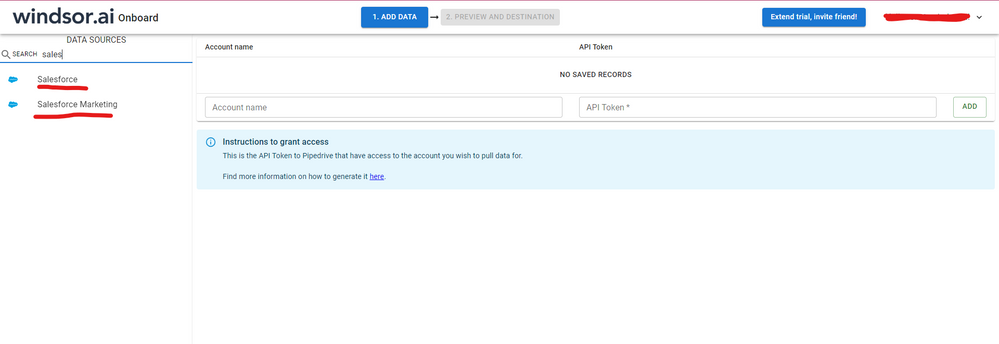
Hi @Matt_HD I know this reply is very late, but were you able to find a solution? As a workaround, maybe you can try to test your connection with a 3rd party connector. I've tried windsor.ai, supermetrics (which doesn't have PBI as a destination, so you first have to export to Google Sheets and then export to PBI) and funnel.io. I stayed with windsor because it is much cheaper so just to let you know other options. In case you wonder, to make the connection first search for the Salesforce connector in the data sources list:
After that, just grant access to your Salesforce account using your credentials, then on preview and destination page you will see a preview of your Salesforce fields:
There just select the fields you need. It is also compatible with custom fields and custom objects, so you'll be able to export them through windsor. Finally, just select PBI as your data destination and finally just copy and paste the url on PBI --> Get Data --> Web --> Paste the url.
Hi @Matt_HD
It seems there is no default connector to accomplish this requirement in Power BI.
Here is a link discussing about this problem and an idea you could vote for.
Maybe you could integrate contents from many accounts Salesforce into one, then connect to this with Power BI.
As searched, there are some methods for integration.
https://developer.salesforce.com/forums/?id=906F0000000D8DhIAK
https://help.salesforce.com/articleView?id=000317388&type=1&language=en_US&mode=1
Best Regards
Maggie
Community Support Team _ Maggie Li
If this post helps, then please consider Accept it as the solution to help the other members find it more quickly.
Join us in Barcelona for FabCon and SQLCon, the Fabric, Power BI, SQL, and AI community event. Save €200 with code FABCMTY200.
Check out the July 2026 Power BI update to learn about new features.
Join Data Days 2026: 60 days of free live/on-demand sessions, challenges, study groups, and certification opportunities.