cancel
Showing results for 
Search instead for 
Did you mean: 

The Fabric community is upgrading! Read all of the details including the timeline and what you can expect. Learn more

Reply
charles_o
Helper I
Helper I

Salesforce data refresh

Hi-


I have a report built thru Power BI desktop which uses data from Smartsheet and Salesforce.

The data from Salesforce querry has a few edits done on it. 


The data from Smartsheet updates when I push refresh, data from Salesforce does not.


When trying to update the data, either Power BI desktop or online, I am unable to get the Salesforce data to refresh. 


However- I am able to easily access the same Salesforce report as a new source in Power BI.


Any help??

3 REPLIES 3
metrica
Post Prodigy
Post Prodigy

Hi @charles_o,


Since the same Salesforce report works as a new source, I would focus on the existing query. Verify that Include in report refresh is enabled, review the Applied Steps and refresh error, and reauthenticate the source in Power BI Service.


If the native query continues to fail, Power BI Connector for Salesforce provides an alternative token-based connection through an OData source.


AppExchange and 30-day free trial:
https://appexchange.salesforce.com/appxListingDetail?listingId=31526f0e-abd8-4cb5-bd1a-3bd56b5c0577


Docs and support:
https://metricasoftware.com/docs/salesforce/
https://metricasoftware.com/docs/salesforce/contact-support/


Cheers,
Metrica Team

ReportGuru
Post Patron
Post Patron

Hi @charles_o were you able to find a solution? As a workaround, maybe you can try to test your connection with a 3rd party connector, which pulls data from SF objects. I've tried windsor.ai, supermetrics and funnel.io. I stayed with windsor because it is much cheaper so just to let you know other options. In case you wonder, to make the connection first search for the Salesforce connector in the data sources list:


SALESFORCE-1.png


After that, just grant access to your Salesforce account using your credentials, then on preview and destination page you will see a preview of your Salesforce fields:


SALESFORCE-2.png


There just select the fields you need. It is also compatible with custom fields and custom objects, so you'll be able to export them through windsor.  Finally, just select PBI as your data destination and finally just copy and paste the url on PBI --> Get Data --> Web --> Paste the url. 


SELECT_DESTINATION_NEW.png

Anonymous
Not applicable

@charles_o,

Please help to verify the following things.

1. What changes do you make in salesforce source? Do you change data or add new field?

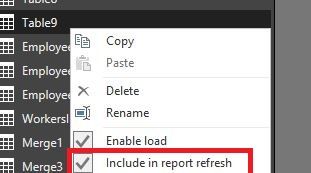
2. Do you use the latest version of Power BI Desktop? In Power BI Desktop, do you enable "Include in report refresh" option for salesforce query?
1.JPG

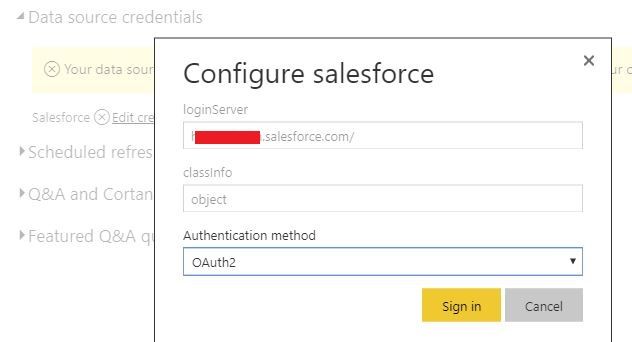
3. Do you enter credential for salesforce under Data source credentials in Power BI Service?
2.JPG

Regards,
Lydia

Helpful resources

Announcements
FabCon and SQLCon Barcelona 2026

FabCon & SQLCon – Barcelona 2026

Join us in Barcelona for FabCon and SQLCon, the Fabric, Power BI, SQL, and AI community event. Save €200 with code FABCMTY200.

Power BI DataViz World Championships carousel

Power BI DataViz World Championships - June 2026

A new Power BI DataViz World Championship is coming this June! Don't miss out on submitting your entry.