Get Fabric or SQL Certified for Free.
Get certified for free when you join Fabric Data Days 2026 and dive into Fabric, Power BI, SQL, AI, and other essential data skills.
Join now- Power BI forums
- Get Help with Power BI
- Desktop
- Service
- Report Server
- Power Query
- Mobile Apps
- Developer
- DAX Commands and Tips
- Custom Visuals Development Discussion
- Health and Life Sciences
- Power BI Spanish forums
- Translated Spanish Desktop
- Training and Consulting
- Instructor Led Training
- Dashboard in a Day for Women, by Women
- Galleries
- Data Stories Gallery
- Themes Gallery
- Contests Gallery
- QuickViz Gallery
- Quick Measures Gallery
- Visual Calculations Gallery
- Fabric Apps Gallery
- Notebook Gallery
- Translytical Task Flow Gallery
- TMDL Gallery
- R Script Showcase
- Webinars and Video Gallery
- Ideas
- Custom Visuals Ideas (read-only)
- Issues
- Issues
- Events
- Upcoming Events
July 28 - August 9 | Final Round of the Power BI Dataviz World Championships. This is your chance. Learn more
- Power BI forums
- Forums
- Get Help with Power BI
- Power Query
- Re: Salesforce credentials
- Subscribe to RSS Feed
- Mark Topic as New
- Mark Topic as Read
- Float this Topic for Current User
- Bookmark
- Subscribe
- Printer Friendly Page

- Mark as New
- Bookmark
- Subscribe
- Mute
- Subscribe to RSS Feed
- Permalink
- Report Inappropriate Content
Salesforce credentials
New to Power BI. When getting data from Salesforce (Objects) i do not see where one can sign in with the SF credentials. I worked in Power BI several days ago and then my sign on (SF) was changed and i am allowed to see numerous sites data now.. Need to pull all of that data into Power BI, but when I go to get data it isi just pulling from the one site that I used to sign on under. Where do you go to change that in Power BI get data...
Solved! Go to Solution.

- Mark as New
- Bookmark
- Subscribe
- Mute
- Subscribe to RSS Feed
- Permalink
- Report Inappropriate Content
How do you connect to Salesforce, using Power BI Desktop or Salesforce content pack in Power BI Service?
If you use Power BI Desktop, go to File->Options and Settings->Data Source Settings, find the Salesforce data source, click “Edit permissions” to change credential.
However, if you connect to Salesforce content pack in Power BI Service, firstly delete the existing Salesforce dataset in Service, then re-connect to the Salesforce content pack by using InPrivate Browsing in IE.
Regards,
Lydia
- Mark as New
- Bookmark
- Subscribe
- Mute
- Subscribe to RSS Feed
- Permalink
- Report Inappropriate Content
If my reply solves your issue, please accept it as solution, that way, other community members would easily find the answer when they get same issues.
Regards,


- Mark as New
- Bookmark
- Subscribe
- Mute
- Subscribe to RSS Feed
- Permalink
- Report Inappropriate Content
Hi @lrockwell
In Power BI Desktop, open File > Options and settings > Data source settings, select the Salesforce source, and choose Edit Permissions or Clear Permissions. Then reconnect using the required Salesforce account.
Power BI Connector for Salesforce uses an app-specific access token stored in the metricaToken parameter. The token can be replaced in Power BI when access needs to be updated.
AppExchange and 30-day free trial:
https://appexchange.salesforce.com/appxListingDetail?listingId=31526f0e-abd8-4cb5-bd1a-3bd56b5c0577
Docs and support:
https://metricasoftware.com/docs/salesforce/
https://metricasoftware.com/docs/salesforce/contact-support/
Cheers,
Metrica Team


- Mark as New
- Bookmark
- Subscribe
- Mute
- Subscribe to RSS Feed
- Permalink
- Report Inappropriate Content
Hi @lrockwellwere you able to find a solution? As a workaround, maybe you can try to test your connection with a 3rd party connector. I've tried windsor.ai, supermetrics and funnel.io. I stayed with windsor because it is much cheaper so just to let you know about other options. In case you wonder, to make the connection first search for the Salesforce connector in the data sources list:
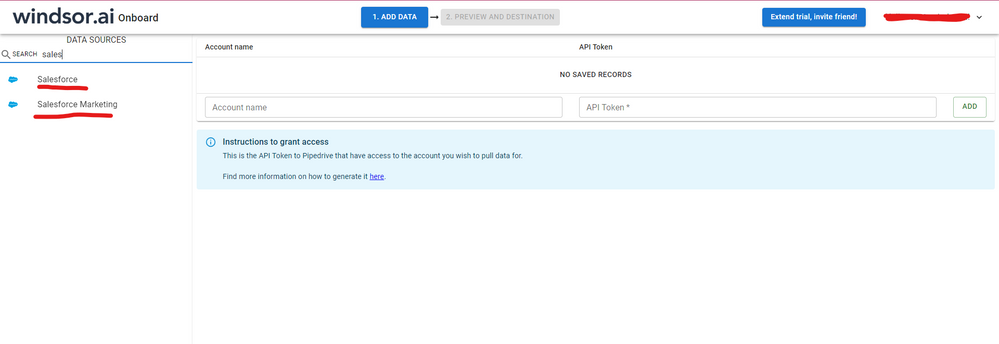
After that, just grant access to your Salesforce account using your credentials, then on preview and destination page you will see a preview of your Salesforce fields:

There just select the fields you need. It is also compatible with custom fields and custom objects, so you'll be able to export them through windsor. Finally, just select PBI as your data destination and finally just copy and paste the url on PBI --> Get Data --> Web --> Paste the url.

- Mark as New
- Bookmark
- Subscribe
- Mute
- Subscribe to RSS Feed
- Permalink
- Report Inappropriate Content
The problem has been resolved. Thank you
- Mark as New
- Bookmark
- Subscribe
- Mute
- Subscribe to RSS Feed
- Permalink
- Report Inappropriate Content
If my reply solves your issue, please accept it as solution, that way, other community members would easily find the answer when they get same issues.
Regards,
- Mark as New
- Bookmark
- Subscribe
- Mute
- Subscribe to RSS Feed
- Permalink
- Report Inappropriate Content
How do you connect to Salesforce, using Power BI Desktop or Salesforce content pack in Power BI Service?
If you use Power BI Desktop, go to File->Options and Settings->Data Source Settings, find the Salesforce data source, click “Edit permissions” to change credential.
However, if you connect to Salesforce content pack in Power BI Service, firstly delete the existing Salesforce dataset in Service, then re-connect to the Salesforce content pack by using InPrivate Browsing in IE.
Regards,
Lydia
Helpful resources

Fabric Community Sticker Challenge - Barcelona 2026
If you love stickers, then you will definitely want to check out our community sticker challenge, Barcelona edition!

Power BI Monthly Update - July 2026
Check out the July 2026 Power BI update to learn about new features.

Power BI DataViz World Championships - June 2026
A new Power BI DataViz World Championship is coming this June! Don't miss out on submitting your entry.


