Get certified for free when you join Fabric Data Days 2026 and dive into Fabric, Power BI, SQL, AI, and other essential data skills.
Join nowData Days is here! Join us now for 60+ days of learning, challenges, and connection. Learn more
Hello we have a SSAS server inside a VPN.
How we can connect to this server from power bi?
Thank you in advance.
@Anonymous Provided that machine you've got Power BI Desktop installed is able to talk to VM on which SSAS is you should be ok accessing that SSAS instance. You can also consdier installing power bi desktop on the actual VM hosting SSAS.
The machine is the same.
We have power bi desktop and sql server (with ssas) in the same machine.
The we want to publish the dashboards in the cloud.
must I use gateway to direct query?
Hi @Anonymous,
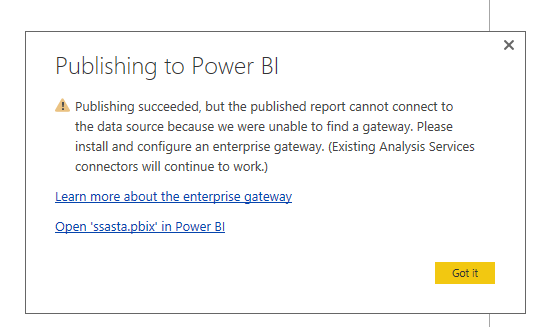
Do you want to connect to SQL Server Analysis Server(SSAS) database via “Connect Live” option in Power BI Desktop? If that is the case, you don’t require a gateway in Power BI Desktop. However, after you publish Power BI Desktop file(PBIX file) to Power BI Service, you would get a warning as follows.
In order to access the published report in Power BI Service, you would need to install and configure on-premises gateway and add the SSAS data source under the gateway. Otherwise, you will get error message as shown in the following screenshot.
Thanks,
Lydia Zhang
Ok. And how can I create a gateway to SSAS with directquery method?
Thank you in advance.
Hi @Anonymous,
You can refer to the following articles to configure gateway and add SSAS data source under the gateway.
On-premises data gateway
Manage your data source - Analysis Services
Thanks,
Lydia Zhang
Don't miss out on Data Days, June 15 through August 7. Learn Fabric, Power BI, SQL, AI and more.
Check out the May 2026 Power BI update to learn about new features.
| User | Count |
|---|---|
| 4 | |
| 4 | |
| 3 | |
| 2 | |
| 1 |
| User | Count |
|---|---|
| 11 | |
| 11 | |
| 5 | |
| 4 | |
| 4 |