
cancel
Showing results for 
Search instead for 
Did you mean: 

We've captured the moments from FabCon & SQLCon that everyone is talking about, and we are bringing them to the community, live and on-demand. Starts on April 14th. Register now

Reply
mafaber
Helper II
Helper II

SPOL folder to dataflow

Hi,


I'm trying to set up dataflows using SPOL files as datasources. What I do is I create the table in the desktop version then copy the M code from advanced editor to a blank query dataflow. It all works fine until I want to combine multiple files. Then I run into an error, even though Dataflows theoretically support SPOL folders based on https://docs.microsoft.com/en-us/power-bi/service-dataflows-data-sources#connecting-to-additional-da....

The error message is the following:

dataflow_err1.PNG


I'd really appreciate, if you could shine some light on what I do wrong.

2 REPLIES 2
v-frfei-msft
Community Support
Community Support

Hi @mafaber ,


Please refer to this case please.

https://community.powerbi.com/t5/Service/Dataflows-refresh-gives-error-about-AzureStorage-BlobConten...

Community Support Team _ Frank
If this post helps, then please consider Accept it as the solution to help the others find it more quickly.

Hi @v-frfei-msft,


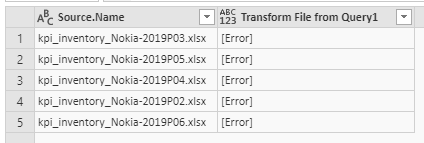
if I understand correctly, what I could use from that post is that I should check the credentials I use to access the datasource. But I think it's a different problem, individual files I can load without a problem from the same site, and I can also see the first few steps working while connecting to a list of files. The first step I see an error is the 'Removed other columns':

dataflow_err2.PNG

And after this step, the 'Expanded table columns' step results the error message I showed in the original post.

But still, I use no gateway and set up my credentials manually using the Windows Account I use for PBI and SPOL too.

Helpful resources

Announcements
New to Fabric survey Carousel

New to Fabric Survey

If you have recently started exploring Fabric, we'd love to hear how it's going. Your feedback can help with product improvements.

Power BI DataViz World Championships carousel

Power BI DataViz World Championships - June 2026

A new Power BI DataViz World Championship is coming this June! Don't miss out on submitting your entry.

Join our Fabric User Panel

Join our Fabric User Panel

Share feedback directly with Fabric product managers, participate in targeted research studies and influence the Fabric roadmap.

March Power BI Update Carousel

Power BI Community Update - March 2026

Check out the March 2026 Power BI update to learn about new features.