Join us at FabCon Atlanta from March 16 - 20, 2026, for the ultimate Fabric, Power BI, AI and SQL community-led event. Save $200 with code FABCOMM.
Register now!The Power BI Data Visualization World Championships is back! Get ahead of the game and start preparing now! Learn more
Hi,
I am needing help knowing how to connect my SLICERS to 2 different datasets graphs in PowerBi. I attempted to try but can't quite figure it out.
@fergmn Have my answer or you yourself solved your problem? If so, can you please share your solution or accept my answer as Solution to help other members find it faster? Thank you very much for your kind cooperation!
Not sure if understood you well.
The field in the slicer shall come from a dimension table, that table shall have relationships on a primary key to both of your datasets. Or the field in the slicer can sit in Dataset 1 but Dataset 1 shall have one to many relationship filtering Dataset 2.
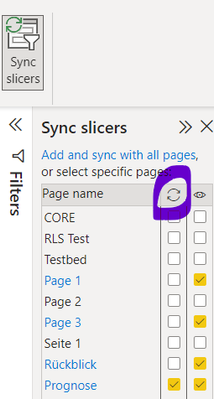
If you want to syncronize the slicers, so whatever you choose on page one is selected on page 2, then View-Sync Slicers, Select the Slicer you want to sync and tick it in the corresponding box, hope thats answers your question.
The Power BI Data Visualization World Championships is back! Get ahead of the game and start preparing now!
| User | Count |
|---|---|
| 19 | |
| 10 | |
| 9 | |
| 7 | |
| 6 |