cancel
Showing results for 
Search instead for 
Did you mean: 

Try your skills in the Power BI Dataviz World Championship! Round one ends June 26. Join now

Reply
jansb000
Regular Visitor

SAP BW connectivity issue

I have been using SAP BW as a datasource without problems. Now I have to test several new user accounts to check if their authorization settings are correct. However I can't find a way to reset my own account settings. As soon as I have entered de BW server name, system number etc I get the list of cubes. Power BI assumes that I always want to login with my initial account.


Question: How can I reset this so I am able to login with another account?

1 REPLY 1
Anonymous
Not applicable

Hi @jansb000,

I am not familiar with SAP BW, however, based on this  blog, you should be able to change account setting in Power BI Desktop.

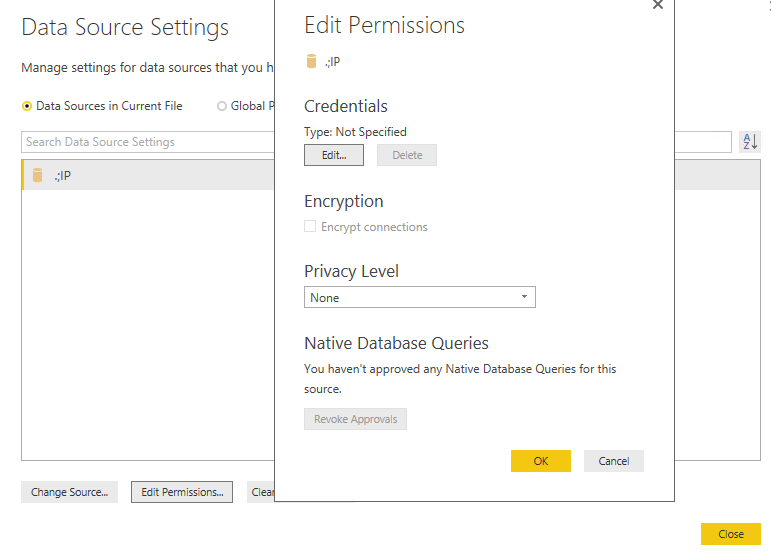
Please go to Files>Options and settings>Data source settings in Power BI Desktop, search for your SAP BW data source, click Edit Permissions in the following similar screenshot, click the Edit button on the Credentials screen and check if you can change the user name and password.
1.png

In addition, make sure that your Basis Administrator has disabled the Single Sign On option for your user account and enabled the Logon using Username/Password option.

Thanks,
Lydia Zhang

Helpful resources

Announcements
Fabric Data Days is here Carousel

Data Days 2026

Don't miss out on Data Days, June 15 through August 7. Learn Fabric, Power BI, SQL, AI and more.

Power BI DataViz World Championships carousel

Power BI DataViz World Championships - June 2026

A new Power BI DataViz World Championship is coming this June! Don't miss out on submitting your entry.