cancel
Showing results for 
Search instead for 
Did you mean: 

We've captured the moments from FabCon & SQLCon that everyone is talking about, and we are bringing them to the community, live and on-demand. Starts on April 14th. Register now

Reply
Brysonds
Helper III
Helper III

SAP BW Gateway Connection Error?

Hello!


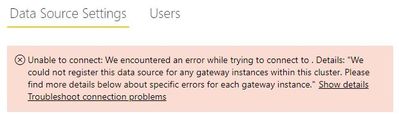
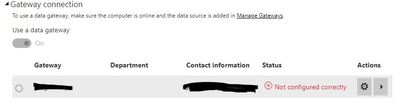
I am getting an error when creating a connection to our BW environment from the Power BI enterprise gateway:


Error adding connection.JPG


Error on gateway.JPG


The gateway itself appears to be working as we have an active SCCM connection that is working. Also, the gateway has been updated to the latest version.


I beleive this worked in the past (some time in 2017) using a personal gateway - obviously we want to use the enterprise gateway.


Are there any SAP related files that need to be installed on the machin that hosts the enterprise gateway?


Regards,

Bryson

1 ACCEPTED SOLUTION

FYI - the solution was to install the SAP Netweaver RFC (found here) on the enterprise gateway machine. 


Afterthat, the connection was created without error. I used the latest implementation 2.0.


Regards,

Bryson

View solution in original post

3 REPLIES 3
Anonymous
Not applicable

@Brysonds,

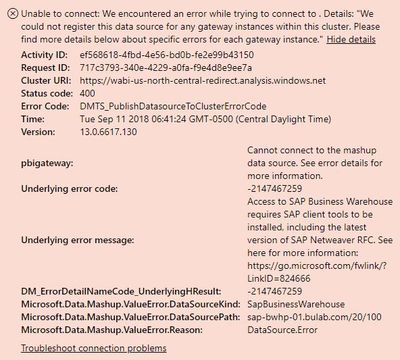
Please click "Show details" in your screenshot to show detailed error message. In addition, do you install SAP client tool on the gateway machine? Are you able to access the SAP data source  using other clients such as Power BI Desktop in the gateway machine?

There is also a similar thread for your reference.
https://community.powerbi.com/t5/Service/Unable-to-add-data-source-SAP-BW-server-from-Power-BI-Servi...

Regards,
Lydia

Hi Lydia!


Here is the detail from the error message. It mentions installing SAP Netweaver RFC, so that is why I was asking if installation is needed on the gateway machine. Currently, there is no SAP files installed on the gateway machine.


Error detail.JPG


I will try out installing SAP Netweaver RFC on the gateway machine and report back.


Thanks!

Bryson

FYI - the solution was to install the SAP Netweaver RFC (found here) on the enterprise gateway machine. 


Afterthat, the connection was created without error. I used the latest implementation 2.0.


Regards,

Bryson

Helpful resources

Announcements
New to Fabric survey Carousel

New to Fabric Survey

If you have recently started exploring Fabric, we'd love to hear how it's going. Your feedback can help with product improvements.

Power BI DataViz World Championships carousel

Power BI DataViz World Championships - June 2026

A new Power BI DataViz World Championship is coming this June! Don't miss out on submitting your entry.

Join our Fabric User Panel

Join our Fabric User Panel

Share feedback directly with Fabric product managers, participate in targeted research studies and influence the Fabric roadmap.

March Power BI Update Carousel

Power BI Community Update - March 2026

Check out the March 2026 Power BI update to learn about new features.