
cancel
Showing results for 
Search instead for 
Did you mean: 

The Power BI Data Visualization World Championships is back! Get ahead of the game and start preparing now! Learn more

Reply
SJHALANI
Helper I
Helper I

Rows to Columns

Hi,
I have a table which is the below format:

PO#Other columnsSOW Type
aaxxa
aaxxb
aaxxc
bbxxa
bbxxb


I want to have only 1 unique row per PO. The info in 'other columns' is the same for a given PO. So basically want to have the below output:

PO#Other columnsabc
aaxxYesYesYes
bbyyYesYesNo


Please help me figure out how to achieve the above output. TIA!


1 ACCEPTED SOLUTION
v-jingzhang
Community Support
Community Support

Hi @SJHALANI 


You can transform the table with below steps in Power Query. 

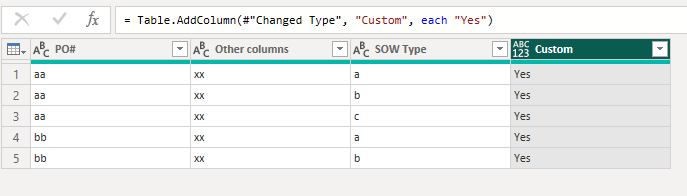
First add a custom column with value "Yes".

vjingzhang_2-1678442338269.png

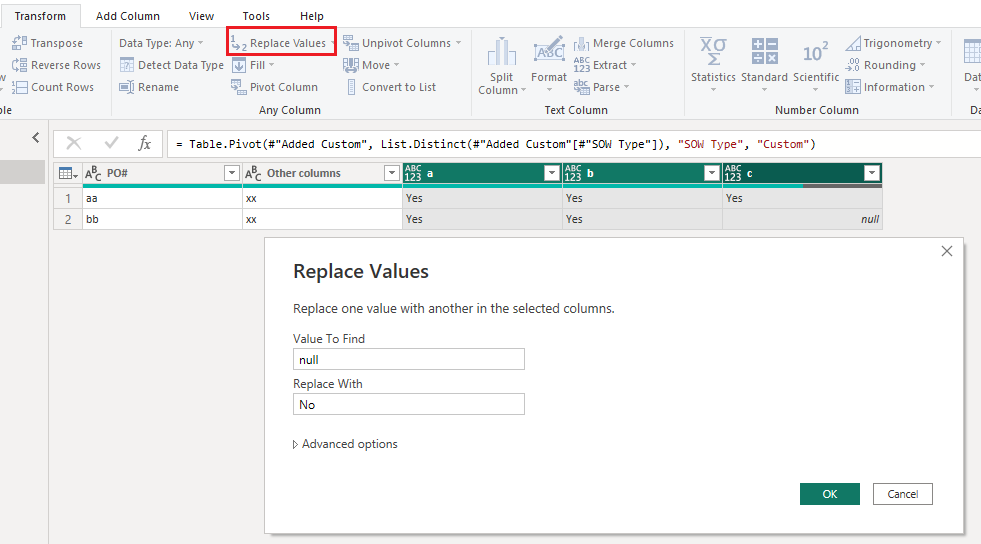
Then select "SOW Type" column, use "Pivot Column" feature, select the earlier "Custom" column as Values Column and use "Don't Aggregate". 

vjingzhang_3-1678442463492.png

Finally select a,b,c columns, replace null with "No" in these columns. 

vjingzhang_5-1678442536053.png

You will get the result you want. 

vjingzhang_4-1678442522303.png


Best Regards,
Community Support Team _ Jing
If this post helps, please Accept it as Solution to help other members find it.


View solution in original post

3 REPLIES 3
v-jingzhang
Community Support
Community Support

Hi @SJHALANI 


You can transform the table with below steps in Power Query. 

First add a custom column with value "Yes".

vjingzhang_2-1678442338269.png

Then select "SOW Type" column, use "Pivot Column" feature, select the earlier "Custom" column as Values Column and use "Don't Aggregate". 

vjingzhang_3-1678442463492.png

Finally select a,b,c columns, replace null with "No" in these columns. 

vjingzhang_5-1678442536053.png

You will get the result you want. 

vjingzhang_4-1678442522303.png


Best Regards,
Community Support Team _ Jing
If this post helps, please Accept it as Solution to help other members find it.


Hi,

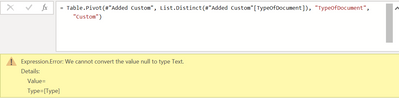
Thanks for the response. The only thing is when I am trying to apply the Pivot step above, it gives the below error. Would you know reason for this/how to resolve this?

SJHALANI_0-1678443898783.png

Don't get confused with the "TypeOfDocument" colm, it's the same as "SOW Type" column.
TIA!


ppm1
Solution Sage
Solution Sage

One way would be to create a matrix visual and use your SOW Type column in the Columns field well and your PO# on Rows. You can then use a measure like this one in Values to get your result. Replace Table with the name of your actual table.


HasRows = IF(ISEMPTY(Table), "No", "Yes")


Pat

Microsoft Employee

Helpful resources

Announcements
Power BI DataViz World Championships

Power BI Dataviz World Championships

The Power BI Data Visualization World Championships is back! Get ahead of the game and start preparing now!

December 2025 Power BI Update Carousel

Power BI Monthly Update - December 2025

Check out the December 2025 Power BI Holiday Recap!

FabCon Atlanta 2026 carousel

FabCon Atlanta 2026

Join us at FabCon Atlanta, March 16-20, for the ultimate Fabric, Power BI, AI and SQL community-led event. Save $200 with code FABCOMM.

Top Solution Authors