Join us at FabCon Atlanta from March 16 - 20, 2026, for the ultimate Fabric, Power BI, AI and SQL community-led event. Save $200 with code FABCOMM.
Register now!Vote for your favorite vizzies from the Power BI Dataviz World Championship submissions. Vote now!
hi!
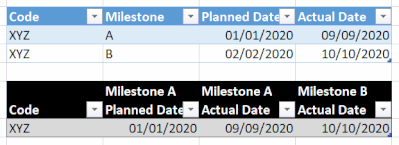
I have a table where a basic row is by milestone (blue table) and I have to rearrange it so that it is by code (black table).
Could you please help me with that challenge?
Artur
Solved! Go to Solution.
Take a look at this M code. It returns this table.

let
Source = Table.FromRows(Json.Document(Binary.Decompress(Binary.FromText("i45WioiMUtJRcgRiQ31DfSMDIwMg01LfEsKM1YGpcAJiI4QKQwN9IIKoiQUA", BinaryEncoding.Base64), Compression.Deflate)), let _t = ((type nullable text) meta [Serialized.Text = true]) in type table [Code = _t, Milestone = _t, #"Planned Date" = _t, #"Actual Date" = _t]),
#"Changed Type" = Table.TransformColumnTypes(Source,{{"Code", type text}, {"Milestone", type text}, {"Planned Date", type date}, {"Actual Date", type date}}),
#"Unpivoted Other Columns" = Table.UnpivotOtherColumns(#"Changed Type", {"Code", "Milestone"}, "Attribute", "Value"),
#"Merged Columns" = Table.CombineColumns(#"Unpivoted Other Columns",{"Milestone", "Attribute"},Combiner.CombineTextByDelimiter(" ", QuoteStyle.None),"Attribute.1"),
#"Added Prefix" = Table.TransformColumns(#"Merged Columns", {{"Attribute.1", each "Milestone " & _, type text}}),
#"Pivoted Column" = Table.Pivot(#"Added Prefix", List.Distinct(#"Added Prefix"[Attribute.1]), "Attribute.1", "Value")
in
#"Pivoted Column"
1) In Power Query, select New Source, then Blank Query
2) On the Home ribbon, select "Advanced Editor" button
3) Remove everything you see, then paste the M code I've given you in that box.
4) Press Done
5) See this article if you need help using this M code in your model.
DAX is for Analysis. Power Query is for Data Modeling
Proud to be a Super User!
MCSA: BI ReportingTake a look at this M code. It returns this table.
let
Source = Table.FromRows(Json.Document(Binary.Decompress(Binary.FromText("i45WioiMUtJRcgRiQ31DfSMDIwMg01LfEsKM1YGpcAJiI4QKQwN9IIKoiQUA", BinaryEncoding.Base64), Compression.Deflate)), let _t = ((type nullable text) meta [Serialized.Text = true]) in type table [Code = _t, Milestone = _t, #"Planned Date" = _t, #"Actual Date" = _t]),
#"Changed Type" = Table.TransformColumnTypes(Source,{{"Code", type text}, {"Milestone", type text}, {"Planned Date", type date}, {"Actual Date", type date}}),
#"Unpivoted Other Columns" = Table.UnpivotOtherColumns(#"Changed Type", {"Code", "Milestone"}, "Attribute", "Value"),
#"Merged Columns" = Table.CombineColumns(#"Unpivoted Other Columns",{"Milestone", "Attribute"},Combiner.CombineTextByDelimiter(" ", QuoteStyle.None),"Attribute.1"),
#"Added Prefix" = Table.TransformColumns(#"Merged Columns", {{"Attribute.1", each "Milestone " & _, type text}}),
#"Pivoted Column" = Table.Pivot(#"Added Prefix", List.Distinct(#"Added Prefix"[Attribute.1]), "Attribute.1", "Value")
in
#"Pivoted Column"
1) In Power Query, select New Source, then Blank Query
2) On the Home ribbon, select "Advanced Editor" button
3) Remove everything you see, then paste the M code I've given you in that box.
4) Press Done
5) See this article if you need help using this M code in your model.
DAX is for Analysis. Power Query is for Data Modeling
Proud to be a Super User!
MCSA: BI ReportingVote for your favorite vizzies from the Power BI World Championship submissions!
If you love stickers, then you will definitely want to check out our Community Sticker Challenge!
Check out the January 2026 Power BI update to learn about new features.
| User | Count |
|---|---|
| 14 | |
| 11 | |
| 8 | |
| 7 | |
| 6 |