Don't miss your chance to take the Fabric Data Engineer (DP-700) exam on us!
Learn moreNext up in the FabCon + SQLCon recap series: The roadmap for Microsoft SQL and Maximizing Developer experiences in Fabric. All sessions are available on-demand after the live show. Register now
I have a data set of a list of people within an organization with columns stating who they are, when they were hired and a column on their temrination date if they left the organization. I am working on writing a dax ststaement to keep a rolling count of the number of people in the org as time goes with it increasing as people get hired, and removing people if they get terminated, but am very much stuck and would apprecaite any tips or help!
Hi @jonahlawson ,
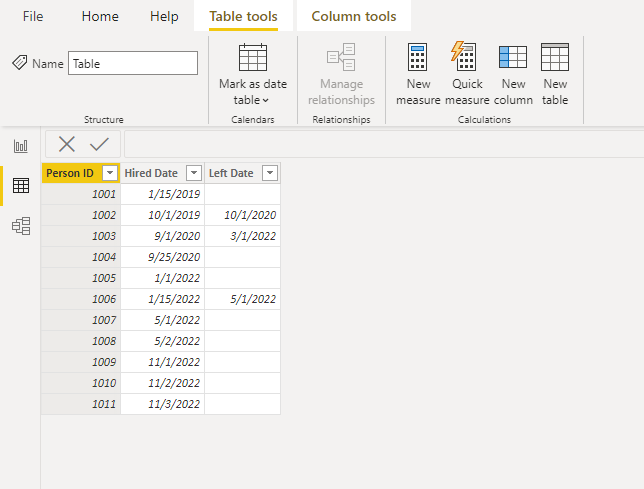
I created a sample data to restore your data.
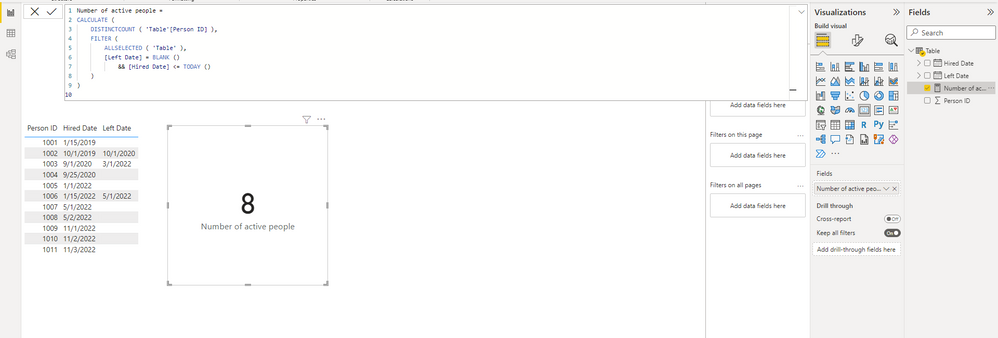
Here's the measure which counts the number of active people. In the FILTER() function, "[Hired Date] <= TODAY ()" is to prevent future recruits from appearing in the data sheet.
Number of active people =
CALCULATE (
DISTINCTCOUNT ( 'Table'[Person ID] ),
FILTER (
ALLSELECTED ( 'Table' ),
[Left Date] = BLANK ()
&& [Hired Date] <= TODAY ()
)
)
Best Regards,
Stephen Tao
If this post helps, then please consider Accept it as the solution to help the other members find it more quickly.
Hi @jonahlawson ,
Create a measure something like this (I'm assuming you do not have a relationship between your calendar table and your employees table):
_noofHeadsInOrgOverTime =
VAR __cDate = MAX(calendar[date])
RETURN
CALCULATE(
DISTINCTCOUNT(yourTable[employeeID]),
FILTER(
yourTable,
yourTable[startDate] <= __cDate
&& (youTable[terminationDate] >= __cDate || ISBLANK(youTable[terminationDate]))
)
)
You then use calendar[date] (or calendar[month], calendar[year] etc.) on the axis of any visuals to see the balance at any point in time.
Pete
Proud to be a Datanaut!
This works great except a need a way to make it a running/culmative total as time goes on. I have a culmative measure I created "Rolling Total = CALCULATE(DISTINCTCOUNT('Squad Aligment'[Person]), ALL('Squad Calender'), 'Squad Calender'[Date] <=MAX ('Squad Calender'[Date]))", but have yet to find a way to incorpate the subtraction of anyone terminated as well.
Hi @jonahlawson ,
That's exactly what my measure does, although I think I made a mistake in my instructions. The version I gave actually WON'T work if your calendar table IS related to your employees table, so my apologies for that. I've updated my original post so as not confuse future readers.
If you do have your calendar table related to your employees table, then please try this measure instead:
_noofHeadsInOrgOverTime =
VAR __cDate = MAX(calendar[date])
RETURN
CALCULATE(
CALCULATE(
DISTINCTCOUNT(yourTable[employeeID]),
FILTER(
yourTable,
yourTable[startDate] <= __cDate
&& (youTable[terminationDate] >= __cDate || ISBLANK(youTable[terminationDate]))
)
),
CROSSFILTER(calendar[date], yourTable[date], none)
)
If you don't have this relationship in place, my original measure will work fine.
Either way, you need to give the measures a date context e.g. if you want to display the current value in a card, you'll need to put a visual-level filter on the card using a dimension from your calendar table filtered for 'today' or 'yesterday' or similar.
Pete
Proud to be a Datanaut!
If you have recently started exploring Fabric, we'd love to hear how it's going. Your feedback can help with product improvements.
A new Power BI DataViz World Championship is coming this June! Don't miss out on submitting your entry.
Share feedback directly with Fabric product managers, participate in targeted research studies and influence the Fabric roadmap.
| User | Count |
|---|---|
| 6 | |
| 4 | |
| 3 | |
| 3 | |
| 2 |
| User | Count |
|---|---|
| 7 | |
| 6 | |
| 5 | |
| 5 | |
| 5 |