cancel
Showing results for 
Search instead for 
Did you mean: 

Vote for your favorite vizzies from the Power BI Dataviz World Championship submissions. Vote now!

Reply
SDHaas
Frequent Visitor

Return the first matching value from range using List

Hello.


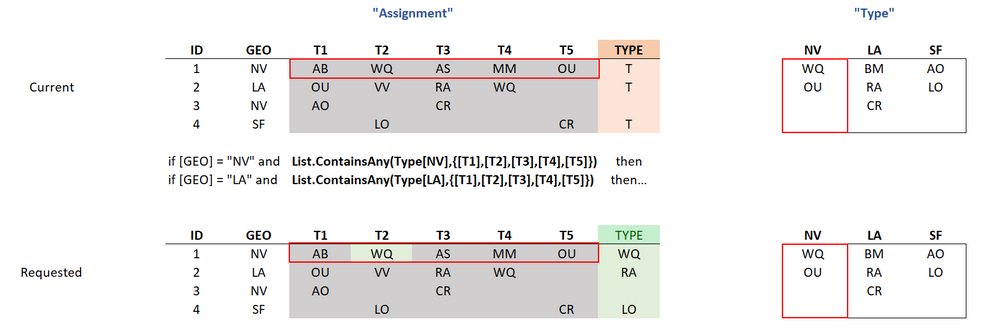
I have two tables ('Assignment', 'Type'). I'm trying to search a range in the first table and return the first match from the second table. I'm currently using "List.ContainsAny" and returning 'T' if it contains a match. Is there a way to return the matching value vs. just 'T'. I'm also open to any suggestions for a more efficient method with regard to performance being new to the area. Any help is much appreciated! 


Current:


if

    [GEO]="NV" and

    List.ContainsAny(Type[NV],{[T1],[T2],[T3],[T4],[T5]}) then

        'T'

else...


SDHaas_2-1643215684770.png


1 ACCEPTED SOLUTION
Jakinta
Solution Sage
Solution Sage

You can add this step in Assignment query.


= Table.AddColumn( PreviousStepName, "TYPE", each let x=List.Skip(Record.ToList(_),2), y=Record.ToList(_){1}, z=Table.Column(Type, y) in try List.RemoveNulls (List.Intersect( { x,z} )){0} otherwise "")


View solution in original post

2 REPLIES 2
AlexisOlson
Super User
Super User

Try adding a custom column like this:

List.First(
    List.Intersect(
        {
            Table.Column(Type, [GEO]),
            Record.FieldValues(_)
        }
    )
)


Here's a full sample query:

let
    Source = Table.FromRows(Json.Document(Binary.Decompress(Binary.FromText("i45WMlTSUfILAxKOTkAiPBDECgYSvr5Awj9UKVYnWskIyPRxhPB1lMJAqoMcYarBKozhpviDhHSUnIMgNFjWBMgIdoMI+EAVQNTExgIA", BinaryEncoding.Base64), Compression.Deflate)), let _t = ((type nullable text) meta [Serialized.Text = true]) in type table [ID = _t, GEO = _t, T1 = _t, T2 = _t, T3 = _t, T4 = _t, T5 = _t]),
    #"Changed Type" = Table.TransformColumnTypes(Source,{{"ID", Int64.Type}, {"GEO", type text}, {"T1", type text}, {"T2", type text}, {"T3", type text}, {"T4", type text}, {"T5", type text}}),
    #"Added Custom" = Table.AddColumn(#"Changed Type", "TYPE", each List.First(List.Intersect({Table.Column(Type, [GEO]), Record.FieldValues(_)})), type text)
in
    #"Added Custom"
Jakinta
Solution Sage
Solution Sage

You can add this step in Assignment query.


= Table.AddColumn( PreviousStepName, "TYPE", each let x=List.Skip(Record.ToList(_),2), y=Record.ToList(_){1}, z=Table.Column(Type, y) in try List.RemoveNulls (List.Intersect( { x,z} )){0} otherwise "")


Helpful resources

Announcements
Power BI DataViz World Championships

Power BI Dataviz World Championships

Vote for your favorite vizzies from the Power BI World Championship submissions!

Sticker Challenge 2026 Carousel

Join our Community Sticker Challenge 2026

If you love stickers, then you will definitely want to check out our Community Sticker Challenge!

January Power BI Update Carousel

Power BI Monthly Update - January 2026

Check out the January 2026 Power BI update to learn about new features.

FabCon Atlanta 2026 carousel

FabCon Atlanta 2026

Join us at FabCon Atlanta, March 16-20, for the ultimate Fabric, Power BI, AI and SQL community-led event. Save $200 with code FABCOMM.