cancel
Showing results for 
Search instead for 
Did you mean: 

The Power BI Data Visualization World Championships is back! It's time to submit your entry. Live now!

Reply
jaryszek
Memorable Member
Memorable Member

Retrive headers only from CSVs in folder

hi Guys,


i have files in csv in folder and want to get only headers for them.
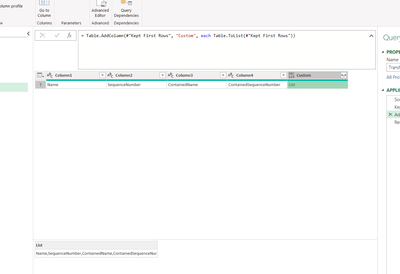
In transform sample file i did example for csv where rows are null and i have only headers:

jaryszek_0-1653646785547.png


I created List but the list is delimeted by "," and i want to convert it somehow to records(rows).
My goal is to have table with 2 columns: TableName, ColumnName for each table in folder.


Can you please help?
Best,
Jacek


1 ACCEPTED SOLUTION
Vijay_A_Verma
Most Valuable Professional

Keep it as List only. I believe you created list by following formula in sample file

=Record.ToList(_)

After this, delete all columns from your sample file except last one.

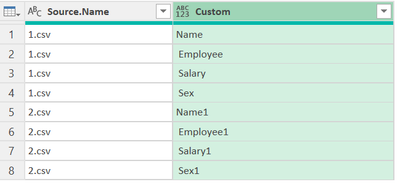
Now, you will have this result in your combined file

1.png

When you click double arrow then, you get option for Expand to new rows and you will get following result

1.png

View solution in original post

3 REPLIES 3
Vijay_A_Verma
Most Valuable Professional

Keep it as List only. I believe you created list by following formula in sample file

=Record.ToList(_)

After this, delete all columns from your sample file except last one.

Now, you will have this result in your combined file

1.png

When you click double arrow then, you get option for Expand to new rows and you will get following result

1.png

Thank you @Vijay_A_Verma It worked.


What doest it mean "_" within "(_)" ? 
Can you please explain?

Best,
Jacek

Vijay_A_Verma
Most Valuable Professional

_ means current row. 

Helpful resources

Announcements
Power BI DataViz World Championships

Power BI Dataviz World Championships

The Power BI Data Visualization World Championships is back! It's time to submit your entry.

January Power BI Update Carousel

Power BI Monthly Update - January 2026

Check out the January 2026 Power BI update to learn about new features.

FabCon Atlanta 2026 carousel

FabCon Atlanta 2026

Join us at FabCon Atlanta, March 16-20, for the ultimate Fabric, Power BI, AI and SQL community-led event. Save $200 with code FABCOMM.