Get certified for free when you join Fabric Data Days 2026 and dive into Fabric, Power BI, SQL, AI, and other essential data skills.
Join nowJuly 28 - August 9 | Final Round of the Power BI Dataviz World Championships. This is your chance. Learn more
hi Guys,
i have files in csv in folder and want to get only headers for them.
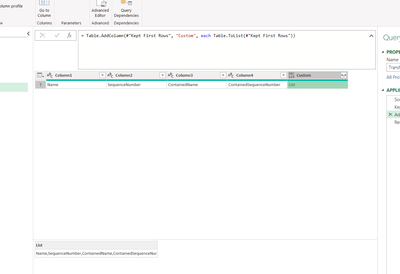
In transform sample file i did example for csv where rows are null and i have only headers:
I created List but the list is delimeted by "," and i want to convert it somehow to records(rows).
My goal is to have table with 2 columns: TableName, ColumnName for each table in folder.
Can you please help?
Best,
Jacek
Solved! Go to Solution.
Keep it as List only. I believe you created list by following formula in sample file
=Record.ToList(_)
After this, delete all columns from your sample file except last one.
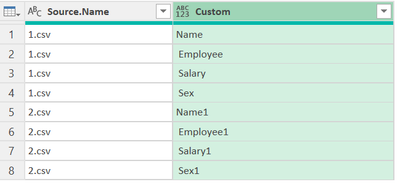
Now, you will have this result in your combined file
When you click double arrow then, you get option for Expand to new rows and you will get following result
Keep it as List only. I believe you created list by following formula in sample file
=Record.ToList(_)
After this, delete all columns from your sample file except last one.
Now, you will have this result in your combined file
When you click double arrow then, you get option for Expand to new rows and you will get following result
Thank you @Vijay_A_Verma It worked.
What doest it mean "_" within "(_)" ?
Can you please explain?
Best,
Jacek
_ means current row.
If you love stickers, then you will definitely want to check out our community sticker challenge, Barcelona edition!
Check out the July 2026 Power BI update to learn about new features.