Get certified for free when you join Fabric Data Days 2026 and dive into Fabric, Power BI, SQL, AI, and other essential data skills.
Join nowData Days is here! Join us now for 60+ days of learning, challenges, and connection. Learn more
Hello
I am experiencing SQL server performance issues and can see that a report from PowerBI is creating multiple queries towards the sql server. Can someone explains why and how can the powerBi /report be edited so that this does not happens?
Solved! Go to Solution.
Hi @galbo1993 ,
Can you provide more detail around "PowerBI is creating multiple queries towards the sql server" please?
How are you seeing these connections?
When is it happening?
- when you first open your PBIX,
- when refreshing in Desktop,
- or when refreshing in the Service etc.?
There's loads of reasons why PBI would make multiple calls to the server, so will also need detailed info on your queries and their structures e.g.
- are you using a lot of merges in your queries?
- are your queries all folding back to the server?
-- if not, then what are the functions being used at the steps where folding fails?
Pete
Proud to be a Datanaut!
Hi @BA_Pete
Its a report refreshing through Power BI Service.
The query is just "select * from 1 view "
The query however is taking a lot of time and at some point failing but I do not understand why Power bi restarts it automatically.
Hi, @galbo1993
What connection mode are you using? Have you set schedule refresh?
Please share the refresh history screenshot(hide privacy)
Janey
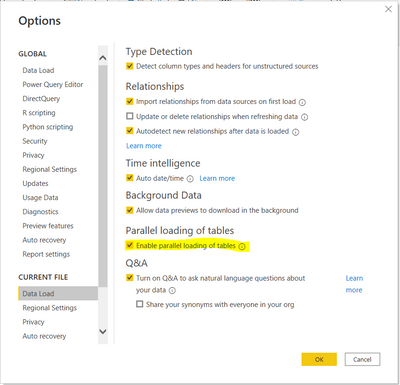
Turn off the parallel loading for the tables in the Options.
Don't miss out on Data Days, June 15 through August 7. Learn Fabric, Power BI, SQL, AI and more.
Check out the May 2026 Power BI update to learn about new features.
| User | Count |
|---|---|
| 4 | |
| 4 | |
| 2 | |
| 2 | |
| 1 |
| User | Count |
|---|---|
| 11 | |
| 11 | |
| 5 | |
| 4 | |
| 4 |