This time we’re going bigger than ever. Fabric, Power BI, SQL, AI and more. We're covering it all. You won't want to miss it.
Learn moreLevel up your Power BI skills this month - build one visual each week and tell better stories with data! Get started
Hello,
I have created a report and publishing it on SharePoint Online using script editor WebPart. I have few questions about report customization:
1. How to show "Export Data" option on the published report
2. How to show filters on published report
3. How to remove Text "Microsoft Power BI" from the report.
4. How to remove options "Share" & "Enter Full Screen"
Screen shots on link below:
http://s000.tinyupload.com/?file_id=00246069555522064634
http://s000.tinyupload.com/?file_id=05352366861798911943
Hi @kodnil,
Do you use the “Publish to Web” feature to generate embedded code and use the code to embed report in SharePoint Online? If that is the case, currently, we are not able to show “Export data” option on the published report, show visual/page/report filters, remove "Microsoft Power BI" text and remove "Share" & "Enter Full Screen" options on the report. Some ideas about these issues have been submitted in the following links, please vote them up.
https://ideas.powerbi.com/forums/265200-power-bi-ideas/suggestions/16512895-export-data-from-embedde...
https://ideas.powerbi.com/forums/265200-power-bi-ideas/suggestions/14977941-export-from-embedd-repor...
https://ideas.powerbi.com/forums/265200-power-bi-ideas/suggestions/14975772-report-level-filters-aft...
https://ideas.powerbi.com/forums/265200-power-bi-ideas/suggestions/16384234-remove-share-item
In addition, to work around the filters issue, you can use slicers instead.
Thanks,
Lydia Zhang
Please suggest alternative to this. Also i wanted to have date filters. Not sure how slicers can help. I need user to filter based on start date & End Date.
Hi @kodnil,
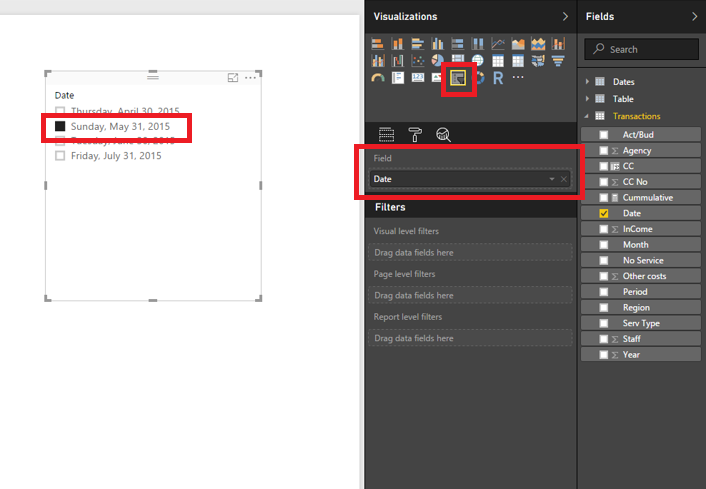
Except the filters, there is no workaround for other issues, please vote the above ideas. To use slicer instead of filters, you would need to create two slicers and drag date fields into the slicers, then use them to filter your visuals.
Thanks,
Lydia Zhang
Check out the April 2026 Power BI update to learn about new features.
Sign up to receive a private message when registration opens and key events begin.
If you have recently started exploring Fabric, we'd love to hear how it's going. Your feedback can help with product improvements.