cancel
Showing results for 
Search instead for 
Did you mean: 

July 28 - August 9 | Final Round of the Power BI Dataviz World Championships. This is your chance. Learn more

Reply
kodnil
New Member

Report customization on SharePoint

Hello,


I have created a report and publishing it on SharePoint Online using script editor WebPart. I have few questions about report customization:

1. How to show "Export Data" option on the published report

2. How to show filters on published report

3. How to remove Text "Microsoft Power BI" from the report.

4. How to remove options "Share" & "Enter Full Screen"


Screen shots on link below:


http://s000.tinyupload.com/?file_id=00246069555522064634

http://s000.tinyupload.com/?file_id=05352366861798911943


3 REPLIES 3
Anonymous
Not applicable

Hi @kodnil,

Do you use the “Publish to Web” feature to generate embedded code and use the code to embed report in SharePoint Online? If that is the case, currently, we are not able to show “Export  data” option on the published report, show visual/page/report filters, remove "Microsoft Power BI" text and  remove "Share" & "Enter Full Screen" options on the report. Some ideas about these issues have been submitted in the following links, please vote them up.

https://ideas.powerbi.com/forums/265200-power-bi-ideas/suggestions/16512895-export-data-from-embedde...
https://ideas.powerbi.com/forums/265200-power-bi-ideas/suggestions/14977941-export-from-embedd-repor...
https://ideas.powerbi.com/forums/265200-power-bi-ideas/suggestions/14975772-report-level-filters-aft...
https://ideas.powerbi.com/forums/265200-power-bi-ideas/suggestions/16384234-remove-share-item

In addition, to work around the filters issue, you can use slicers instead.

Thanks,
Lydia Zhang

Please suggest alternative to this. Also i wanted to have date filters. Not sure how slicers can help. I need user to filter based on start date & End Date.

Anonymous
Not applicable

Hi @kodnil,

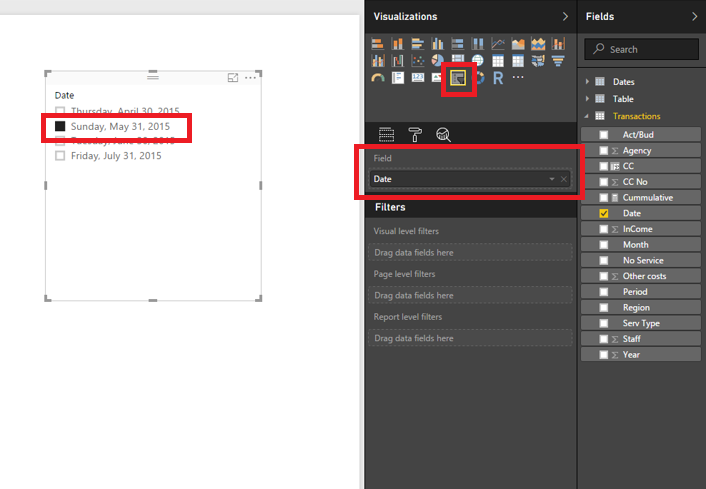
Except the filters, there is no workaround for other issues, please vote the above ideas. To use slicer instead of filters, you would need to create two slicers and drag date fields into the slicers, then use them to filter your visuals.
1.PNG

Thanks,
Lydia Zhang

Helpful resources

Announcements
FabCon and SQLCon Barcelona 2026

FabCon & SQLCon – Barcelona 2026

Join us in Barcelona for FabCon and SQLCon, the Fabric, Power BI, SQL, and AI community event. Save €200 with code FABCMTY200.

Fabric Community Sticker Design Challenge Barcelona Carousel

Fabric Community Sticker Challenge - Barcelona 2026

If you love stickers, then you will definitely want to check out our community sticker challenge, Barcelona edition!

July Power BI Update Carousel

Power BI Monthly Update - July 2026

Check out the July 2026 Power BI update to learn about new features.

Power BI DataViz World Championships carousel

Power BI DataViz World Championships - June 2026

A new Power BI DataViz World Championship is coming this June! Don't miss out on submitting your entry.