cancel
Showing results for 
Search instead for 
Did you mean: 

The Power BI Data Visualization World Championships is back! Get ahead of the game and start preparing now! Learn more

Reply
Anonymous
Not applicable

Replacing multiple value at once

Is there any way to replace multiple values in a column in just one step?
Let's say my column has a, b and c and I want them to be 1 2 and 3. I know I cant create a conditional column but can I make it with Table.ReplaceValue or any other function and avoid creating a new column

1 ACCEPTED SOLUTION
v-alq-msft
Community Support
Community Support

Hi, @Anonymous 


Based on your description, I created data to reproduce your scenario. The pbix file is attached in the end.

Table:

j2.png


You may add a new step with following codes.

= Table.TransformColumns(#"Changed Type",{"Text",
each 
if _="a"
then 1
else if _="b"
then 2
else if _="c"
then 3
else null 
})

or

= Table.ReplaceValue(#"Changed Type",each [Text],each true,
(x,y,z)=>
if y="a" then 1
else if y="b" then 2
else if y="c" then 3
else null,
{"Text"}
)


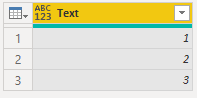
Result:

j1.png


Best Regards

Allan


If this post helps, then please consider Accept it as the solution to help the other members find it more quickly.

View solution in original post

3 REPLIES 3
v-alq-msft
Community Support
Community Support

Hi, @Anonymous 


Based on your description, I created data to reproduce your scenario. The pbix file is attached in the end.

Table:

j2.png


You may add a new step with following codes.

= Table.TransformColumns(#"Changed Type",{"Text",
each 
if _="a"
then 1
else if _="b"
then 2
else if _="c"
then 3
else null 
})

or

= Table.ReplaceValue(#"Changed Type",each [Text],each true,
(x,y,z)=>
if y="a" then 1
else if y="b" then 2
else if y="c" then 3
else null,
{"Text"}
)


Result:

j1.png


Best Regards

Allan


If this post helps, then please consider Accept it as the solution to help the other members find it more quickly.

Anonymous
Not applicable


there are many diffrent ways to accomplish that task.

Following of these, you could use (after a short adaptation) the schema proposed (but seems ultimately not adopted) here by @carlpaul153 .


you have to define  a list of words to be replaced wtbr={"undici","ventidue","trentatre"} and a list of worrds that replace the first ones wtrtfo={"11","22","33"}


let
    Source = Table.FromRows(Json.Document(Binary.Decompress(Binary.FromText("PcyxDYAwDETRVU6p2ShKEWEXlsBBIUlByTQUbMEmTIIVAc019/S9d0VA3BIoZkZVklEwppWhSdFYi1BlFwaTFXPHgpLtiLa497Ofn8R1QCZQWhaxqLzJbt66iaoonLcO/pYL4QE=", BinaryEncoding.Base64), Compression.Deflate)), let _t = ((type nullable text) meta [Serialized.Text = true]) in type table [Column1 = _t]),
    #"Changed Type" = Table.TransformColumnTypes(Source,{{"Column1", type text}}),

    wtbr={"undici","ventidue","trentatre"},
    wtrtfo={"11","22","33"},
    n=List.Count(wtrtfo),
    #"Added Custom" = Table.AddColumn(#"Changed Type", "Custom", each List.Accumulate({0..n-1}, [Column1],(state, current) => Text.Replace(state, wtbr{current}, wtrtfo{current})))
in
    #"Added Custom"


Greg_Deckler
Community Champion
Community Champion

@Anonymous I think I've seen @ImkeF and @edhans do this, I believe it involves feeding lists in using { } or something, can't remember.


Follow on LinkedIn
@ me in replies or I'll lose your thread!!!
Instead of a Kudo, please vote for this idea
Become an expert!: Enterprise DNA
External Tools: MSHGQM
YouTube Channel!: Microsoft Hates Greg
Latest book!:
DAX For Humans

DAX is easy, CALCULATE makes DAX hard...

Helpful resources

Announcements
Power BI DataViz World Championships

Power BI Dataviz World Championships

The Power BI Data Visualization World Championships is back! Get ahead of the game and start preparing now!

December 2025 Power BI Update Carousel

Power BI Monthly Update - December 2025

Check out the December 2025 Power BI Holiday Recap!

FabCon Atlanta 2026 carousel

FabCon Atlanta 2026

Join us at FabCon Atlanta, March 16-20, for the ultimate Fabric, Power BI, AI and SQL community-led event. Save $200 with code FABCOMM.