Join us in Barcelona for FabCon and SQLCon, September 28 - October 1, 2026.
This is best Fabric, Power BI, SQL and AI community event. How do we know? The last event sold out! Save €200 with code FABCMTY200.
Register now- Power BI forums
- Get Help with Power BI
- Desktop
- Service
- Report Server
- Power Query
- Mobile Apps
- Developer
- DAX Commands and Tips
- Custom Visuals Development Discussion
- Health and Life Sciences
- Power BI Spanish forums
- Translated Spanish Desktop
- Training and Consulting
- Instructor Led Training
- Dashboard in a Day for Women, by Women
- Galleries
- Data Stories Gallery
- Themes Gallery
- Contests Gallery
- QuickViz Gallery
- Quick Measures Gallery
- Visual Calculations Gallery
- Fabric Apps Gallery
- Notebook Gallery
- Translytical Task Flow Gallery
- TMDL Gallery
- R Script Showcase
- Webinars and Video Gallery
- Ideas
- Custom Visuals Ideas (read-only)
- Issues
- Issues
- Events
- Upcoming Events
The Fabric community is now in read-only for platform upgrade. Learn more
- Power BI forums
- Forums
- Get Help with Power BI
- Power Query
- Re: Replacing Values based on WildCard
- Subscribe to RSS Feed
- Mark Topic as New
- Mark Topic as Read
- Float this Topic for Current User
- Bookmark
- Subscribe
- Printer Friendly Page


- Mark as New
- Bookmark
- Subscribe
- Mute
- Subscribe to RSS Feed
- Permalink
Replacing Values based on WildCard
Hi,
Was wondering if anyone had idea about using wildcard entries to replace values in power Query. I have a column with many rows, each row representing string of text. I want to replace all values there the string inclues a "th" and precedes a number with a blank space. However, I don't want it to replace a string where th doesn't precede a number
For example, if my data set is as follows,
| Name |
| 123th Street |
| Health |
Here there are two entries where string contains th, but for 123th Street, the "th" is preceeded by a number. As such the output should be
| Name |
| 123 Street |
| Health |
I am able to use find and replace, but that would replace all "th" within the string irrespective of whether it is preceeded by a number or not.
Solved! Go to Solution.


- Mark as New
- Bookmark
- Subscribe
- Mute
- Subscribe to RSS Feed
- Permalink
@Imrans123 A complete dynamic solution in PQ is possible with JS and regex
let
regex=let
fx=(input)=>
Web.Page(
"<script>
var x='"&input&"';
function dynamicReplace(a) {
    var b = a.match(/\d+th/gm); /*checks for a pattern-'th' preceded by digit in a string*/
    if (b == null) {            /*if no match returns the original string*/
        return a
    } else {
        return a.replace(/th/gm, '') /*if match replace only 'th' with a blank space*/
    }
};
document.write(dynamicReplace(x));
</script>"){0}[Data]{0}[Children]{1}[Children]{0}[Text]

in
fx,
Source = Table.FromRows(Json.Document(Binary.Decompress(Binary.FromText("i45WMjQyLslQCC4pSk0tUYrViVbySE3MKclQio0FAA==", BinaryEncoding.Base64), Compression.Deflate)), let _t = ((type nullable text) meta [Serialized.Text = true]) in type table [Name = _t]),
#"Changed Type" = Table.TransformColumnTypes(Source,{{"Name", type text}}),
    #"Added Custom" = Table.AddColumn(#"Changed Type", "Custom", each regex([Name]))
in
#"Added Custom"
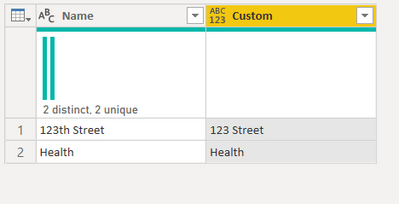
========================
Did I answer your question? Mark my post as a solution!
Proud to be a Super User
My Custom Visualization Projects
• Plotting Live Sound: Live Sound
• Beautiful News: Women in Parliament, Energy Mix, Shrinking Armies
• Visual Capitalist: Working Hrs
• Others: Easing Graph, Animated Calendar
MayViz Submissions
• Week 1: View
• Week 2: View
• Week 3: View
• Week 4: View
========================
- Mark as New
- Bookmark
- Subscribe
- Mute
- Subscribe to RSS Feed
- Permalink
@Imrans123 A complete dynamic solution in PQ is possible with JS and regex
let
regex=let
fx=(input)=>
Web.Page(
"<script>
var x='"&input&"';
function dynamicReplace(a) {
    var b = a.match(/\d+th/gm); /*checks for a pattern-'th' preceded by digit in a string*/
    if (b == null) {            /*if no match returns the original string*/
        return a
    } else {
        return a.replace(/th/gm, '') /*if match replace only 'th' with a blank space*/
    }
};
document.write(dynamicReplace(x));
</script>"){0}[Data]{0}[Children]{1}[Children]{0}[Text]

in
fx,
Source = Table.FromRows(Json.Document(Binary.Decompress(Binary.FromText("i45WMjQyLslQCC4pSk0tUYrViVbySE3MKclQio0FAA==", BinaryEncoding.Base64), Compression.Deflate)), let _t = ((type nullable text) meta [Serialized.Text = true]) in type table [Name = _t]),
#"Changed Type" = Table.TransformColumnTypes(Source,{{"Name", type text}}),
    #"Added Custom" = Table.AddColumn(#"Changed Type", "Custom", each regex([Name]))
in
#"Added Custom"
========================
Did I answer your question? Mark my post as a solution!
Proud to be a Super User
My Custom Visualization Projects
• Plotting Live Sound: Live Sound
• Beautiful News: Women in Parliament, Energy Mix, Shrinking Armies
• Visual Capitalist: Working Hrs
• Others: Easing Graph, Animated Calendar
MayViz Submissions
• Week 1: View
• Week 2: View
• Week 3: View
• Week 4: View
========================


- Mark as New
- Bookmark
- Subscribe
- Mute
- Subscribe to RSS Feed
- Permalink
Yeah, you can probably do this in native M but it's going to be something ugly like this:
Text.Combine(
    List.Transform(Text.Split([Name], " "), each
        let
            TrimLast2 = Text.Start(_, Text.Length(_) - 2)
        in
            if Text.End(_,2) = "th" and
                List.MatchesAll(
                    Text.ToList(TrimLast2),
                    each List.Contains({"0".."9"}, _)
                )
            then TrimLast2
            else _
    ),
    " "
)
- Mark as New
- Bookmark
- Subscribe
- Mute
- Subscribe to RSS Feed
- Permalink
Hi @Imrans123
I don't see wildcard in M...so the logic is if it contains "Street" then remove "th"? Pay attention to case, and modify accordingly
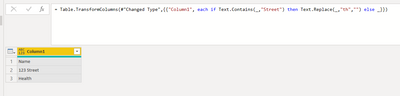
= Table.TransformColumns(yourPreviousStep,{{"Column1", each if Text.Contains(_,"Street") then Text.Replace(_,"th","") else _}})
- Mark as New
- Bookmark
- Subscribe
- Mute
- Subscribe to RSS Feed
- Permalink
The problem with this is that addresses like "123 Fifth Street" and "804 North Street" are very common and these would become "123 Fif Street" and "804 Nor Street".
It could also have any or none of Road/Way/Avenue/Boulevard/Lane/Drive/Terrace/Place/Court and their corresponding abbreviations instead of Street.
Helpful resources

FabCon & SQLCon – Barcelona 2026
Join us in Barcelona for FabCon and SQLCon, the Fabric, Power BI, SQL, and AI community event. Save €200 with code FABCMTY200.

Power BI DataViz World Championships - June 2026
A new Power BI DataViz World Championship is coming this June! Don't miss out on submitting your entry.


