cancel
Showing results for 
Search instead for 
Did you mean: 

The Power BI Data Visualization World Championships is back! Get ahead of the game and start preparing now! Learn more

Reply
Magdoulin1
New Member

Replacing Errors in Power Query

Hello everyone,


I am trying to replace errors in one of the columns by the below function but it does not work, what kind of  modifction I need to apply in the below code?


That is a sample of my table: Table1
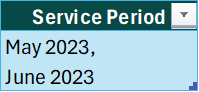
To Upload.png


And below is the code:


let
Source = Excel.CurrentWorkbook(){[Name="Table1"]}[Content],
#"Changed Type" = Table.TransformColumnTypes(Source,{{"Service Period", type text}}),
#"Inserted Minimum" = Table.AddColumn(#"Changed Type", "Minimum", each List.Min({#date(Value.FromText(Text.End(Text.BeforeDelimiter([Service Period], ", "&"#(lf)"),4)),Date.Month(Date.FromText("1"&Text.BeforeDelimiter([Service Period], ", "&"#(lf)"))),1), #date(Value.FromText(Text.End(Text.AfterDelimiter([Service Period], ", "&"#(lf)"),4)),Date.Month(Date.FromText("1"&Text.AfterDelimiter([Service Period], ", "&"#(lf)"))),1)}), Int64.Type),
#"Inserted Parsed Date" = Table.AddColumn(#"Inserted Minimum", "Index", each Date.From(DateTimeZone.From([Service Period])), type date),
#"Replaced Errors" = Table.ReplaceErrorValues(#"Inserted Parsed Date", {{"Index", List.Min({#date(Value.FromText(Text.End(Text.BeforeDelimiter([Service Period], ", "&"#(lf)"),4)),Date.Month(Date.FromText("1"&Text.BeforeDelimiter([Service Period], ", "&"#(lf)"))),1), #date(Value.FromText(Text.End(Text.AfterDelimiter([Service Period], ", "&"#(lf)"),4)),Date.Month(Date.FromText("1"&Text.AfterDelimiter([Service Period], ", "&"#(lf)"))),1)})}})
in
#"Replaced Errors"

1 ACCEPTED SOLUTION
m_dekorte
Super User
Super User

Hi @Magdoulin1,


Your requirement is unclear, what are you aiming to achieve?
For example this will get what you appear to be after but other than that ???


let
    Source = Table.FromList( {"May 2023,#(lf)June 2023"}, Splitter.SplitByNothing(), type table[Service Period=text] ),
    insertMinimum = Table.AddColumn(Source, "Minimum", each List.Min( List.Transform( Text.Split([Service Period], "#(lf)"), Date.From )))
in
    insertMinimum


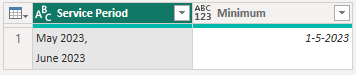
It yields this outcome.

m_dekorte_0-1710838309760.png

I hope this is helpful

View solution in original post

2 REPLIES 2
m_dekorte
Super User
Super User

Hi @Magdoulin1,


Your requirement is unclear, what are you aiming to achieve?
For example this will get what you appear to be after but other than that ???


let
    Source = Table.FromList( {"May 2023,#(lf)June 2023"}, Splitter.SplitByNothing(), type table[Service Period=text] ),
    insertMinimum = Table.AddColumn(Source, "Minimum", each List.Min( List.Transform( Text.Split([Service Period], "#(lf)"), Date.From )))
in
    insertMinimum


It yields this outcome.

m_dekorte_0-1710838309760.png

I hope this is helpful

Anonymous
Not applicable

@m_dekorte 

Great! I never know that Date.From can add 1 as day value when the source date lacks day. Thanks for this simple solution!


@Magdoulin1 

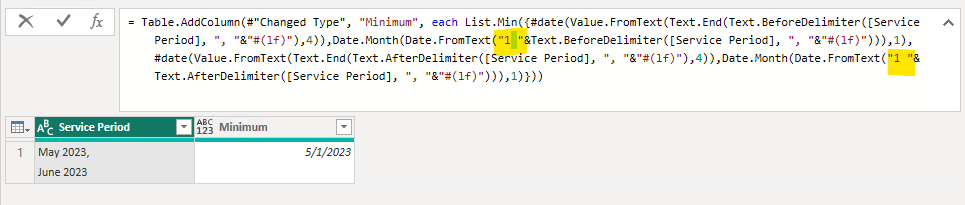
Your code will work if you add a whitespace after 1. This can make them be recognized as date correctly. 

vjingzhanmsft_0-1711439690599.png


Best Regards,
Jing

Helpful resources

Announcements
Power BI DataViz World Championships

Power BI Dataviz World Championships

The Power BI Data Visualization World Championships is back! Get ahead of the game and start preparing now!

November Power BI Update Carousel

Power BI Monthly Update - November 2025

Check out the November 2025 Power BI update to learn about new features.

FabCon Atlanta 2026 carousel

FabCon Atlanta 2026

Join us at FabCon Atlanta, March 16-20, for the ultimate Fabric, Power BI, AI and SQL community-led event. Save $200 with code FABCOMM.