Don't miss your chance to take exam DP-600 or DP-700 on us!
Request nowLearn from the best! Meet the four finalists headed to the FINALS of the Power BI Dataviz World Championships! Register now
Hello,
I have the following tables: TableA and TableB
TableA
| Id | R1AM | R2AM | R2PM | R3PM | R4PM | CountAM | CountPM |
| id1 | 1 | 0 | 0 | 0 | 1 | 1 | 1 |
| id2 | 0 | 0 | 1 | 1 | 0 | 1 | 2 |
| id3 | 1 | 1 | 1 | 1 | 0 | 3 | 2 |
| id4 | 0 | 0 | 0 | 1 | 0 | 2 | 1 |
TableB:
| Program | Duplicate |
| R1PM | 2 |
| R2PM | 3 |
| R3PM | 3 |
| R4PM | 4 |
| R5PM | 4 |
Names of column ending with "PM" in TableA are a subset of "Program" in TableB.
I have to update TableA by using information from TableB.
Reading each "program" in TableB, I check if the program (name of column ) in TableA exist.
If yes, I repeat that column in tableA x number of times. x is the corresponding "replicate" number from TableB.
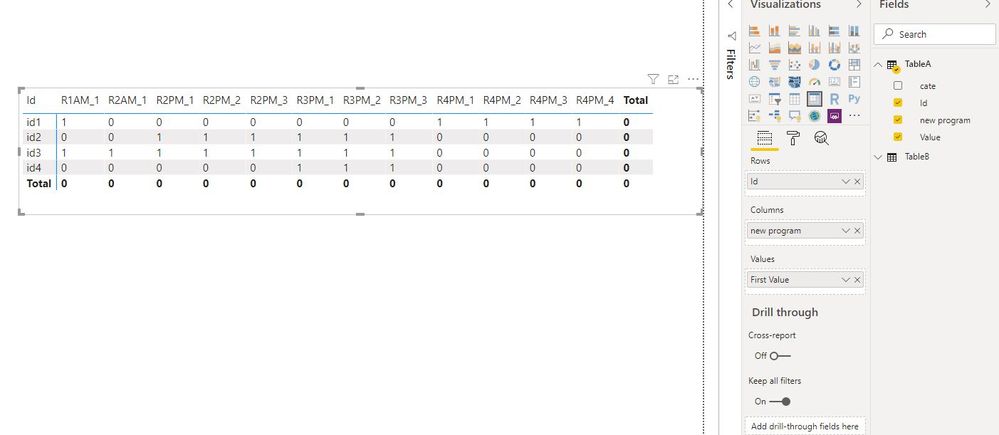
My result should be the updated TableA below:
| Id | R1AM | R2AM | R2PM | R2PM | R2PM | R3PM | R3PM | R3PM | R4PM | R4PM | R4PM | R4PM |
| id1 | 1 | 0 | 0 | 0 | 0 | 0 | 0 | 0 | 1 | 1 | 1 | 1 |
| id2 | 0 | 0 | 1 | 1 | 1 | 1 | 1 | 1 | 0 | 0 | 0 | 0 |
| id3 | 1 | 1 | 1 | 1 | 1 | 1 | 1 | 1 | 0 | 0 | 0 | 0 |
| id4 | 0 | 0 | 0 | 0 | 0 | 1 | 1 | 1 | 0 | 0 | 0 | 0 |
Then compute some stats such as counting entries in all column ending with "PM" ( result = 19 )
Can somebody pls help?
Any suggestion is welcome.
Thank you.
Solved! Go to Solution.
Hi @Merleau
Please check M queries in My pbix.
If you have any problem or need detailed steps, feel free to let me know.
Best Regards
Maggie
Community Support Team _ Maggie Li
If this post helps, then please consider Accept it as the solution to help the other members find it more quickly.
Hi @Merleau
Please check M queries in My pbix.
If you have any problem or need detailed steps, feel free to let me know.
Best Regards
Maggie
Community Support Team _ Maggie Li
If this post helps, then please consider Accept it as the solution to help the other members find it more quickly.
This is brilliant!
Thank you so much.
However, I had to pivot it back to compute the different total. I finally insert it as a table in my report.
This way, I have the freedom to arrange the columns in a particular order. As a matrix, I didn't know how to do it.
Again, I appreciate the help.
Thank you.
Maybe it is because it is all squished together and hard to read but I have no clue how you are getting from A to B (source to expected ouput). Can you please explain in plain language the logic?
Share feedback directly with Fabric product managers, participate in targeted research studies and influence the Fabric roadmap.
Check out the February 2026 Power BI update to learn about new features.
| User | Count |
|---|---|
| 9 | |
| 9 | |
| 8 | |
| 8 | |
| 6 |