Join us at FabCon Atlanta from March 16 - 20, 2026, for the ultimate Fabric, Power BI, AI and SQL community-led event. Save $200 with code FABCOMM.
Register now!Vote for your favorite vizzies from the Power BI Dataviz World Championship submissions. Vote now!
Good morning,
I change my wish to try to find a solution.
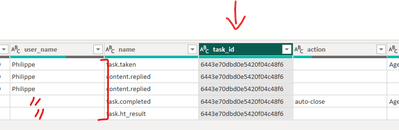
In my data, each task_id is associated with a user_name but it is not repeated over the entire column for the same task_id.
How to repeat in another column the user_name associated with a task_id?
Thank you very much.
https://drive.google.com/file/d/1j-P7F-Prw_5y-3QmV8WzE8GdApm1X5NX/view?usp=drive_link
Hi,
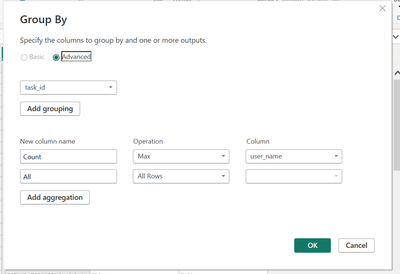
you can potentially do this by using the group by option:
1. Select Task_Id as the group
2. Add a username column under aggregation and select Max as the operation of the username colum
3. Add a second aggegation as All Rows
Click okay and expand the all rows column - you should have a new username column (i called it username1) with a completed list.
If I answered your question, please mark my post as solution, Appreciate your Kudos 👍
Hello @DOLEARY85
Thank you very much for your help.
The file I made available is a small file. My real file weighs several GB and the data is on Google big query.
The manipulation you gave me seems to take a long time.
Vote for your favorite vizzies from the Power BI World Championship submissions!
If you love stickers, then you will definitely want to check out our Community Sticker Challenge!
Check out the January 2026 Power BI update to learn about new features.
| User | Count |
|---|---|
| 16 | |
| 12 | |
| 9 | |
| 7 | |
| 6 |