This time we’re going bigger than ever. Fabric, Power BI, SQL, AI and more. We're covering it all. You won't want to miss it.
Learn moreDid you hear? There's a new SQL AI Developer certification (DP-800). Start preparing now and be one of the first to get certified. Register now
Hello
Below is the sample excel table where I want to remove the duplicates
Tried to remove duplicates in Power BI, sorting by ID and DOB and used Max function for each field. The snapshot of the result is as below
You can see that ID 1 has two parents and the DOB of CC is not correct.
You can see that when there are 2 different parent details for an ID then it is not working properly.
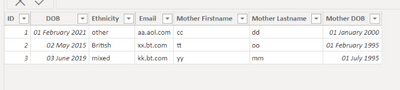
I want the data be like the one below (ie. only one parent detail (with maximum data filled in) tied against each ID). Is this possible to achieve in Power BI? Any help is much appreciated. Thanks
Solved! Go to Solution.
Looks like you have a data quality problem. One person cannot have two mothers, last I checked.
When you have duplicates like this, who is to day one Mother's Firstname is right or wrong? Based on the fact that one row has DOB and one not?
Try this: On DOB column, replace NULL with some real early date, like 1/1/1930. Now DUPLICATE the dataset (don't reference). Aggregate that by ID, and take MAX(DOB). Now JOIN that to the original dataset, and join on ID and DOB, with INNER JOIN. Lastly, replace 1/1/1930 with NULL.
Proud to be a Super User! | |
Feel free to mark replies as "Accepted Solution" if appropriate.
Proud to be a Super User! | |
Looks like you have a data quality problem. One person cannot have two mothers, last I checked.
When you have duplicates like this, who is to day one Mother's Firstname is right or wrong? Based on the fact that one row has DOB and one not?
Try this: On DOB column, replace NULL with some real early date, like 1/1/1930. Now DUPLICATE the dataset (don't reference). Aggregate that by ID, and take MAX(DOB). Now JOIN that to the original dataset, and join on ID and DOB, with INNER JOIN. Lastly, replace 1/1/1930 with NULL.
Proud to be a Super User! | |
Thankyou!
Check out the April 2026 Power BI update to learn about new features.
Sign up to receive a private message when registration opens and key events begin.
If you have recently started exploring Fabric, we'd love to hear how it's going. Your feedback can help with product improvements.