cancel
Showing results for 
Search instead for 
Did you mean: 

The Power BI Data Visualization World Championships is back! Get ahead of the game and start preparing now! Learn more

Reply
afhealey
Frequent Visitor

Removing HTML tags and reordering text

Howdy folks,

I have a situation where a text string is being imported that could contain hyperlinks (it might not contain any, or it could contain several). What I want to do is extract the text and format the link to be contained within brackets after the hyperlinked text. For example:


<p>This is some text</p>
<p><a href="http://www.google.com" rel="nofollow">Google link</a></p>
<p> </p>
<p><a href="http://www.bing.com/" rel="nofollow">Bing link</a></p>

This is some text

Google link (http://www.google.com)

Bing link (www.bing.com)


I can strip all the tags without issue, but I need to keep the destination URL as well and would like to format it nicely.

Is there a straightforward way to do this?

1 ACCEPTED SOLUTION
v-yingjl
Community Support
Community Support

Hi @afhealey ,

You can splilt column many times by specific string and filter the specfic string to achieve this in power query. The whole query would be like this:

let
    Source = Table.FromRows(Json.Document(Binary.Decompress(Binary.FromText("i45Wiik1MDBOLgBTqSEZmcUKQFScn5uqUJJaUQKR1YdKx+ShqIZwEhUyilLTbGOUMkpKCqz09cvLy/XS8/PTc1L1kvNzY5QUilJzgLJ5+Wn5OTn55TEQG1PdwUoUcjLzsqGWJCKbisNKBTIdlJSZlw5yjj5O9zgBVRB0jVJsLAA=", BinaryEncoding.Base64), Compression.Deflate)), let _t = ((type nullable text) meta [Serialized.Text = true]) in type table [Data = _t]),
    #"Changed Type" = Table.TransformColumnTypes(Source,{{"Data", type text}}),
    #"Split Column by Delimiter" = Table.ExpandListColumn(Table.TransformColumns(#"Changed Type", {{"Data", Splitter.SplitTextByDelimiter("<p>", QuoteStyle.Csv), let itemType = (type nullable text) meta [Serialized.Text = true] in type {itemType}}}), "Data"),
    #"Split Column by Delimiter1" = Table.ExpandListColumn(Table.TransformColumns(#"Split Column by Delimiter", {{"Data", Splitter.SplitTextByDelimiter(" ", QuoteStyle.Csv), let itemType = (type nullable text) meta [Serialized.Text = true] in type {itemType}}}), "Data"),
    #"Changed Type1" = Table.TransformColumnTypes(#"Split Column by Delimiter1",{{"Data", type text}}),
    #"Filtered Rows" = Table.SelectRows(#"Changed Type1", each Text.Contains([Data], "href")),
    #"Split Column by Delimiter2" = Table.ExpandListColumn(Table.TransformColumns(#"Filtered Rows", {{"Data", Splitter.SplitTextByDelimiter("=", QuoteStyle.Csv), let itemType = (type nullable text) meta [Serialized.Text = true] in type {itemType}}}), "Data"),
    #"Changed Type2" = Table.TransformColumnTypes(#"Split Column by Delimiter2",{{"Data", type text}}),
    #"Filtered Rows1" = Table.SelectRows(#"Changed Type2", each not Text.Contains([Data], "href"))
in
    #"Filtered Rows1"
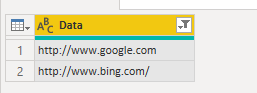
re.png


Best Regards,
Community Support Team _ Yingjie Li
If this post helps, then please consider Accept it as the solution to help the other members find it more quickly.

View solution in original post

2 REPLIES 2
v-yingjl
Community Support
Community Support

Hi @afhealey ,

You can splilt column many times by specific string and filter the specfic string to achieve this in power query. The whole query would be like this:

let
    Source = Table.FromRows(Json.Document(Binary.Decompress(Binary.FromText("i45Wiik1MDBOLgBTqSEZmcUKQFScn5uqUJJaUQKR1YdKx+ShqIZwEhUyilLTbGOUMkpKCqz09cvLy/XS8/PTc1L1kvNzY5QUilJzgLJ5+Wn5OTn55TEQG1PdwUoUcjLzsqGWJCKbisNKBTIdlJSZlw5yjj5O9zgBVRB0jVJsLAA=", BinaryEncoding.Base64), Compression.Deflate)), let _t = ((type nullable text) meta [Serialized.Text = true]) in type table [Data = _t]),
    #"Changed Type" = Table.TransformColumnTypes(Source,{{"Data", type text}}),
    #"Split Column by Delimiter" = Table.ExpandListColumn(Table.TransformColumns(#"Changed Type", {{"Data", Splitter.SplitTextByDelimiter("<p>", QuoteStyle.Csv), let itemType = (type nullable text) meta [Serialized.Text = true] in type {itemType}}}), "Data"),
    #"Split Column by Delimiter1" = Table.ExpandListColumn(Table.TransformColumns(#"Split Column by Delimiter", {{"Data", Splitter.SplitTextByDelimiter(" ", QuoteStyle.Csv), let itemType = (type nullable text) meta [Serialized.Text = true] in type {itemType}}}), "Data"),
    #"Changed Type1" = Table.TransformColumnTypes(#"Split Column by Delimiter1",{{"Data", type text}}),
    #"Filtered Rows" = Table.SelectRows(#"Changed Type1", each Text.Contains([Data], "href")),
    #"Split Column by Delimiter2" = Table.ExpandListColumn(Table.TransformColumns(#"Filtered Rows", {{"Data", Splitter.SplitTextByDelimiter("=", QuoteStyle.Csv), let itemType = (type nullable text) meta [Serialized.Text = true] in type {itemType}}}), "Data"),
    #"Changed Type2" = Table.TransformColumnTypes(#"Split Column by Delimiter2",{{"Data", type text}}),
    #"Filtered Rows1" = Table.SelectRows(#"Changed Type2", each not Text.Contains([Data], "href"))
in
    #"Filtered Rows1"

re.png


Best Regards,
Community Support Team _ Yingjie Li
If this post helps, then please consider Accept it as the solution to help the other members find it more quickly.

CNENFRNL
Community Champion
Community Champion

I really doubt Power Query would cope with it with ease considering following cases in practice, CAPITAL letters, arbitary blank spaces, etc,

<A HREF = "http://www.google.com" REL="nofollow">Google link</A>
<a href="http://www.google.com" rel="nofollow">Google link</a>
<a href= 'http://www.yahoo.com' rel="nofollow">Yahoo link</a>

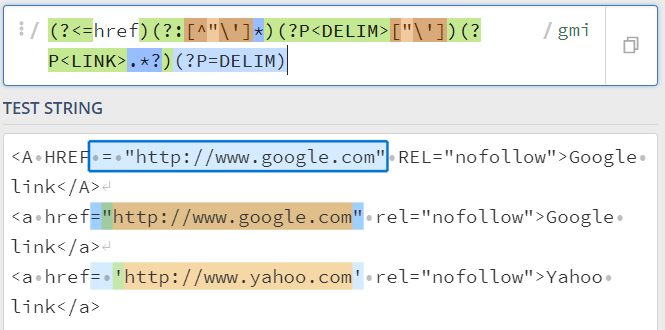
 Resort to regular expression with embedded R or Python script using such a pattern,

(?<=href)(?:[^"\']*)(?P<DELIM>["\'])(?P<LINK>.*?)(?P=DELIM)

Screenshot 2021-06-15 213034.png


Thanks to the great efforts by MS engineers to simplify syntax of DAX! Most beginners are SUCCESSFULLY MISLED to think that they could easily master DAX; but it turns out that the intricacy of the most frequently used RANKX() is still way beyond their comprehension!

DAX is simple, but NOT EASY!

Helpful resources

Announcements
Power BI DataViz World Championships

Power BI Dataviz World Championships

The Power BI Data Visualization World Championships is back! Get ahead of the game and start preparing now!

December 2025 Power BI Update Carousel

Power BI Monthly Update - December 2025

Check out the December 2025 Power BI Holiday Recap!

FabCon Atlanta 2026 carousel

FabCon Atlanta 2026

Join us at FabCon Atlanta, March 16-20, for the ultimate Fabric, Power BI, AI and SQL community-led event. Save $200 with code FABCOMM.

Top Solution Authors