Get certified for free when you join Fabric Data Days 2026 and dive into Fabric, Power BI, SQL, AI, and other essential data skills.
Join nowData Days is here! Join us now for 60+ days of learning, challenges, and connection. Learn more
I have a very big table with around 650K lines. I want to deselect rows based on values from two columns.
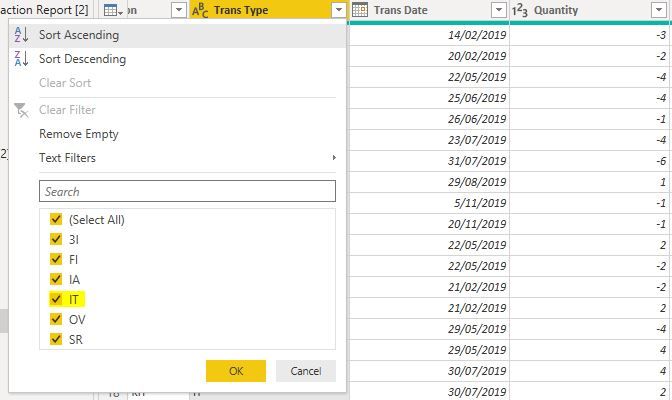
I would like to deselect rows where [Trans Type] = IT and Quantity < 0, meaning i do no want rows having IT as Trans Type and negative Quantity in my dataset.
Below is the screen shot of the table.
Solved! Go to Solution.
Hello @Anonymous
just apply a SelectRows with two conditions.
Here an the code that should work for you:
NewStep = Table.SelectRows(PreviousStep, each [Trans Type]<>"IT" or [Quantity]>=0)this excludes every row with either IT in Trans Type or Quantity <0
If this post helps or solves your problem, please mark it as solution (to help other users find useful content and to acknowledge the work of users that helped you)
Kudoes are nice too
Have fun
Jimmy
Hello @Anonymous
just apply a SelectRows with two conditions.
Here an the code that should work for you:
NewStep = Table.SelectRows(PreviousStep, each [Trans Type]<>"IT" or [Quantity]>=0)this excludes every row with either IT in Trans Type or Quantity <0
If this post helps or solves your problem, please mark it as solution (to help other users find useful content and to acknowledge the work of users that helped you)
Kudoes are nice too
Have fun
Jimmy
Hi Jimmy,
Thank you very much. It worked.
The statement is excluding rows with IT in Trans Type and Quantity <0, which is what i wanted.
Hello @Anonymous
I'm glad it worked out
your feedback is very appreciated
have a nice day
Jimmy
Just to query this; your original post said you want to filter under BOTH conditions. An OR in there will filter where either applies, so you will be filtering out rows where IT has a Quantity > 0 and every row where Quantity = 0. If that's what you want then fine, but it's not what you asked for. If I am correct you need to use AND instead.
Don't miss out on Data Days, June 15 through August 7. Learn Fabric, Power BI, SQL, AI and more.
Check out the May 2026 Power BI update to learn about new features.
| User | Count |
|---|---|
| 4 | |
| 4 | |
| 3 | |
| 2 | |
| 1 |
| User | Count |
|---|---|
| 11 | |
| 11 | |
| 5 | |
| 4 | |
| 3 |