Get Fabric or SQL Certified for Free.
Get certified for free when you join Fabric Data Days 2026 and dive into Fabric, Power BI, SQL, AI, and other essential data skills.
Join now- Power BI forums
- Get Help with Power BI
- Desktop
- Service
- Report Server
- Power Query
- Mobile Apps
- Developer
- DAX Commands and Tips
- Custom Visuals Development Discussion
- Health and Life Sciences
- Power BI Spanish forums
- Translated Spanish Desktop
- Training and Consulting
- Instructor Led Training
- Dashboard in a Day for Women, by Women
- Galleries
- Data Stories Gallery
- Themes Gallery
- Contests Gallery
- QuickViz Gallery
- Quick Measures Gallery
- Visual Calculations Gallery
- Fabric Apps Gallery
- Notebook Gallery
- Translytical Task Flow Gallery
- TMDL Gallery
- R Script Showcase
- Webinars and Video Gallery
- Ideas
- Custom Visuals Ideas (read-only)
- Issues
- Issues
- Events
- Upcoming Events
July 28 - August 9 | Final Round of the Power BI Dataviz World Championships. This is your chance. Learn more
- Power BI forums
- Forums
- Get Help with Power BI
- Power Query
- Remove last column / Import from folder
- Subscribe to RSS Feed
- Mark Topic as New
- Mark Topic as Read
- Float this Topic for Current User
- Bookmark
- Subscribe
- Printer Friendly Page


- Mark as New
- Bookmark
- Subscribe
- Mute
- Subscribe to RSS Feed
- Permalink
- Report Inappropriate Content
Remove last column / Import from folder
I´m trying to import excel files from a folder. It works fine, if the excel files are simular. If a column is missing i get an error and i don´t know how to fix it. It would be great to get help on this.
This is the template file:

If a file from the folder has missing columns like this i get an error - also the last column (total) need to be deleted.
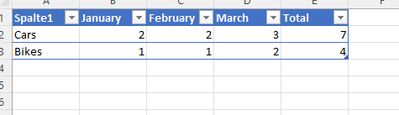
Can someone help me on this?
Solved! Go to Solution.


- Mark as New
- Bookmark
- Subscribe
- Mute
- Subscribe to RSS Feed
- Permalink
- Report Inappropriate Content
You can add a step to remove the last column.
let
    Quelle = Excel.Workbook(Parameter1, null, false),
    BWA_sheet = Quelle{[Item="BWA",Kind="Sheet"]}[Data],
    FilterNullAndWhitespace = each List.Select(_, each _ <> null and (not (_ is text) or Text.Trim(_) <> "")),
    #"Entfernte untere Zeilen" = Table.RemoveLastN(BWA_sheet, each try List.IsEmpty(List.Skip(FilterNullAndWhitespace(Record.FieldValues(_)), 1)) otherwise false),
    #"Entfernte oberste Zeilen" = Table.Skip(#"Entfernte untere Zeilen", each try List.IsEmpty(List.Skip(FilterNullAndWhitespace(Record.FieldValues(_)), 1)) otherwise false),
    #"Entfernte letzte Spalte" = Table.RemoveColumns(#"Entfernte oberste Zeilen", {List.Last(Table.ColumnNames(#"Entfernte oberste Zeilen"))})
in
#"Entfernte letzte Spalte"- Mark as New
- Bookmark
- Subscribe
- Mute
- Subscribe to RSS Feed
- Permalink
- Report Inappropriate Content
Great! Thanks for your help. Last question. I want to have the percentage different between the years. For example, i select a filter years 2019 & 2021 - i want to have the difference between the values of each month. If i select 2018 & 2019, the difference between this years. If i select 3 years, the difference of each year. 2018 (difference in %) 2019 (difference in %) 2021
- Mark as New
- Bookmark
- Subscribe
- Mute
- Subscribe to RSS Feed
- Permalink
- Report Inappropriate Content
This belongs as a separate post (probably in DAX rather than Power Query).
- Mark as New
- Bookmark
- Subscribe
- Mute
- Subscribe to RSS Feed
- Permalink
- Report Inappropriate Content
Hi @AlexisOlson
here is my code from table "Jahresübersicht"
let
    Quelle = Folder.Files(Datenpfad & "Jahresübersicht"),
    #"Gefilterte ausgeblendete Dateien1" = Table.SelectRows(Quelle, each [Attributes]?[Hidden]? <> true),
    #"Benutzerdefinierte Funktion aufrufen1" = Table.AddColumn(#"Gefilterte ausgeblendete Dateien1", "Datei transformieren", each #"Datei transformieren"([Content])),
    #"Umbenannte Spalten1" = Table.RenameColumns(#"Benutzerdefinierte Funktion aufrufen1", {"Name", "Source.Name"}),
    #"Andere entfernte Spalten1" = Table.SelectColumns(#"Umbenannte Spalten1", {"Source.Name", "Datei transformieren"}),
    #"Erweiterte Tabellenspalte1" = Table.ExpandTableColumn(#"Andere entfernte Spalten1", "Datei transformieren", Table.ColumnNames(#"Datei transformieren"(Beispieldatei))),
    #"Geänderter Typ" = Table.TransformColumnTypes(#"Erweiterte Tabellenspalte1",{{"Source.Name", type text}, {"Column1", type any}, {"Column2", type text}, {"Column3", type any}, {"Column4", type any}, {"Column5", type any}, {"Column6", type any}, {"Column7", type any}, {"Column8", type any}, {"Column9", type any}, {"Column10", type any}, {"Column11", type any}, {"Column12", type any}, {"Column13", type any}, {"Column14", type any}, {"Column15", type any}}),
    #"Entfernte Spalten" = Table.RemoveColumns(#"Geänderter Typ",{"Column15"}),
    #"Umbenannte Spalten" = Table.RenameColumns(#"Entfernte Spalten",{{"Column1", "Zeile"}, {"Column2", "Bezeichnung"}, {"Column3", "Januar"}, {"Column4", "Februar"}, {"Column5", "März"}, {"Column6", "Arpil"}, {"Column7", "Mai"}, {"Column8", "Juni"}, {"Column9", "Juli"}, {"Column10", "August"}, {"Column11", "September"}, {"Column12", "Oktober"}, {"Column13", "November"}, {"Column14", "Dezember"}}),
    #"Entpivotierte andere Spalten" = Table.UnpivotOtherColumns(#"Umbenannte Spalten", {"Source.Name", "Zeile", "Bezeichnung"}, "Attribut", "Wert"),
    #"Umbenannte Spalten2" = Table.RenameColumns(#"Entpivotierte andere Spalten",{{"Attribut", "Monat"}}),
    #"Gefilterte Zeilen" = Table.SelectRows(#"Umbenannte Spalten2", each ([Bezeichnung] <> "Bezeichnung")),
    #"Eingefügter Textbereich" = Table.AddColumn(#"Gefilterte Zeilen", "Textbereich", each Text.Middle([Source.Name], 15, 4), type text),
    #"Umbenannte Spalten3" = Table.RenameColumns(#"Eingefügter Textbereich",{{"Textbereich", "Jahr"}}),
    #"Neu angeordnete Spalten" = Table.ReorderColumns(#"Umbenannte Spalten3",{"Source.Name", "Zeile", "Bezeichnung", "Wert", "Monat", "Jahr"}),
    #"Geänderter Typ1" = Table.TransformColumnTypes(#"Neu angeordnete Spalten",{{"Wert", type number}, {"Jahr", Int64.Type}}),
    #"Ersetzter Wert" = Table.ReplaceValue(#"Geänderter Typ1","Arpil","April",Replacer.ReplaceText,{"Monat"}),
    #"Geänderter Typ2" = Table.TransformColumnTypes(#"Ersetzter Wert",{{"Zeile", Int64.Type}})
in
    #"Geänderter Typ2"
Not sure, if you also need this code - it´s from "transform example file"
let
    Quelle = Excel.Workbook(Parameter1, null, false),
    BWA_sheet = Quelle{[Item="BWA",Kind="Sheet"]}[Data],
    FilterNullAndWhitespace = each List.Select(_, each _ <> null and (not (_ is text) or Text.Trim(_) <> "")),
    #"Entfernte untere Zeilen" = Table.RemoveLastN(BWA_sheet, each try List.IsEmpty(List.Skip(FilterNullAndWhitespace(Record.FieldValues(_)), 1)) otherwise false),
    #"Entfernte oberste Zeilen" = Table.Skip(#"Entfernte untere Zeilen", each try List.IsEmpty(List.Skip(FilterNullAndWhitespace(Record.FieldValues(_)), 1)) otherwise false),
    #"Geänderter Typ" = Table.TransformColumnTypes(#"Entfernte oberste Zeilen",{{"Column1", type any}, {"Column2", type text}, {"Column3", type any}, {"Column4", type any}, {"Column5", type any}, {"Column6", type any}, {"Column7", type any}, {"Column8", type any}, {"Column9", type any}, {"Column10", type any}, {"Column11", type any}, {"Column12", type any}, {"Column13", type any}, {"Column14", type any}, {"Column15", type any}})
in
    #"Geänderter Typ"
As mentioned above, some files don´t have all columns - the last "total" column is not needed in the scenario.
- Mark as New
- Bookmark
- Subscribe
- Mute
- Subscribe to RSS Feed
- Permalink
- Report Inappropriate Content
Thanks. This helps a lot.
The first thing I would try is to simply remove the last step of the transformation function so that it looks like this:
let
    Quelle = Excel.Workbook(Parameter1, null, false),
    BWA_sheet = Quelle{[Item="BWA",Kind="Sheet"]}[Data],
    FilterNullAndWhitespace = each List.Select(_, each _ <> null and (not (_ is text) or Text.Trim(_) <> "")),
    #"Entfernte untere Zeilen" = Table.RemoveLastN(BWA_sheet, each try List.IsEmpty(List.Skip(FilterNullAndWhitespace(Record.FieldValues(_)), 1)) otherwise false),
    #"Entfernte oberste Zeilen" = Table.Skip(#"Entfernte untere Zeilen", each try List.IsEmpty(List.Skip(FilterNullAndWhitespace(Record.FieldValues(_)), 1)) otherwise false)
in
    #"Entfernte oberste Zeilen"
This way there aren't any explicit column names until you've expanded
- Mark as New
- Bookmark
- Subscribe
- Mute
- Subscribe to RSS Feed
- Permalink
- Report Inappropriate Content
Looks good! And i imported the file with missing columns - but the TOTAL (always the last) need to be deleted.
- Mark as New
- Bookmark
- Subscribe
- Mute
- Subscribe to RSS Feed
- Permalink
- Report Inappropriate Content
You can add a step to remove the last column.
let
    Quelle = Excel.Workbook(Parameter1, null, false),
    BWA_sheet = Quelle{[Item="BWA",Kind="Sheet"]}[Data],
    FilterNullAndWhitespace = each List.Select(_, each _ <> null and (not (_ is text) or Text.Trim(_) <> "")),
    #"Entfernte untere Zeilen" = Table.RemoveLastN(BWA_sheet, each try List.IsEmpty(List.Skip(FilterNullAndWhitespace(Record.FieldValues(_)), 1)) otherwise false),
    #"Entfernte oberste Zeilen" = Table.Skip(#"Entfernte untere Zeilen", each try List.IsEmpty(List.Skip(FilterNullAndWhitespace(Record.FieldValues(_)), 1)) otherwise false),
    #"Entfernte letzte Spalte" = Table.RemoveColumns(#"Entfernte oberste Zeilen", {List.Last(Table.ColumnNames(#"Entfernte oberste Zeilen"))})
in
#"Entfernte letzte Spalte"- Mark as New
- Bookmark
- Subscribe
- Mute
- Subscribe to RSS Feed
- Permalink
- Report Inappropriate Content
M code is the code of the advanced editor?
- Mark as New
- Bookmark
- Subscribe
- Mute
- Subscribe to RSS Feed
- Permalink
- Report Inappropriate Content
Yes.
- Mark as New
- Bookmark
- Subscribe
- Mute
- Subscribe to RSS Feed
- Permalink
- Report Inappropriate Content
I'm guessing you have a step that's transforming column data types that refers to all the columns by name. There are a few possible workarounds.
- Unpivot all except the first column before setting the column type.
- Make the code more dynamic using Table.ColumnNames instead of the actual names.
- Remove that step from the transformation function and set the column type after combining all the files.
- Mark as New
- Bookmark
- Subscribe
- Mute
- Subscribe to RSS Feed
- Permalink
- Report Inappropriate Content
Thanks for your answer. Can you give me an example? I don't know how to fix the problem.
- Mark as New
- Bookmark
- Subscribe
- Mute
- Subscribe to RSS Feed
- Permalink
- Report Inappropriate Content
If you share your M code, I can point you to which parts to modify.

Helpful resources

Fabric Community Sticker Challenge - Barcelona 2026
If you love stickers, then you will definitely want to check out our community sticker challenge, Barcelona edition!

Power BI Monthly Update - July 2026
Check out the July 2026 Power BI update to learn about new features.

Power BI DataViz World Championships - June 2026
A new Power BI DataViz World Championship is coming this June! Don't miss out on submitting your entry.


