FabCon is coming to Atlanta
Join us at FabCon Atlanta from March 16 - 20, 2026, for the ultimate Fabric, Power BI, AI and SQL community-led event. Save $200 with code FABCOMM.
Register now!- Power BI forums
- Get Help with Power BI
- Desktop
- Service
- Report Server
- Power Query
- Mobile Apps
- Developer
- DAX Commands and Tips
- Custom Visuals Development Discussion
- Health and Life Sciences
- Power BI Spanish forums
- Translated Spanish Desktop
- Training and Consulting
- Instructor Led Training
- Dashboard in a Day for Women, by Women
- Galleries
- Data Stories Gallery
- Themes Gallery
- Contests Gallery
- QuickViz Gallery
- Quick Measures Gallery
- Visual Calculations Gallery
- Notebook Gallery
- Translytical Task Flow Gallery
- TMDL Gallery
- R Script Showcase
- Webinars and Video Gallery
- Ideas
- Custom Visuals Ideas (read-only)
- Issues
- Issues
- Events
- Upcoming Events
The Power BI Data Visualization World Championships is back! Get ahead of the game and start preparing now! Learn more
- Power BI forums
- Forums
- Get Help with Power BI
- Power Query
- Remove duplicates, keep the latest entry (Sharepoi...
- Subscribe to RSS Feed
- Mark Topic as New
- Mark Topic as Read
- Float this Topic for Current User
- Bookmark
- Subscribe
- Printer Friendly Page

- Mark as New
- Bookmark
- Subscribe
- Mute
- Subscribe to RSS Feed
- Permalink
- Report Inappropriate Content
Remove duplicates, keep the latest entry (Sharepoint as source)
Hi! I have here a FCONS table that has multiple Reservation No.
I only need the LATEST entry of the Reservation No. (highlighted in yellow)
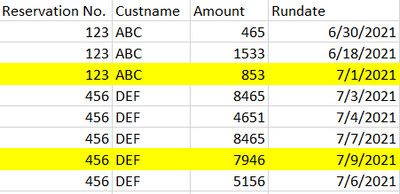
I have resolved this before with Table.Buffer on my local folder as source. But since I have migrated the source to Sharepoint, I need to redevelop this again and noticed that Table.Buffer may not be applicable anymore since it slows down the performance.
Hoping someone could help me with a workaround, Or walk me through the Table.Buffer with Sharepoint as source.
EDIT: As much as possible, the most EFFICIENT way applicable to BIG DATA.
Thanks!
Solved! Go to Solution.
- Mark as New
- Bookmark
- Subscribe
- Mute
- Subscribe to RSS Feed
- Permalink
- Report Inappropriate Content
Hi! Thanks for taking time. I have resolved the issue by sorting descendingly the RunDate then partition by Reservation No. - add index column, expand the partition table and remove its duplicates.
- Mark as New
- Bookmark
- Subscribe
- Mute
- Subscribe to RSS Feed
- Permalink
- Report Inappropriate Content
Hi! Thanks for taking time. I have resolved the issue by sorting descendingly the RunDate then partition by Reservation No. - add index column, expand the partition table and remove its duplicates.


- Mark as New
- Bookmark
- Subscribe
- Mute
- Subscribe to RSS Feed
- Permalink
- Report Inappropriate Content
@ImkeF I see. So yes, the Group By approach makes more sense as long as that bug exists. Performance will be horrible in both cases, I assume.


- Mark as New
- Bookmark
- Subscribe
- Mute
- Subscribe to RSS Feed
- Permalink
- Report Inappropriate Content
Hi @hmenco ,
not sure if this would be faster, but it might be worth a try:
Group by reservation and cust no and add 2 fields:
max Rundate and All
Expand All and filter Rundate = MaxRundate
Although the grouping operation will cost performance, no need to sort and buffer.
@lbendlin ,
the sort order you've described is not guaranteed to stick:
Bug warning for Table.Sort and removing duplicates... - Microsoft Power BI Community
Imke Feldmann (The BIccountant)
If you liked my solution, please give it a thumbs up. And if I did answer your question, please mark this post as a solution. Thanks!
How to integrate M-code into your solution -- How to get your questions answered quickly -- How to provide sample data -- Check out more PBI- learning resources here -- Performance Tipps for M-queries
- Mark as New
- Bookmark
- Subscribe
- Mute
- Subscribe to RSS Feed
- Permalink
- Report Inappropriate Content
@ImkeF thank you for the warning. Since this is a SharePoint source I assume no query folding is happening and the sort is safe-ish?
- Mark as New
- Bookmark
- Subscribe
- Mute
- Subscribe to RSS Feed
- Permalink
- Report Inappropriate Content
Hi @lbendlin ,
no, that's not how I understood the thread:
.." or because when run locally it may constraint the operators in some ways that would make the operation inefficient or impossible to enforce.."
To me this means that even locally evaluated queries won't have a guaranteed sort order.
Imke Feldmann (The BIccountant)
If you liked my solution, please give it a thumbs up. And if I did answer your question, please mark this post as a solution. Thanks!
How to integrate M-code into your solution -- How to get your questions answered quickly -- How to provide sample data -- Check out more PBI- learning resources here -- Performance Tipps for M-queries
- Mark as New
- Bookmark
- Subscribe
- Mute
- Subscribe to RSS Feed
- Permalink
- Report Inappropriate Content
There's a simple trick. Sort your data as needed (which is unfortunate as it is very costly) - in your case you need to sort by Rundate descending - and then select the {Reservation No.] column and choose "Remove Duplicates". That will only keep the first row for each Reservation No. which is actually the last row due to the sorting etc.
- Mark as New
- Bookmark
- Subscribe
- Mute
- Subscribe to RSS Feed
- Permalink
- Report Inappropriate Content
I've done this but it doesn't keep the LATEST entry. Any other workaround? Thanks!

Helpful resources

Power BI Dataviz World Championships
The Power BI Data Visualization World Championships is back! Get ahead of the game and start preparing now!

Power BI Monthly Update - December 2025
Check out the December 2025 Power BI Holiday Recap!

FabCon Atlanta 2026
Join us at FabCon Atlanta, March 16-20, for the ultimate Fabric, Power BI, AI and SQL community-led event. Save $200 with code FABCOMM.


| User | Count |
|---|---|
| 17 | |
| 9 | |
| 8 | |
| 7 | |
| 7 |


