Join us at FabCon Atlanta from March 16 - 20, 2026, for the ultimate Fabric, Power BI, AI and SQL community-led event. Save $200 with code FABCOMM.
Register now!The Power BI Data Visualization World Championships is back! Get ahead of the game and start preparing now! Learn more
I have a column which is the output of a group by function that looks like :
|
|
My target is to have rows without the numbering and the "." delimiter :
item 1 Item 2 Items 3 |
Any ideas to help me 🙏
Thanks a lot !
Solved! Go to Solution.
NewStep=Table.TransformColumns(PreviousStepName,{"column name",each Text.Combine(List.Alternate(Text.SplitAny(_,".#(lf)"),1,1),"#(lf)")})
Hi, @Betty888 ;
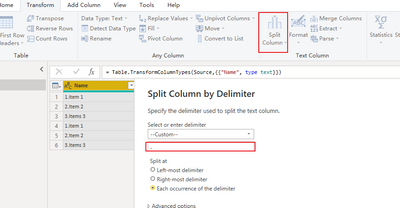
You could split column by delimiter ;
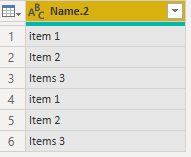
Then delete first column and the final show:
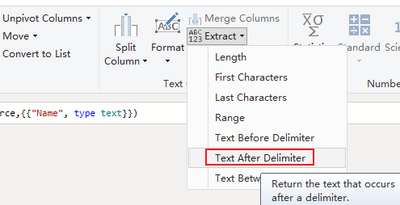
Or Delete before "."
The final show:
let
Source = Table.FromRows(Json.Document(Binary.Decompress(Binary.FromText("i45WMtTLLEnNVTBUitWJVjLS8wRxjMAcYzCnWMEYzCNKXSwA", BinaryEncoding.Base64), Compression.Deflate)), let _t = ((type nullable text) meta [Serialized.Text = true]) in type table [Name = _t]),
#"Changed Type" = Table.TransformColumnTypes(Source,{{"Name", type text}}),
#"Extracted Text After Delimiter" = Table.TransformColumns(#"Changed Type", {{"Name", each Text.AfterDelimiter(_, "."), type text}})
in
#"Extracted Text After Delimiter"
Best Regards,
Community Support Team _ Yalan Wu
If this post helps, then please consider Accept it as the solution to help the other members find it more quickly.
Many thanks !
I tried this soltuin, but it didn't work in my case, because the delimiters occur several times ...
Thanks again and have a nice day !
NewStep=Table.TransformColumns(PreviousStepName,{"column name",each Text.Combine(List.Alternate(Text.SplitAny(_,".#(lf)"),1,1),"#(lf)")})
Many thanks !
This works magically on my data, all look perfect now !!!!
You saved my day 🙂
Thank you again !
The Power BI Data Visualization World Championships is back! Get ahead of the game and start preparing now!
Check out the November 2025 Power BI update to learn about new features.