Join us at FabCon Atlanta from March 16 - 20, 2026, for the ultimate Fabric, Power BI, AI and SQL community-led event. Save $200 with code FABCOMM.
Register now!View all the Fabric Data Days sessions on demand. View schedule
I have a very basic MS Access database with one table saved on my machine and I am able to import the table into Power BI. However, when I add new data to the MS access DB, and then hit 'refresh data' in Power BI, none of the new data is uploaded into Power BI. Is this not possible with Access and Power BI? And if not, are there other workarounds that I could possibly implement instead?
Thank you.
Solved! Go to Solution.
@wfarrell,
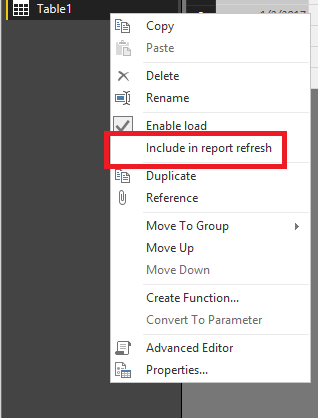
Do you click Refresh button in Data/Report view of Power BI Desktop or query editor? If you disable "Include in report refresh" option for your table in query editor and click refresh button in report view of Power BI Desktop, the data will not get updated in Data/Report view of Power BI Desktop.
Regards,
Lydia
@wfarrell,
Do you click Refresh button in Data/Report view of Power BI Desktop or query editor? If you disable "Include in report refresh" option for your table in query editor and click refresh button in report view of Power BI Desktop, the data will not get updated in Data/Report view of Power BI Desktop.
Regards,
Lydia
Check out the November 2025 Power BI update to learn about new features.
Advance your Data & AI career with 50 days of live learning, contests, hands-on challenges, study groups & certifications and more!
| User | Count |
|---|---|
| 12 | |
| 7 | |
| 5 | |
| 5 | |
| 3 |