

cancel
Showing results for 
Search instead for 
Did you mean: 

July 7 - July 17 | Round 2 of the Power BI Dataviz World Championships. Don't miss your chance! Learn more

Reply
NJ81858
Helper IV
Helper IV

Refreshing Error Message

Hi there,


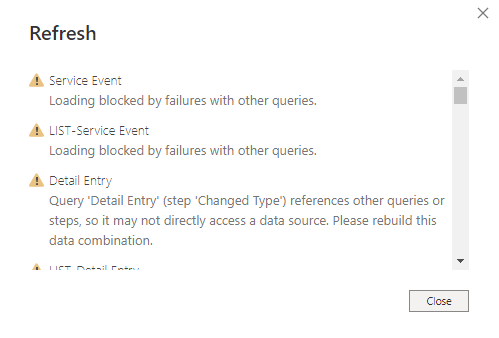
Every time that I refresh my data in Power BI Desktop, I get an error message that it failed. This is the error message that I get:

Power BI Error.PNG

I have researched online how to fix this error and I found a solution that said to load the data into one query and then do nothing else, and then create another query to connect to that query instead of connecting to a data source. An example of this is:


My Loading Query titled 'LIST-Detail Entry':

Loading Query.PNG

The first few steps of the Query I am transforming:

T Query.PNG


I have also found another solution in changing the data privacy settings, and I have done that so that the data can refresh without problems and neither of those two solutions have solved the error message that I am getting.


Unfortunately I cannot share my .pbix file, so if there is any screenshots of anything that I can provide to assist in a solution just let me know!

1 REPLY 1
Ehren
Microsoft Employee
Microsoft Employee

Can you share the query where you put all your logic into a single query? The one in the screenshot above is still referencing another query (Transform File (3)).


The other solution would be to disable data privacy for this file, as long as you're not concerned about data leakage between sources.


EDIT: It also looks like you've only shared a subset of the queries above. If you share the full query text, it will be easier for folks to identify the source of the issue.

Helpful resources

Announcements
FabCon and SQLCon Barcelona 2026

FabCon & SQLCon – Barcelona 2026

Join us in Barcelona for FabCon and SQLCon, the Fabric, Power BI, SQL, and AI community event. Save €200 with code FABCMTY200.

July Power BI Update Carousel

Power BI Monthly Update - July 2026

Check out the July 2026 Power BI update to learn about new features.

60 days of Data Days Carousel

Data Days 2026

Join Data Days 2026: 60 days of free live/on-demand sessions, challenges, study groups, and certification opportunities.

Power BI DataViz World Championships carousel

Power BI DataViz World Championships - June 2026

A new Power BI DataViz World Championship is coming this June! Don't miss out on submitting your entry.

Top Solution Authors