cancel
Showing results for 
Search instead for 
Did you mean: 

We've captured the moments from FabCon & SQLCon that everyone is talking about, and we are bringing them to the community, live and on-demand. Starts on April 14th. Register now

Reply
waseempervaiz83
New Member

Refresh not completing after loading all rows

Hi all,


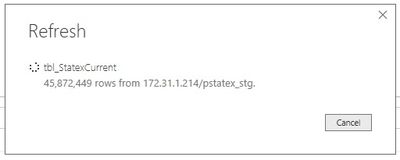
We are loading data from a local SQL server. The load completes and it seems that all the rows in the table have been loaded. There is only one table in the load. The progress screen is not going away. I left it overnight and it was still stuck at the same screen in the morning. Attached image shows where it is stuck. The dots circle is still spinning which should mean that it is doing something. 

 LoadProgress.jpg

I have disabled time intelligence, ralationships etc from the load setting, saved and reloaded but the problem persists. 


Any help is much appreciated.


Thanks 

1 REPLY 1
v-qiuyu-msft
Community Support
Community Support

Hi @waseempervaiz83,


From your description, you connect to SQL Server database and create one query in the desktop. When you refresh the query in desktop, it display refresh progress screenshot for a long time though data are updated, right?


In your scenario, did you get data in Import mode or DirectQuery mode? Please try to update the Power BI desktop to the latest version 2.48.4792.481 64-bit (July 2017) to see if the same issue occurs. If possible please restart the machine that hosts Power BI desktop, then refresh again.


Best Regards,
Qiuyun Yu


Community Support Team _ Qiuyun Yu
If this post helps, then please consider Accept it as the solution to help the other members find it more quickly.

Helpful resources

Announcements
New to Fabric survey Carousel

New to Fabric Survey

If you have recently started exploring Fabric, we'd love to hear how it's going. Your feedback can help with product improvements.

Power BI DataViz World Championships carousel

Power BI DataViz World Championships - June 2026

A new Power BI DataViz World Championship is coming this June! Don't miss out on submitting your entry.

Join our Fabric User Panel

Join our Fabric User Panel

Share feedback directly with Fabric product managers, participate in targeted research studies and influence the Fabric roadmap.

March Power BI Update Carousel

Power BI Community Update - March 2026

Check out the March 2026 Power BI update to learn about new features.