cancel
Showing results for 
Search instead for 
Did you mean: 

The Power BI Data Visualization World Championships is back! Get ahead of the game and start preparing now! Learn more

Reply
Anonymous
Not applicable

Refresh failed (no available Gateway)

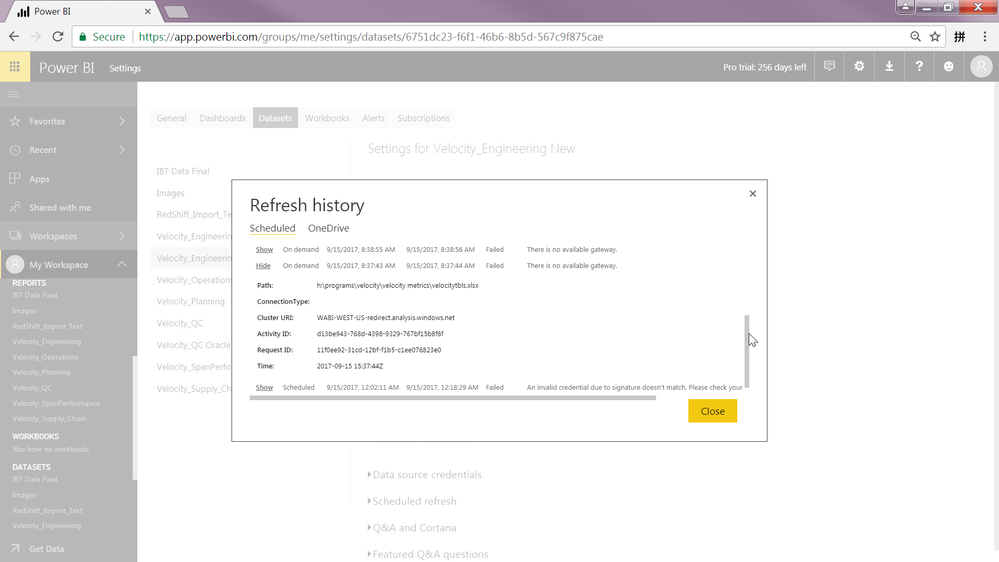
So last week when I first set up my gateway, the refresh worked (and there were places where it prompts me to enter credentials under data source credentials, now it is empty shown in screenshot).  Then then it fails and fails over and over again.  The second screenshot shows the error msg for failed refreshing.  Not sure what I did wrong here. Thank you.


2017-09-18 09_12_53-Power BI.png

2017-09-18 09_10_28-Power BI.png

1 ACCEPTED SOLUTION
Anonymous
Not applicable

@Anonymous,

Please install on-premises gateway on your machine and add the Excel data source within gateway following the guide in this similar thread, then choose "Use a data gateway" option under Gateway connection in your first screenshot and check if you can refresh the dataset.

However, if you still want to use on-premises gateway (personal mode), please delete the dataset in Power BI Service and re-connect to dataset and check if you can refresh it.

Regards,
Lydia

View solution in original post

3 REPLIES 3
Anonymous
Not applicable

@Anonymous,

Please install on-premises gateway on your machine and add the Excel data source within gateway following the guide in this similar thread, then choose "Use a data gateway" option under Gateway connection in your first screenshot and check if you can refresh the dataset.

However, if you still want to use on-premises gateway (personal mode), please delete the dataset in Power BI Service and re-connect to dataset and check if you can refresh it.

Regards,
Lydia

Anonymous
Not applicable

Is the machine running your gateway always on?  Is the network it is on always accessable 24/7?


I'm wondering if at the time of the refresh that something is closed or powered off.

Anonymous
Not applicable

@Anonymous Thank you.  The machine is always on and the network is always accessable.

I tried to manually refresh it.  It failed too.


Thank you.

Helpful resources

Announcements
November Power BI Update Carousel

Power BI Monthly Update - November 2025

Check out the November 2025 Power BI update to learn about new features.

Fabric Data Days Carousel

Fabric Data Days

Advance your Data & AI career with 50 days of live learning, contests, hands-on challenges, study groups & certifications and more!

FabCon Atlanta 2026 carousel

FabCon Atlanta 2026

Join us at FabCon Atlanta, March 16-20, for the ultimate Fabric, Power BI, AI and SQL community-led event. Save $200 with code FABCOMM.