cancel
Showing results for 
Search instead for 
Did you mean: 

The Power BI Data Visualization World Championships is back! Get ahead of the game and start preparing now! Learn more

Reply
rmahmood
New Member

Receiving Expression.Error after removing a column

Hi, 


I was wondering if someone can help me with the below error message.


I received an error stating that a column was no longer found within the table, so proceeded with removing the column name from the function..(The bold "ID" column name was removed.)


Before

= Table.RenameColumns(#"69c9ef31-e946-49bf-9580-26f04fab1dbf",{{"ID", "ID.1"}})

After

= Table.RenameColumns(#"959854d2-acca-4877-84bb-fa5dcfafb44d",{{"ID.1"}})


Now I am receiving the following message...

Expression.Error: We expected a RenameOperations value.
Details:
[List]


I am stuck here.  Any help would be appreciated! 

1 ACCEPTED SOLUTION
Anonymous
Not applicable

Hi @rmahmood ,


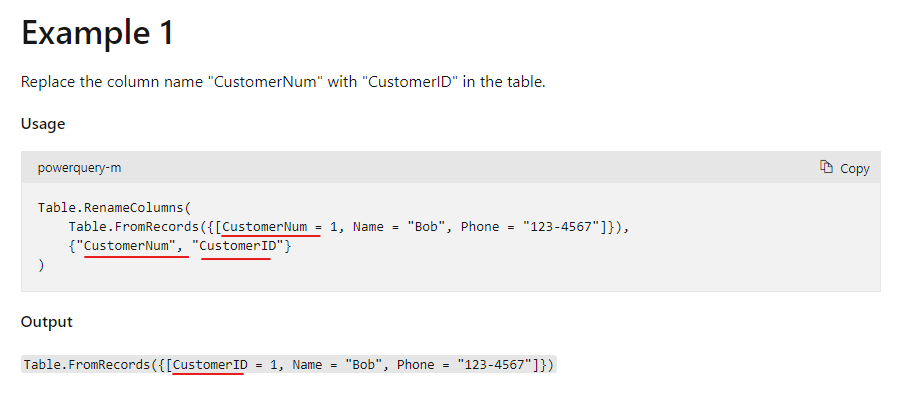
The Table.RenameColumns function needs the replaced column name. "ID" in the formula cannot be removed. 

vstephenmsft_0-1647593406362.png

Table.RenameColumns - PowerQuery M | Microsoft Docs


Do you want to delete the ID column in the table and keep the ID.1 column? Then you can rename the column name first, and then remove the ID column.


Best Regards,

Stephen Tao


If this post helps, then please consider Accept it as the solution to help the other members find it more quickly.

View solution in original post

2 REPLIES 2
Anonymous
Not applicable

Hi @rmahmood ,


The Table.RenameColumns function needs the replaced column name. "ID" in the formula cannot be removed. 

vstephenmsft_0-1647593406362.png

Table.RenameColumns - PowerQuery M | Microsoft Docs


Do you want to delete the ID column in the table and keep the ID.1 column? Then you can rename the column name first, and then remove the ID column.


Best Regards,

Stephen Tao


If this post helps, then please consider Accept it as the solution to help the other members find it more quickly.

Thingsclump
Resolver V
Resolver V

Hi @rmahmood 

If column does not exist, then PQ can not rename it. In your before code, ID column has been renamed as ID.1. The two values ID and ID.1 are part of a list. Now ID is removed so code does not specify which column to be renamed as ID.1


I belive solution is to remove rename step all together as you do not have the column itself.


Some examples are in this link.


https://docs.microsoft.com/en-us/powerquery-m/table-renamecolumns


Thanks


Helpful resources

Announcements
Power BI DataViz World Championships

Power BI Dataviz World Championships

The Power BI Data Visualization World Championships is back! Get ahead of the game and start preparing now!

December 2025 Power BI Update Carousel

Power BI Monthly Update - December 2025

Check out the December 2025 Power BI Holiday Recap!

FabCon Atlanta 2026 carousel

FabCon Atlanta 2026

Join us at FabCon Atlanta, March 16-20, for the ultimate Fabric, Power BI, AI and SQL community-led event. Save $200 with code FABCOMM.

Top Solution Authors