This time we’re going bigger than ever. Fabric, Power BI, SQL, AI and more. We're covering it all. You won't want to miss it.
Learn moreDid you hear? There's a new SQL AI Developer certification (DP-800). Start preparing now and be one of the first to get certified. Register now
Hi,
I was wondering if someone can help me with the below error message.
I received an error stating that a column was no longer found within the table, so proceeded with removing the column name from the function..(The bold "ID" column name was removed.)
Before
= Table.RenameColumns(#"69c9ef31-e946-49bf-9580-26f04fab1dbf",{{"ID", "ID.1"}})
After
= Table.RenameColumns(#"959854d2-acca-4877-84bb-fa5dcfafb44d",{{"ID.1"}})
Now I am receiving the following message...
Expression.Error: We expected a RenameOperations value.
Details:
[List]
I am stuck here. Any help would be appreciated!
Solved! Go to Solution.
Hi @rmahmood ,
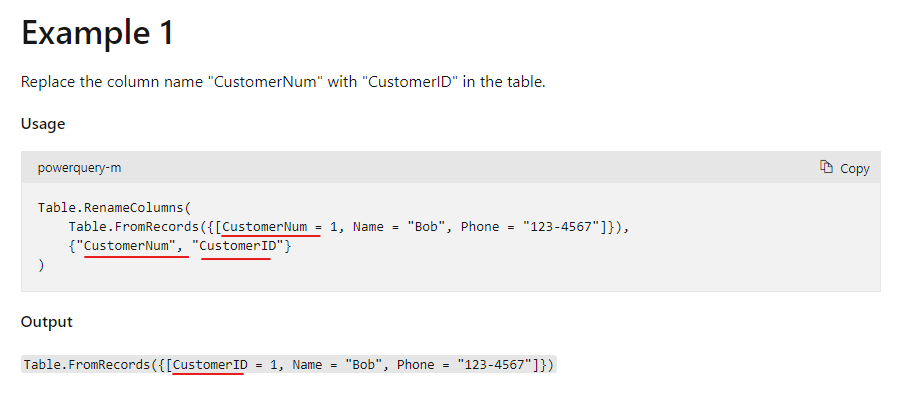
The Table.RenameColumns function needs the replaced column name. "ID" in the formula cannot be removed.
Table.RenameColumns - PowerQuery M | Microsoft Docs
Do you want to delete the ID column in the table and keep the ID.1 column? Then you can rename the column name first, and then remove the ID column.
Best Regards,
Stephen Tao
If this post helps, then please consider Accept it as the solution to help the other members find it more quickly.
Hi @rmahmood ,
The Table.RenameColumns function needs the replaced column name. "ID" in the formula cannot be removed.
Table.RenameColumns - PowerQuery M | Microsoft Docs
Do you want to delete the ID column in the table and keep the ID.1 column? Then you can rename the column name first, and then remove the ID column.
Best Regards,
Stephen Tao
If this post helps, then please consider Accept it as the solution to help the other members find it more quickly.
Hi @rmahmood
If column does not exist, then PQ can not rename it. In your before code, ID column has been renamed as ID.1. The two values ID and ID.1 are part of a list. Now ID is removed so code does not specify which column to be renamed as ID.1
I belive solution is to remove rename step all together as you do not have the column itself.
Some examples are in this link.
https://docs.microsoft.com/en-us/powerquery-m/table-renamecolumns
Thanks
Check out the April 2026 Power BI update to learn about new features.
Sign up to receive a private message when registration opens and key events begin.
If you have recently started exploring Fabric, we'd love to hear how it's going. Your feedback can help with product improvements.