cancel
Showing results for 
Search instead for 
Did you mean: 

The Power BI Data Visualization World Championships is back! Get ahead of the game and start preparing now! Learn more

Reply
-marie-
Frequent Visitor

Random Sorting and Grouping into 10

Hi All, 


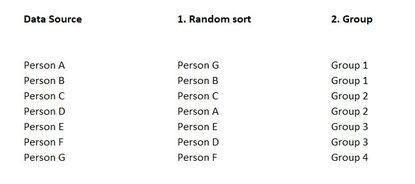
i have a list of persons i want to sort first random and then group into a group size of two persons for each group. Does anyone have a idea how to do this smart? 


I figured out if RandomNumber oder RandomNumberBetween or ListRandom worked, but it didn't the way i did ... 


see the picture below to maybe get clearer what i am trying to reach for. 


RandomSortAndGroup.jpg


Thank you for your help!

1 ACCEPTED SOLUTION
Vijay_A_Verma
Super User
Super User

See the working here - Open a blank query - Home - Advanced Editor - Remove everything from there and paste the below code to test

let
    Source = Table.FromRows(Json.Document(Binary.Decompress(Binary.FromText("i45WCkgtKs7PU3BUitWBc5yQOc7IHBdkjisyxw2Z447M8UDmeCrFxgIA", BinaryEncoding.Base64), Compression.Deflate)), let _t = ((type nullable text) meta [Serialized.Text = true]) in type table [Data = _t]),
    #"Added Custom" = Table.AddColumn(Source, "Custom", each Number.Random(), type number),
    #"Sorted Rows" = Table.Sort(Table.Buffer(#"Added Custom"),{{"Custom", Order.Ascending}}),
    #"Added Index" = Table.AddIndexColumn(#"Sorted Rows", "Index", 1, 1, Int64.Type),
    #"Divided Column" = Table.TransformColumns(#"Added Index", {{"Index", each _ / 2, type number}}),
    #"Rounded Up" = Table.TransformColumns(#"Divided Column",{{"Index", Number.RoundUp, Int64.Type}}),
    #"Added Custom1" = Table.AddColumn(#"Rounded Up", "Group", each "Group "&Text.From([Index])),
    #"Removed Columns" = Table.RemoveColumns(#"Added Custom1",{"Custom", "Index"})
in
    #"Removed Columns"

 

View solution in original post

2 REPLIES 2
Vijay_A_Verma
Super User
Super User

See the working here - Open a blank query - Home - Advanced Editor - Remove everything from there and paste the below code to test

let
    Source = Table.FromRows(Json.Document(Binary.Decompress(Binary.FromText("i45WCkgtKs7PU3BUitWBc5yQOc7IHBdkjisyxw2Z447M8UDmeCrFxgIA", BinaryEncoding.Base64), Compression.Deflate)), let _t = ((type nullable text) meta [Serialized.Text = true]) in type table [Data = _t]),
    #"Added Custom" = Table.AddColumn(Source, "Custom", each Number.Random(), type number),
    #"Sorted Rows" = Table.Sort(Table.Buffer(#"Added Custom"),{{"Custom", Order.Ascending}}),
    #"Added Index" = Table.AddIndexColumn(#"Sorted Rows", "Index", 1, 1, Int64.Type),
    #"Divided Column" = Table.TransformColumns(#"Added Index", {{"Index", each _ / 2, type number}}),
    #"Rounded Up" = Table.TransformColumns(#"Divided Column",{{"Index", Number.RoundUp, Int64.Type}}),
    #"Added Custom1" = Table.AddColumn(#"Rounded Up", "Group", each "Group "&Text.From([Index])),
    #"Removed Columns" = Table.RemoveColumns(#"Added Custom1",{"Custom", "Index"})
in
    #"Removed Columns"


Hi Vijay_A_Verma, 


thanks! This is a great idea! As i had to do a similar thing with groups of ten i then added a index with steps of 0.1 and used then RoundNumbers - also worked fine and is similiar to your solution. 


Best regards + happy weekend!


Helpful resources

Announcements
Power BI DataViz World Championships

Power BI Dataviz World Championships

The Power BI Data Visualization World Championships is back! Get ahead of the game and start preparing now!

December 2025 Power BI Update Carousel

Power BI Monthly Update - December 2025

Check out the December 2025 Power BI Holiday Recap!

FabCon Atlanta 2026 carousel

FabCon Atlanta 2026

Join us at FabCon Atlanta, March 16-20, for the ultimate Fabric, Power BI, AI and SQL community-led event. Save $200 with code FABCOMM.