
cancel
Showing results for 
Search instead for 
Did you mean: 

The Power BI Data Visualization World Championships is back! Get ahead of the game and start preparing now! Learn more

Reply
jake_BIV
Helper I
Helper I

REST API Post query nightly refresh Dataflow working for 11 months then started failing on 6/1/2021

Hi. I have a weird occurrence that has me puzzled and was hoping someone in the community may have had something similar and could share some insight.


SITUATION:

  • I have a dataflow setup that queries a REST API nightly.
  • It has refreshed fine for about 11 months.
  • The M code below has not changed or been updated in that time.
  • On 6/1/2021 it started failing with the error below.

jake_BIV_0-1622989448332.png

  • I tried the same query in Power BI Desktop and it failed there also.
  • I am able to connect fine through Postman using the same parameters.
  • I have contacted the data vendor to see if anything has changed on their API and they said no (of course!).
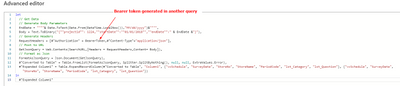
  • My M code is below.

jake_BIV_1-1622989613430.png


QUESTIONS:

  • Has Microsoft changed any syntax?
  • Any other insights to help me solve this puzzle.
1 ACCEPTED SOLUTION
Anonymous
Not applicable

@jake_BIV 
I have not heard any syntax change. A 405 code response confirms that the requested resource is valid and exists, but the client has used an unacceptable HTTP method during the request. And this error can course by many reasons. The very first step is to update the Power Bi desktop to the newest version. And a few suggestions:


1. Try clear cache:

"Web.contents failed to get content from site URL" displayed after trying to establish a connection ...


2. Check the gateway cluster referring to this similar issue:

Solved: Refresh of web source through on-premise gateway g... - Microsoft Power BI Community


3. Same error was discussed here.

Solved: DataSource.Error Web.Contents failed to get data f... - Microsoft Power BI Community


Paul Zheng _ Community Support Team
If this post helps, please Accept it as the solution to help the other members find it more quickly.

View solution in original post

1 REPLY 1
Anonymous
Not applicable

@jake_BIV 
I have not heard any syntax change. A 405 code response confirms that the requested resource is valid and exists, but the client has used an unacceptable HTTP method during the request. And this error can course by many reasons. The very first step is to update the Power Bi desktop to the newest version. And a few suggestions:


1. Try clear cache:

"Web.contents failed to get content from site URL" displayed after trying to establish a connection ...


2. Check the gateway cluster referring to this similar issue:

Solved: Refresh of web source through on-premise gateway g... - Microsoft Power BI Community


3. Same error was discussed here.

Solved: DataSource.Error Web.Contents failed to get data f... - Microsoft Power BI Community


Paul Zheng _ Community Support Team
If this post helps, please Accept it as the solution to help the other members find it more quickly.

Helpful resources

Announcements
Power BI DataViz World Championships

Power BI Dataviz World Championships

The Power BI Data Visualization World Championships is back! Get ahead of the game and start preparing now!

December 2025 Power BI Update Carousel

Power BI Monthly Update - December 2025

Check out the December 2025 Power BI Holiday Recap!

FabCon Atlanta 2026 carousel

FabCon Atlanta 2026

Join us at FabCon Atlanta, March 16-20, for the ultimate Fabric, Power BI, AI and SQL community-led event. Save $200 with code FABCOMM.