Join us at FabCon Atlanta from March 16 - 20, 2026, for the ultimate Fabric, Power BI, AI and SQL community-led event. Save $200 with code FABCOMM.
Register now!The Power BI Data Visualization World Championships is back! Get ahead of the game and start preparing now! Learn more
I have two 2 Tables Table 1 contains - 30K and Table 2 contains - 169 data when i merged(Left Outer join) it now the table contains 2L rows. I am not sure where it went wrong
@Anonymous
Not enough information to understand what exactly is the issue.
Can you load the results to Power BI by click on the Apply and Load button and check how many records are there if your question is about the number of records getting materialized?
⭕ Subscribe and learn Power BI from these videos
⚪ Website ⚪ LinkedIn ⚪ PBI User Group
@Anonymous
When you merge in Power Query, all the matching rows of the referenced table are presented for you to either keep it as a table and expand or aggregate a certain column as sum or count.
You can get just one value by tweaking a small code as shown in this article:
⭕ Subscribe and learn Power BI from these videos
⚪ Website ⚪ LinkedIn ⚪ PBI User Group
@Fowmy
When i do the VLOOKUP in excel row count remains same for ex: If i do VLOOKUP table1 and table 2 - Table 1 count remains same it will not get added up, but when i do the merge in Power BI and exand it i could see row count more than what i should have.
I have used Count Rows activity to know the Rows count before and after merge that is were i found this issue.
I'm new to Power BI so i am not sure where it went wrong
Hi @Anonymous ,
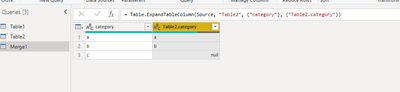
If you do the merge by "left outer",there shouldnt be extra rows.As shown below:
Merged table should have the same row count with the left table before merging.
Could you pls paste some screenshots of your steps and issues for check?
Best Regards,
Kelly
Did I answer your question? Mark my post as a solution!
@Anonymous
Not clear about the situation you are facing issue with. Can you create a sample Power BI file with the scenario and share it here?
You save on OneDrive, any other source then sharer the link.
⭕ Subscribe and learn Power BI from these videos
⚪ Website ⚪ LinkedIn ⚪ PBI User Group
The Power BI Data Visualization World Championships is back! Get ahead of the game and start preparing now!