cancel
Showing results for 
Search instead for 
Did you mean: 

Learn from the best! Meet the four finalists headed to the FINALS of the Power BI Dataviz World Championships! Register now

Reply
smedina1
Frequent Visitor

RANKX

Hi Everyone, 

I have a question about a project with a data. Here we have a column "Order Number" 

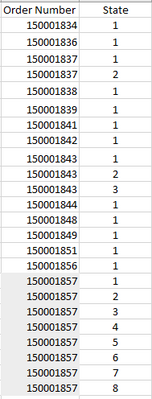
where there are several numbers, that some of them are repeated, we want to formulate in DAX, the example below, that is to say for examples that if the order number 150001857 is repeated 8 times, then the first record tells me that it is: 1, the second: 2, the third: 3 and so on.

We know we can use the RANKX formula but we have not found the right combination. could you please help me.


This we want see with DAX

smedina1_1-1666730384957.png
Thank you.


1 ACCEPTED SOLUTION
Anonymous
Not applicable

Hi @smedina1 ,


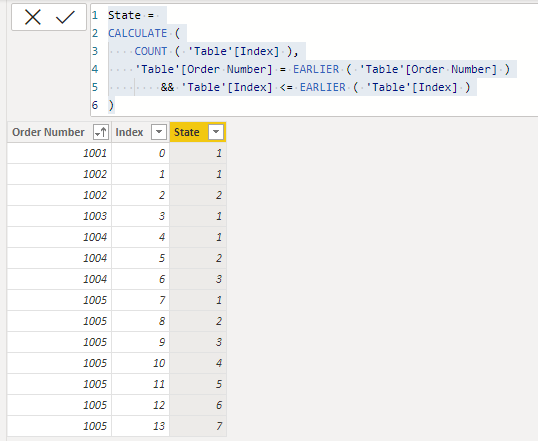
Please try adding an index column in the PowerQuery Editor and then a new calculated column in the desktop.

State = 
CALCULATE (
    COUNT ( 'Table'[Index] ),
    'Table'[Order Number] = EARLIER ( 'Table'[Order Number] )
        && 'Table'[Index] <= EARLIER ( 'Table'[Index] )
)

vcgaomsft_0-1666748415292.png

Best Regards,
Gao

Community Support Team


If there is any post helps, then please consider Accept it as the solution  to help the other members find it more quickly. If I misunderstand your needs or you still have problems on it, please feel free to let us know. Thanks a lot!

How to get your questions answered quickly -- How to provide sample data

View solution in original post

3 REPLIES 3
smedina1
Frequent Visitor

Hello, 

Thank you for your response. 

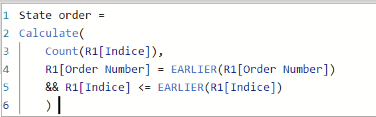
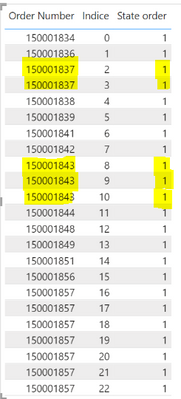
I tried adding an index column and then apply calculated column, but it's not working, I don`t know why

smedina1_1-1666890198417.png


smedina1_0-1666890132464.png


Anonymous
Not applicable

Hi @smedina1 ,

🤔Try:


State Order = 
CALCULATE (
    COUNTROWS ( 'Table' ),
    'Table'[Order Number] = EARLIER ( 'Table'[Order Number] )
        && 'Table'[Index] <= EARLIER ( 'Table'[Index] )
)


The PBIX file is attached for reference.


Best Regards,
Gao

Community Support Team


If there is any post helps, then please consider Accept it as the solution  to help the other members find it more quickly. If I misunderstand your needs or you still have problems on it, please feel free to let us know. Thanks a lot!

How to get your questions answered quickly -- How to provide sample data

Anonymous
Not applicable

Hi @smedina1 ,


Please try adding an index column in the PowerQuery Editor and then a new calculated column in the desktop.

State = 
CALCULATE (
    COUNT ( 'Table'[Index] ),
    'Table'[Order Number] = EARLIER ( 'Table'[Order Number] )
        && 'Table'[Index] <= EARLIER ( 'Table'[Index] )
)

vcgaomsft_0-1666748415292.png

Best Regards,
Gao

Community Support Team


If there is any post helps, then please consider Accept it as the solution  to help the other members find it more quickly. If I misunderstand your needs or you still have problems on it, please feel free to let us know. Thanks a lot!

How to get your questions answered quickly -- How to provide sample data

Helpful resources

Announcements
Power BI DataViz World Championships carousel

Power BI DataViz World Championships - June 2026

A new Power BI DataViz World Championship is coming this June! Don't miss out on submitting your entry.

Join our Fabric User Panel

Join our Fabric User Panel

Share feedback directly with Fabric product managers, participate in targeted research studies and influence the Fabric roadmap.

March Power BI Update Carousel

Power BI Community Update - March 2026

Check out the March 2026 Power BI update to learn about new features.