Join the FabCon + SQLCon recap series. Up next: Power BI, Real-Time Intelligence, IQ and AI, and Data Factory take center stage. All sessions are available on-demand after the live show. Register now
Hi Everyone,
I have a question about a project with a data. Here we have a column "Order Number"
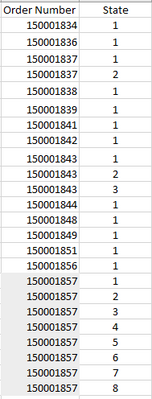
where there are several numbers, that some of them are repeated, we want to formulate in DAX, the example below, that is to say for examples that if the order number 150001857 is repeated 8 times, then the first record tells me that it is: 1, the second: 2, the third: 3 and so on.
We know we can use the RANKX formula but we have not found the right combination. could you please help me.
This we want see with DAX
Thank you.
Solved! Go to Solution.
Hi @smedina1 ,
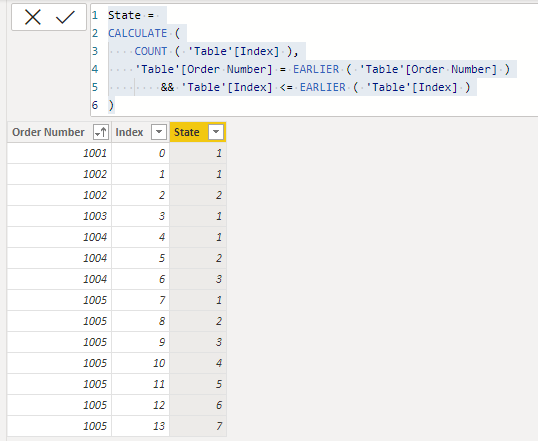
Please try adding an index column in the PowerQuery Editor and then a new calculated column in the desktop.
State =
CALCULATE (
COUNT ( 'Table'[Index] ),
'Table'[Order Number] = EARLIER ( 'Table'[Order Number] )
&& 'Table'[Index] <= EARLIER ( 'Table'[Index] )
)
Best Regards,
Gao
Community Support Team
If there is any post helps, then please consider Accept it as the solution to help the other members find it more quickly. If I misunderstand your needs or you still have problems on it, please feel free to let us know. Thanks a lot!
How to get your questions answered quickly -- How to provide sample data
Hello,
Thank you for your response.
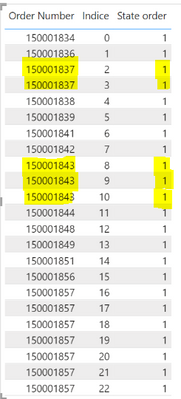
I tried adding an index column and then apply calculated column, but it's not working, I don`t know why
Hi @smedina1 ,
🤔Try:
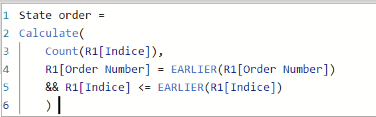
State Order =
CALCULATE (
COUNTROWS ( 'Table' ),
'Table'[Order Number] = EARLIER ( 'Table'[Order Number] )
&& 'Table'[Index] <= EARLIER ( 'Table'[Index] )
)
The PBIX file is attached for reference.
Best Regards,
Gao
Community Support Team
If there is any post helps, then please consider Accept it as the solution to help the other members find it more quickly. If I misunderstand your needs or you still have problems on it, please feel free to let us know. Thanks a lot!
How to get your questions answered quickly -- How to provide sample data
Hi @smedina1 ,
Please try adding an index column in the PowerQuery Editor and then a new calculated column in the desktop.
State =
CALCULATE (
COUNT ( 'Table'[Index] ),
'Table'[Order Number] = EARLIER ( 'Table'[Order Number] )
&& 'Table'[Index] <= EARLIER ( 'Table'[Index] )
)
Best Regards,
Gao
Community Support Team
If there is any post helps, then please consider Accept it as the solution to help the other members find it more quickly. If I misunderstand your needs or you still have problems on it, please feel free to let us know. Thanks a lot!
How to get your questions answered quickly -- How to provide sample data
Check out the April 2026 Power BI update to learn about new features.
If you have recently started exploring Fabric, we'd love to hear how it's going. Your feedback can help with product improvements.
A new Power BI DataViz World Championship is coming this June! Don't miss out on submitting your entry.
| User | Count |
|---|---|
| 3 | |
| 3 | |
| 2 | |
| 2 | |
| 2 |
| User | Count |
|---|---|
| 5 | |
| 4 | |
| 4 | |
| 4 | |
| 4 |