Join us at FabCon Atlanta from March 16 - 20, 2026, for the ultimate Fabric, Power BI, AI and SQL community-led event. Save $200 with code FABCOMM.
Register now!Get Fabric Certified for FREE during Fabric Data Days. Don't miss your chance! Request now
I am using an R script to download a zip file, unzip, and load into Power BI.
This is the code i am using:
temp <- tempfile()
download.file("https://",temp, mode="wb")
input <- read.csv(unzip(temp),sep=';',header=TRUE,stringsAsFactors = FALSE)
unlink(temp)
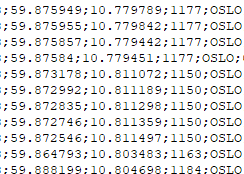
The columns with longitude and latitude are shown with a dot ".":
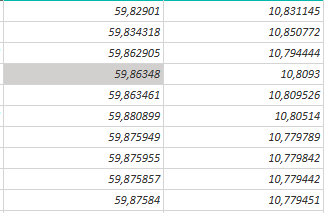
But when file is uploaded to Power BI, this changes to comma, ","
We are based in Norway, and comma is the decimal separator in Norway.
Solved! Go to Solution.
I managed to make a fix by using colClasses="character".
All columns are now shown as text, but i can probably work around it.
I managed to make a fix by using colClasses="character".
All columns are now shown as text, but i can probably work around it.
Check out the November 2025 Power BI update to learn about new features.
Advance your Data & AI career with 50 days of live learning, contests, hands-on challenges, study groups & certifications and more!
| User | Count |
|---|---|
| 10 | |
| 9 | |
| 6 | |
| 5 | |
| 3 |