cancel
Showing results for 
Search instead for 
Did you mean: 

Learn from the best! Meet the four finalists headed to the FINALS of the Power BI Dataviz World Championships! Register now

Reply
Anonymous
Not applicable

Quick Base user names loading into Power Query as codes

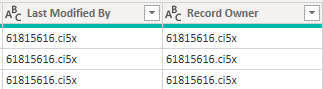
I've successfuly connected Power BI to my Quick Base app, but when I retrieve the data there are two fields that show the username in Quick Base but load into Power Query as codes.  This is happening in the "Last Modified By" and "Record Owner" fields.  So instead of "John Doe" (which is what I see in the Quick Base app) I might see "32598325.fb7x".  Is there any way to pull the actual user name into Power Query, or is this some kind of intentional restriction on the Quick Base side?  Here is an example:


QuickBase.PNG

1 ACCEPTED SOLUTION
Anonymous
Not applicable

Hi Zoe.  The solution was actually even easier than that.  You simply create a new field in your table with the format "Formula - Text", then give it the formula "UserToName([Record Owner])".  The user's name then appears in your reports as "FirstName LastName".  


Thanks for helping out!

View solution in original post

3 REPLIES 3
dax
Community Support
Community Support

Hi pgrim, 

Based on my research, I find that this is a limitations, you could refer to PowerBI-to-Quickbase-User-Names/  and Pull Quick Base Data into Power BI with the New Connector  for details.

So I think you need to create a new table with username and userid manually, then you could create relationship between these two tables.

Best Regards,
Zoe Zhi

If this post helps, then please consider Accept it as the solution to help the other members find it more quickly.


Anonymous
Not applicable

Hi Zoe.  The solution was actually even easier than that.  You simply create a new field in your table with the format "Formula - Text", then give it the formula "UserToName([Record Owner])".  The user's name then appears in your reports as "FirstName LastName".  


Thanks for helping out!

dax
Community Support
Community Support

Hi pgrim, 

It seems that you solve this problem, right?  If so and if you'd like to, you could mark corresponding post as answer or share your solutions. That way, people who in this forum and have similar issue will benefit from it.

Best Regards,
Zoe Zhi

If this post helps, then please consider Accept it as the solution to help the other members find it more quickly.

Helpful resources

Announcements
Power BI DataViz World Championships carousel

Power BI DataViz World Championships - June 2026

A new Power BI DataViz World Championship is coming this June! Don't miss out on submitting your entry.

Join our Fabric User Panel

Join our Fabric User Panel

Share feedback directly with Fabric product managers, participate in targeted research studies and influence the Fabric roadmap.

March Power BI Update Carousel

Power BI Community Update - March 2026

Check out the March 2026 Power BI update to learn about new features.