cancel
Showing results for 
Search instead for 
Did you mean: 

The FabCon + SQLCon recap series starts April 14th at 8am Pacific. If you’re tracking where AI is going inside Fabric, this first session is a can't miss. Register now

Reply
uif19085
Helper III
Helper III

Query Parameters to get all data in Service

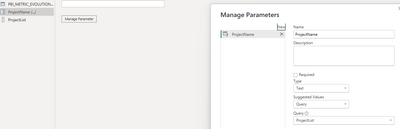
Hello everyone. First time trying to set up PowerQuery to bring all the data in Service if the Parameter is empty. First step was to create a List of Projects with the help of the Column that contains all the project names named PROJECT_NAME, then i've created a Parameter this:

uif19085_0-1692167043550.png

Then i've tried to set up the PowerQuery in the AdvancedEditor and it looks like this:
let
Source = Oracle.Database("{Server}[Data],
PBI_METRIC_EVOLUTION_V1 = DB_PRD{[Name="PBI_METRIC_EVOLUTION_V"]}[Data],
FilteredRows = if ProjectName = "" then PBI_METRIC_EVOLUTION_V1 else Table.SelectRows(PBI_METRIC_EVOLUTION_V1, each [PROJECT_NAME] = ProjectName)
in
FilteredRows

Then for testing i've put an empty string locally in EditParemeters and also on Parameter in Service but it filters with nothing, get only an empty Table. Do i miss something, i'm doing something wrong? Thank you


1 REPLY 1
ToddChitt
Super User
Super User

When you refer to Parameters in Power Query, preface them with #:

 #ProjectName

If the parameter contains spaces in the name, wrap it in single quotes:

#"Project Name"


Do this: Write your Power Query WITHOUT the parameters. Does it work? Can you post that, plus a sample of what the parameter might contain?


If this answers your question, please consider marking it as a Solution. Or give Kudos to helpful replies.


Did I answer your question? If so, mark my post as a solution. Also consider helping someone else in the forums!

Proud to be a Super User!


Helpful resources

Announcements
New to Fabric survey Carousel

New to Fabric Survey

If you have recently started exploring Fabric, we'd love to hear how it's going. Your feedback can help with product improvements.

Power BI DataViz World Championships carousel

Power BI DataViz World Championships - June 2026

A new Power BI DataViz World Championship is coming this June! Don't miss out on submitting your entry.

Join our Fabric User Panel

Join our Fabric User Panel

Share feedback directly with Fabric product managers, participate in targeted research studies and influence the Fabric roadmap.

March Power BI Update Carousel

Power BI Community Update - March 2026

Check out the March 2026 Power BI update to learn about new features.