This time we’re going bigger than ever. Fabric, Power BI, SQL, AI and more. We're covering it all. You won't want to miss it.
Learn moreLevel up your Power BI skills this month - build one visual each week and tell better stories with data! Get started
Apologies in advance, I'm a bit lost.
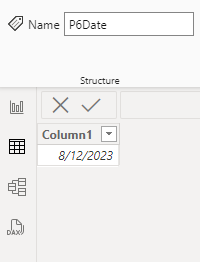
So I have a table with a date in it
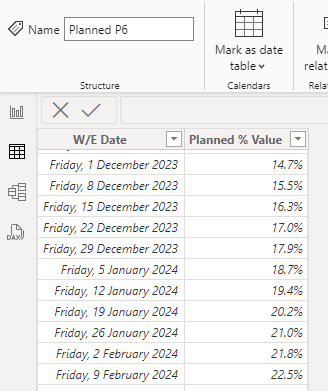
and I want to filter another table for that date and return the % in that row.
Is it as simple as a LookUpValue? Which isn't working for me even though I'm using related and I've modelled as related. Or is that the problem? Should be returning 15.5%.
Solved! Go to Solution.
Not sure why it isn't working but not being able to see the model I cannot be sure what is going on. That said, you should never use LOOKUPVALUE() except in very special circumstances. It isn't a good function. Performs horribly and maintains an Excel mindset bypassing the model advantages.
Try this measure:
Get Percent =
VAR varDate =
MAX ( P6Date[Column1] )
VAR Result =
CALCULATE (
MAX ( 'Planned P6'[Planned % Value] ),
KEEPFILTERS ( 'Planned P6'[W/E Date] = varDate )
)
RETURN
Result
How to get good help fast. Help us help you.
How To Ask A Technical Question If you Really Want An Answer
How to Get Your Question Answered Quickly - Give us a good and concise explanation
How to provide sample data in the Power BI Forum - Provide data in a table format per the link, or share an Excel/CSV file via OneDrive, Dropbox, etc.. Provide expected output using a screenshot of Excel or other image. Do not provide a screenshot of the source data. I cannot paste an image into Power BI tables.
DAX is for Analysis. Power Query is for Data Modeling
Proud to be a Super User!
MCSA: BI ReportingNot sure why it isn't working but not being able to see the model I cannot be sure what is going on. That said, you should never use LOOKUPVALUE() except in very special circumstances. It isn't a good function. Performs horribly and maintains an Excel mindset bypassing the model advantages.
Try this measure:
Get Percent =
VAR varDate =
MAX ( P6Date[Column1] )
VAR Result =
CALCULATE (
MAX ( 'Planned P6'[Planned % Value] ),
KEEPFILTERS ( 'Planned P6'[W/E Date] = varDate )
)
RETURN
Result
How to get good help fast. Help us help you.
How To Ask A Technical Question If you Really Want An Answer
How to Get Your Question Answered Quickly - Give us a good and concise explanation
How to provide sample data in the Power BI Forum - Provide data in a table format per the link, or share an Excel/CSV file via OneDrive, Dropbox, etc.. Provide expected output using a screenshot of Excel or other image. Do not provide a screenshot of the source data. I cannot paste an image into Power BI tables.
DAX is for Analysis. Power Query is for Data Modeling
Proud to be a Super User!
MCSA: BI ReportingThanks heaps! Perfect.
Check out the April 2026 Power BI update to learn about new features.
Sign up to receive a private message when registration opens and key events begin.
If you have recently started exploring Fabric, we'd love to hear how it's going. Your feedback can help with product improvements.