cancel
Showing results for 
Search instead for 
Did you mean: 

July 7 - July 17 | Round 2 of the Power BI Dataviz World Championships. Don't miss your chance! Learn more

Reply
Anonymous
Not applicable

Promote grouped rows to column headers

Hi, 


I have this kind of table :

Group 1  Group 2 Group 3 Group …
Column 1Column 2Column 3Column 1Column 2Column 1Column …Column …


And I want to promote the first 2 rows as below :

Group 1.Column 1Group 1.Column 2Group 1.Column 3Group 2.Column 1Group 2.Column 2Group 3.Column 1Group 3.Column …Group ….Column …


Thanks for your help.

1 ACCEPTED SOLUTION
v-frfei-msft
Community Support
Community Support

Hi @Anonymous ,


M code for your reference. 

let
    Source = Table.FromRows(Json.Document(Binary.Decompress(Binary.FromText("i45Wcs7PKc3NUzBU0oExjRBMYwQTuwIU0dhYAA==", BinaryEncoding.Base64), Compression.Deflate)), let _t = ((type text) meta [Serialized.Text = true]) in type table [#"Group 1" = _t, #"(blank)" = _t, #"(blank).1" = _t, #"Group 2" = _t, #"(blank).2" = _t, #"Group 3" = _t, #"(blank).3" = _t]),
    #"Changed Type" = Table.TransformColumnTypes(Source,{{"Group 1", type text}, {"(blank)", type text}, {"(blank).1", type text}, {"Group 2", type text}, {"(blank).2", type text}, {"Group 3", type text}, {"(blank).3", type text}}),
    #"Demoted Headers" = Table.DemoteHeaders(#"Changed Type"),
    #"Changed Type1" = Table.TransformColumnTypes(#"Demoted Headers",{{"Column1", type text}, {"Column2", type text}, {"Column3", type text}, {"Column4", type text}, {"Column5", type text}, {"Column6", type text}, {"Column7", type text}}),
    #"Transposed Table" = Table.Transpose(#"Changed Type1"),
    #"Added Conditional Column" = Table.AddColumn(#"Transposed Table", "Custom", each if Text.Contains([Column1], "blank") then null else [Column1]),
    #"Filled Down" = Table.FillDown(#"Added Conditional Column",{"Custom"}),
    #"Added Custom" = Table.AddColumn(#"Filled Down", "Custom.1", each [Column2]&[Custom]),
    #"Removed Columns" = Table.RemoveColumns(#"Added Custom",{"Column1", "Column2", "Custom"}),
    #"Transposed Table1" = Table.Transpose(#"Removed Columns"),
    #"Promoted Headers" = Table.PromoteHeaders(#"Transposed Table1", [PromoteAllScalars=true]),
    #"Changed Type2" = Table.TransformColumnTypes(#"Promoted Headers",{{"Column 1Group 1", type any}, {"Column 2Group 1", type any}, {"Column 3Group 1", type any}, {"Column 1Group 2", type any}, {"Column 2Group 2", type any}, {"Column 1Group 3", type any}, {"Column 2Group 3", type any}})
in
    #"Changed Type2"
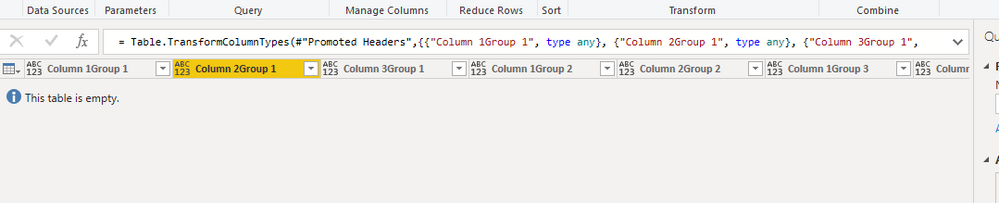
Capture.PNG


Community Support Team _ Frank
If this post helps, then please consider Accept it as the solution to help the others find it more quickly.

View solution in original post

3 REPLIES 3
v-frfei-msft
Community Support
Community Support

Hi @Anonymous ,


M code for your reference. 

let
    Source = Table.FromRows(Json.Document(Binary.Decompress(Binary.FromText("i45Wcs7PKc3NUzBU0oExjRBMYwQTuwIU0dhYAA==", BinaryEncoding.Base64), Compression.Deflate)), let _t = ((type text) meta [Serialized.Text = true]) in type table [#"Group 1" = _t, #"(blank)" = _t, #"(blank).1" = _t, #"Group 2" = _t, #"(blank).2" = _t, #"Group 3" = _t, #"(blank).3" = _t]),
    #"Changed Type" = Table.TransformColumnTypes(Source,{{"Group 1", type text}, {"(blank)", type text}, {"(blank).1", type text}, {"Group 2", type text}, {"(blank).2", type text}, {"Group 3", type text}, {"(blank).3", type text}}),
    #"Demoted Headers" = Table.DemoteHeaders(#"Changed Type"),
    #"Changed Type1" = Table.TransformColumnTypes(#"Demoted Headers",{{"Column1", type text}, {"Column2", type text}, {"Column3", type text}, {"Column4", type text}, {"Column5", type text}, {"Column6", type text}, {"Column7", type text}}),
    #"Transposed Table" = Table.Transpose(#"Changed Type1"),
    #"Added Conditional Column" = Table.AddColumn(#"Transposed Table", "Custom", each if Text.Contains([Column1], "blank") then null else [Column1]),
    #"Filled Down" = Table.FillDown(#"Added Conditional Column",{"Custom"}),
    #"Added Custom" = Table.AddColumn(#"Filled Down", "Custom.1", each [Column2]&[Custom]),
    #"Removed Columns" = Table.RemoveColumns(#"Added Custom",{"Column1", "Column2", "Custom"}),
    #"Transposed Table1" = Table.Transpose(#"Removed Columns"),
    #"Promoted Headers" = Table.PromoteHeaders(#"Transposed Table1", [PromoteAllScalars=true]),
    #"Changed Type2" = Table.TransformColumnTypes(#"Promoted Headers",{{"Column 1Group 1", type any}, {"Column 2Group 1", type any}, {"Column 3Group 1", type any}, {"Column 1Group 2", type any}, {"Column 2Group 2", type any}, {"Column 1Group 3", type any}, {"Column 2Group 3", type any}})
in
    #"Changed Type2"

Capture.PNG


Community Support Team _ Frank
If this post helps, then please consider Accept it as the solution to help the others find it more quickly.
Anonymous
Not applicable

Thanks a lot. Transpose the table is the key to solve my problem 🙂

Nolock
Resident Rockstar
Resident Rockstar

Hi @Anonymous,

I've tried to find a solution for you. Here we go. It takes first 2 rows, transforms them separately and then combine them with the source again. The solution contains also some sample data.


let
    Source = Table.FromRows(Json.Document(Binary.Decompress(Binary.FromText("i45Wci/KLy1QMFTSUYIgCN8ImWMM4sTqRCs55+eU5uaBFUOZRgimMYKJXQGKKMi4tPx8oFBSYhGQrKisApKJSclwhyjFxgIA", BinaryEncoding.Base64), Compression.Deflate)), let _t = ((type text) meta [Serialized.Text = true]) in type table [Column1 = _t, Column2 = _t, Column3 = _t, Column4 = _t, Column5 = _t, Column6 = _t, Column7 = _t]),
    
    // take first 2 rows and transform them
    Source2FirstRows = Table.FirstN(Source, 2),
    #"Transposed Table" = Table.Transpose(Source2FirstRows),
    #"Replaced Value" = Table.ReplaceValue(#"Transposed Table","",null,Replacer.ReplaceValue,{"Column1"}),
    #"Filled Down" = Table.FillDown(#"Replaced Value",{"Column1"}),
    #"Split Column by Delimiter" = Table.SplitColumn(#"Filled Down", "Column1", Splitter.SplitTextByEachDelimiter({" "}, QuoteStyle.Csv, true), {"Column1.1", "Column1.2"}),
    #"Split Column by Delimiter1" = Table.SplitColumn(#"Split Column by Delimiter", "Column2", Splitter.SplitTextByEachDelimiter({" "}, QuoteStyle.Csv, true), {"Column2.1", "Column2.2"}),
    #"Removed Columns" = Table.RemoveColumns(#"Split Column by Delimiter1",{"Column2.2"}),
    #"Added Custom" = Table.AddColumn(#"Removed Columns", "Custom", each [Column1.2] & "." & [Column2.1]),
    #"Removed Columns1" = Table.RemoveColumns(#"Added Custom",{"Column1.2", "Column2.1"}),
    #"Transposed Table1" = Table.Transpose(#"Removed Columns1"),
    
    // remove first 2 rows from Source
    SourceWithout2FirstRows = Table.RemoveFirstN(Source, 2),
    // combine new transformed 2 rows and Source without first 2 rows
    CombineTables = Table.Combine({#"Transposed Table1", SourceWithout2FirstRows})
in
    CombineTables

And screenshots:

BeforeBeforeAfterAfter

Helpful resources

Announcements
FabCon and SQLCon Barcelona 2026

FabCon & SQLCon – Barcelona 2026

Join us in Barcelona for FabCon and SQLCon, the Fabric, Power BI, SQL, and AI community event. Save €200 with code FABCMTY200.

60 days of Data Days Carousel

Data Days 2026

Join Fabric Data Days 2026: 60 days of free live/on-demand sessions, challenges, study groups, and certification opportunities.

Power BI DataViz World Championships carousel

Power BI DataViz World Championships - June 2026

A new Power BI DataViz World Championship is coming this June! Don't miss out on submitting your entry.
