
cancel
Showing results for 
Search instead for 
Did you mean: 

We've captured the moments from FabCon & SQLCon that everyone is talking about, and we are bringing them to the community, live and on-demand. Starts on April 14th. Register now

Reply
jesuslogmein
Helper I
Helper I

Problems with Datamarts

I have created a datamart and a report connected to it.

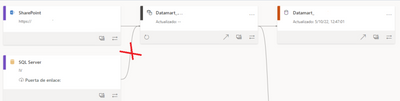
The problem is that a SQL DB is connected to my datamart and I don't know how to remove it, in the online PowerQuery of the datamart there is no connection to SQL, how can I remove that data source?


jesuslogmein_1-1666084387273.png


thnxs


1 REPLY 1
v-jingzhang
Community Support
Community Support

Hi @jesuslogmein 


Which kind of data source did you connect to in this datamart? 


I did a test by connecting to an Excel file stored in my OneDrive for Business. After building a report on my datamart, I get the following lineage view. I guess this is probably by design as this connection is using two kind of connectors in it. If possible, I'd like to use the same type of data source as yours to have a test. 

vjingzhang_0-1666171834517.png


Best Regards,
Community Support Team _ Jing
If this post helps, please Accept it as Solution to help other members find it.

Helpful resources

Announcements
New to Fabric survey Carousel

New to Fabric Survey

If you have recently started exploring Fabric, we'd love to hear how it's going. Your feedback can help with product improvements.

Power BI DataViz World Championships carousel

Power BI DataViz World Championships - June 2026

A new Power BI DataViz World Championship is coming this June! Don't miss out on submitting your entry.

Join our Fabric User Panel

Join our Fabric User Panel

Share feedback directly with Fabric product managers, participate in targeted research studies and influence the Fabric roadmap.

March Power BI Update Carousel

Power BI Community Update - March 2026

Check out the March 2026 Power BI update to learn about new features.