cancel
Showing results for 
Search instead for 
Did you mean: 

The Power BI Data Visualization World Championships is back! Get ahead of the game and start preparing now! Learn more

Reply
lgo
Frequent Visitor

Problem with error handling and dates

Hi everybody!


I currently have some dates with the day with "00", let-s say, the sources does not have idea about the day so it is reported as 00. So some of the dates are 00-08-2019. As the column is recognized as a date, those values are reported as a cero. 


I find the same situation in other columns, but, it they are not recognized as dates, i have the time to replace -00 for -01 and then change it to date format, and i still keep those values!


What can I do for the power query editor to leave the original values for me to able to change them before finding errors? (I have already tried to unclick the option to recognize the data type, but i has not worked so far). 


I do not know if i explain mayself in a good way... I hope you guys understand. Thank you in advance!

1 ACCEPTED SOLUTION
ImkeF
Community Champion
Community Champion

Hi @lgo ,

you have 2 choices:


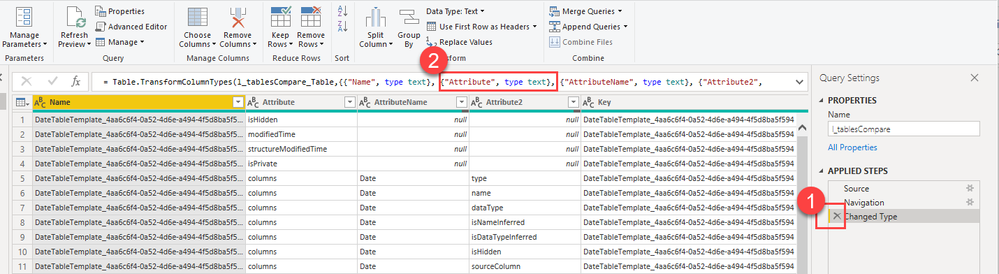
1) remove the automatically created changed step manually by clicking the cross

2) manually edit the automatically created M code and delete only the column whose formatting you want to skip:


image.png


Imke Feldmann (The BIccountant)

If you liked my solution, please give it a thumbs up. And if I did answer your question, please mark this post as a solution. Thanks!

How to integrate M-code into your solution -- How to get your questions answered quickly -- How to provide sample data -- Check out more PBI- learning resources here -- Performance Tipps for M-queries

View solution in original post

4 REPLIES 4
ImkeF
Community Champion
Community Champion

Hi @lgo ,

you have 2 choices:


1) remove the automatically created changed step manually by clicking the cross

2) manually edit the automatically created M code and delete only the column whose formatting you want to skip:


image.png


Imke Feldmann (The BIccountant)

If you liked my solution, please give it a thumbs up. And if I did answer your question, please mark this post as a solution. Thanks!

How to integrate M-code into your solution -- How to get your questions answered quickly -- How to provide sample data -- Check out more PBI- learning resources here -- Performance Tipps for M-queries

lgo
Frequent Visitor

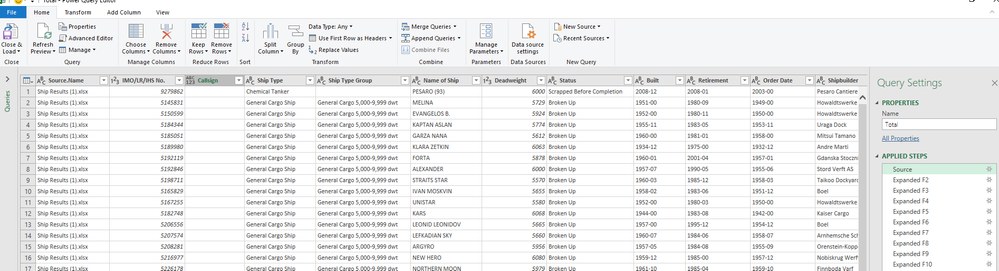
Thank you so much for your reply! but i can't see the same in my screen!


Capture.PNG

lgo
Frequent Visitor

So I have discovered something further....


I have all the tables without Data types in the columns...when I do merge + then expand = some columns got the Data type! Do you know why this is happening?


Thank in advance,


Laura.

ImkeF
Community Champion
Community Champion

Hi Laura,

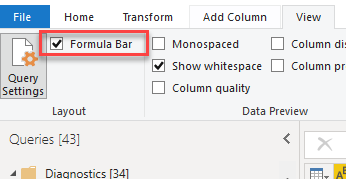
you have to enable the Formula Bar in the View-Tab like so:


image.png


You should check the Source-queries (the current one and the ones you're merging). Fix the corrections you want to make there before merging.

Usually you loose your types during merge/expand-operations. This is a known limitation.


Imke Feldmann (The BIccountant)

If you liked my solution, please give it a thumbs up. And if I did answer your question, please mark this post as a solution. Thanks!

How to integrate M-code into your solution -- How to get your questions answered quickly -- How to provide sample data -- Check out more PBI- learning resources here -- Performance Tipps for M-queries

Helpful resources

Announcements
Power BI DataViz World Championships

Power BI Dataviz World Championships

The Power BI Data Visualization World Championships is back! Get ahead of the game and start preparing now!

December 2025 Power BI Update Carousel

Power BI Monthly Update - December 2025

Check out the December 2025 Power BI Holiday Recap!

FabCon Atlanta 2026 carousel

FabCon Atlanta 2026

Join us at FabCon Atlanta, March 16-20, for the ultimate Fabric, Power BI, AI and SQL community-led event. Save $200 with code FABCOMM.

Top Solution Authors